买服务器上雨云
 由超大带宽雨云提供赞助
Project Information
Rrerequisites
Server recommend
If you don't have a server yet, feel free to shop around via the discount link below.
The latest version of aaPanel install the node env without the need to install additional pm2.
# 1. Install git
apt-get install git # ubuntu
yum install git # centos
# 2. Clone
git clone https://github.com/hjdhnx/drpy-node.git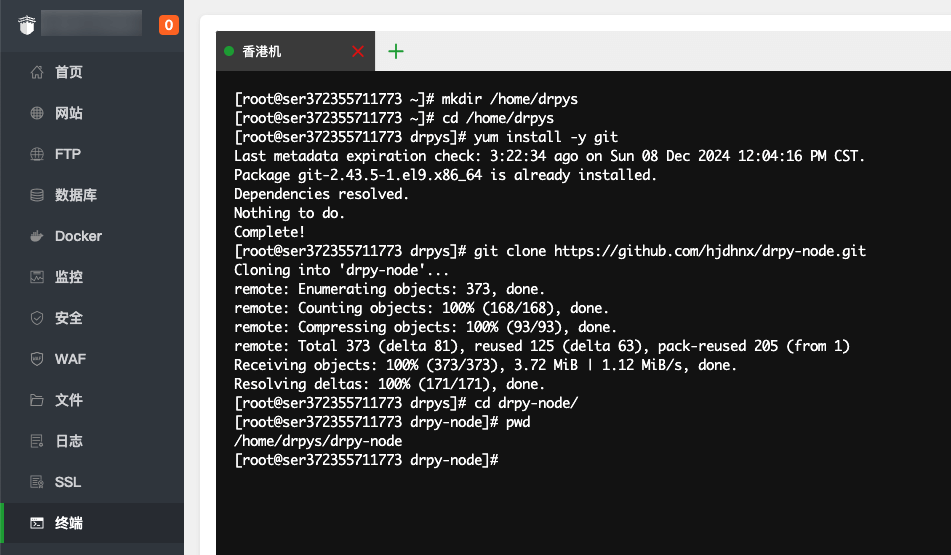
Choose a management method among node and pm2.
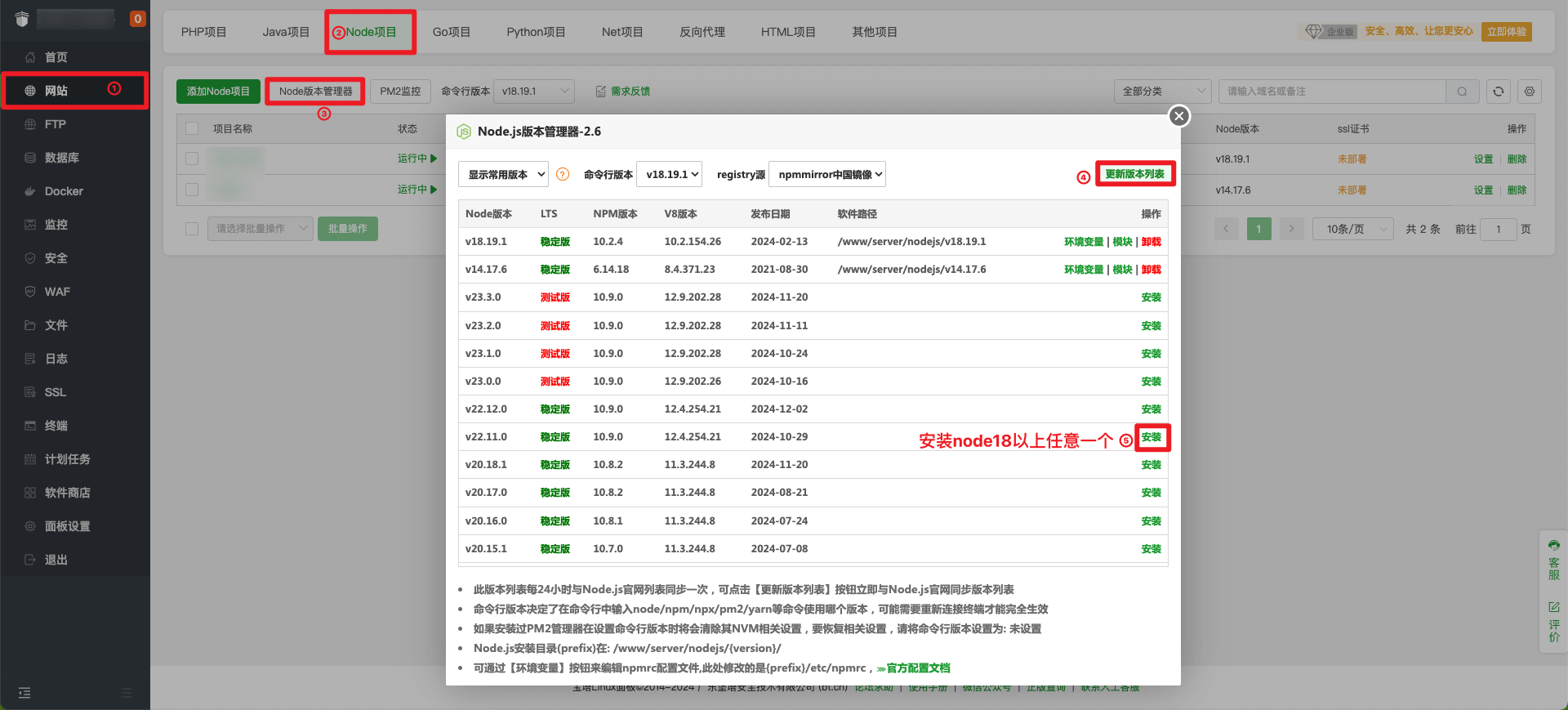
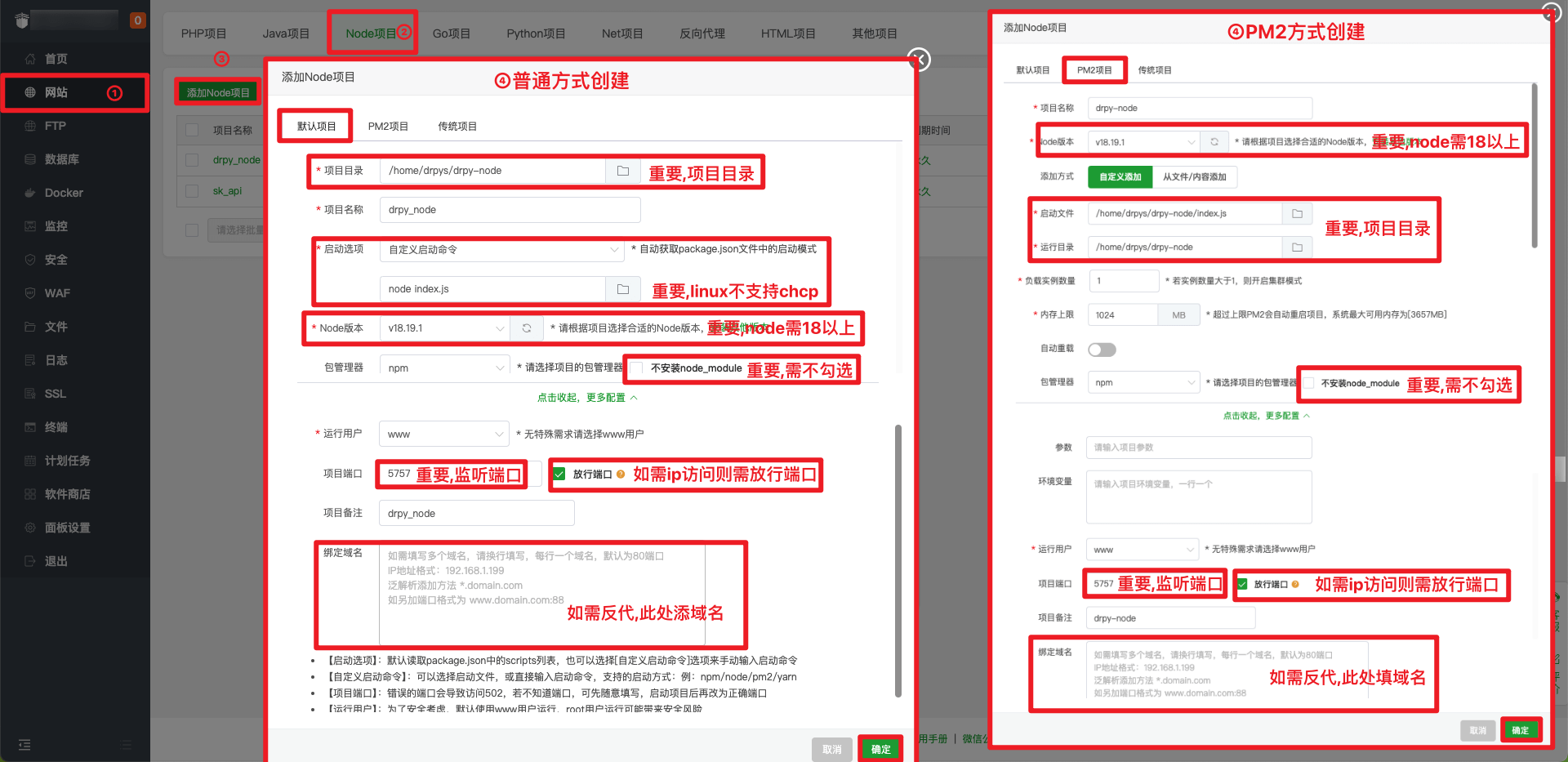
# 1. Go project root directory
cd drpy-node
# 2. Update code
git pull # normal pull
git fetch --all && git reset --hard origin/main # force pull
# 3. Restart
Website->Node Project->Status->Reboot# node
# Note: The project directory, node path and running user
PATH=/www/server/nodejs/v18.20.5/bin:/sbin:/usr/bin:/usr/sbin:/usr/local/bin:/usr/local/sbin:~/bin # Note the node version path
export PATH
export HOME=/www # Note the running user
export NODE_PATH="/www/server/nodejs/v18.20.5/etc/node_modules" # Note the node version path
cd /home/www/drpy-node # Note the project path
git fetch --all && git reset --hard origin/main
npm install
pgrep -f "node index.js" | grep -v $$ | xargs -r kill -9
nohup node index.js > /www/wwwlogs/nodejs/drpy_node.log 2>&1 &
# pm2
# Note: The project directory, node path and running user
PATH=/www/server/nodejs/v18.20.5/bin:/sbin:/usr/bin:/usr/sbin:/usr/local/bin:/usr/local/sbin:~/bin # Note the node version path
export PATH
export PM2_HOME=/root/.pm2/
export HOME=/root # Note the running user
export NODE_PATH="/www/server/nodejs/v18.20.5/etc/node_modules" # Note the node version path
cd /home/www/drpy-node/ # Note the project path
git fetch --all && git reset --hard origin/main
npm install
npm install -g pm2
pm2 delete drpyS
pm2 start /www/server/nodejs/vhost/pm2_configs/drpyS/ecosystem.config.cjs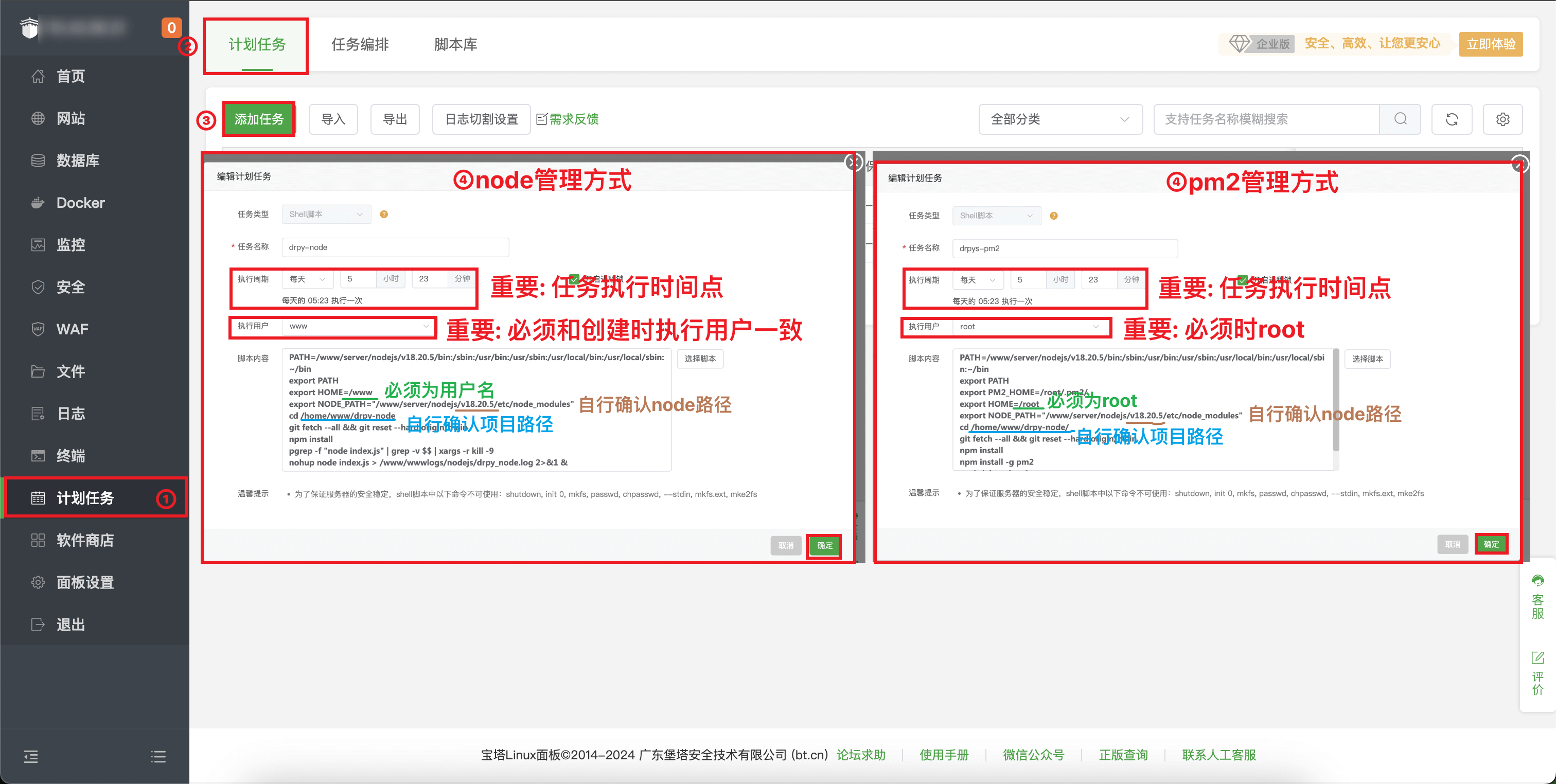
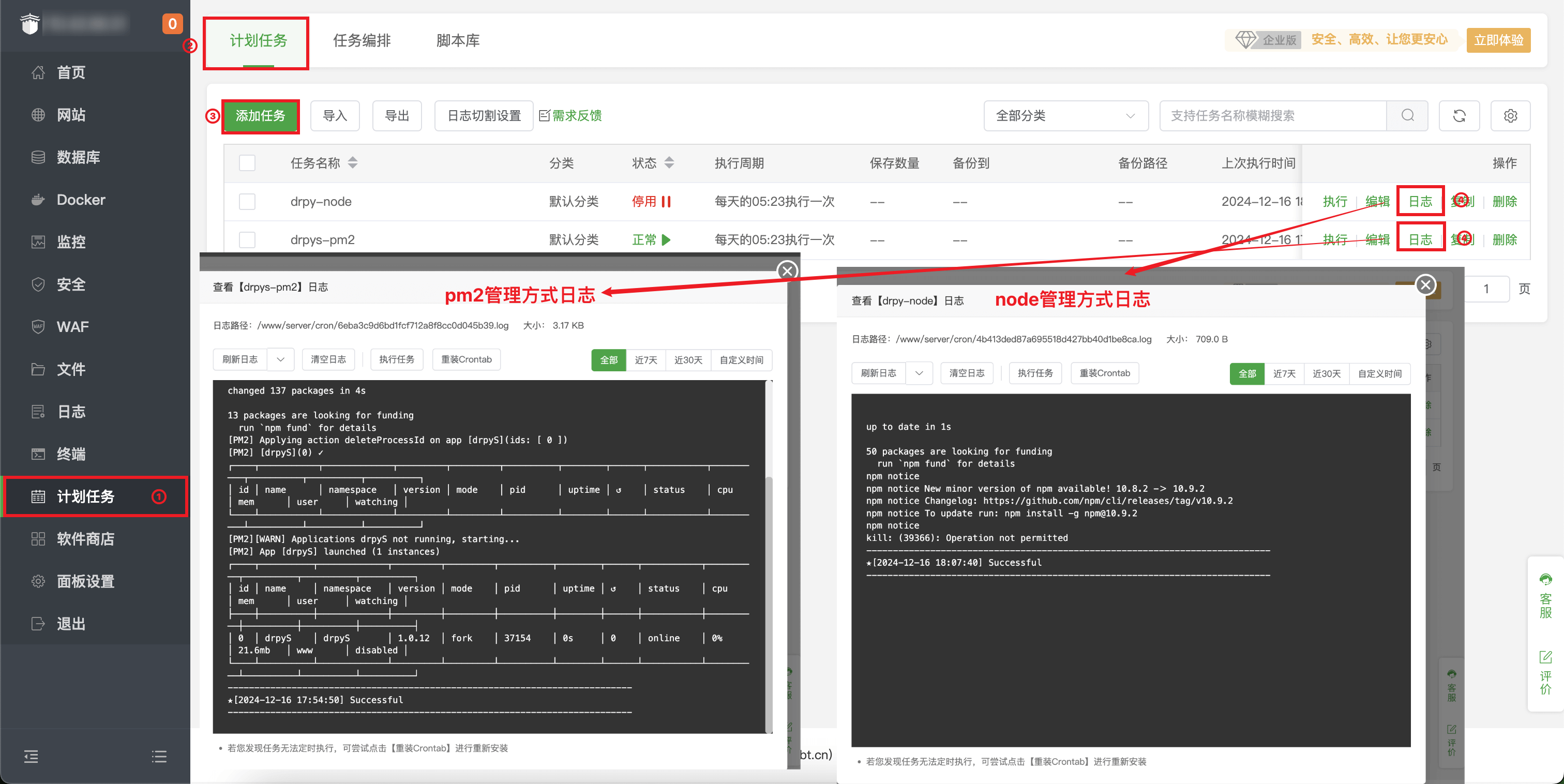
# 1. Install git
apt-get install git # ubuntu
yum install git # centos
# 2. Clone
git clone https://github.com/hjdhnx/drpy-node.git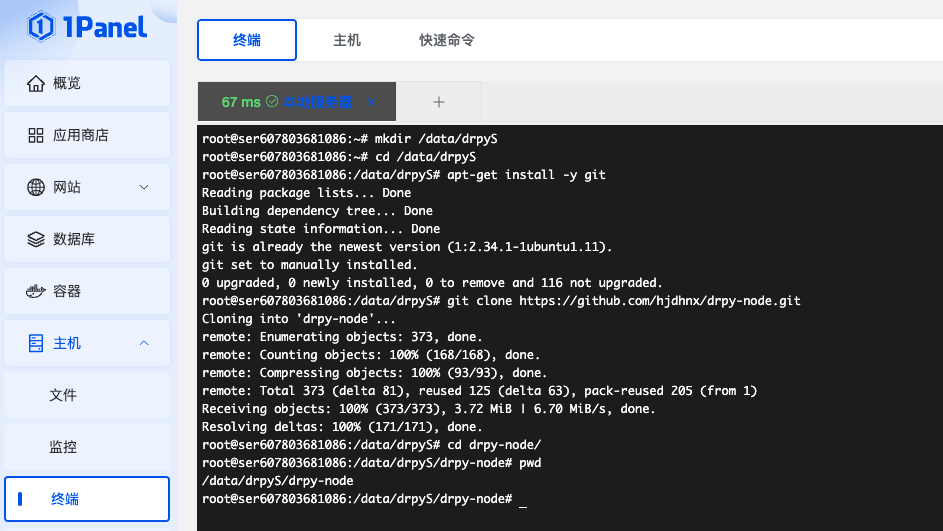
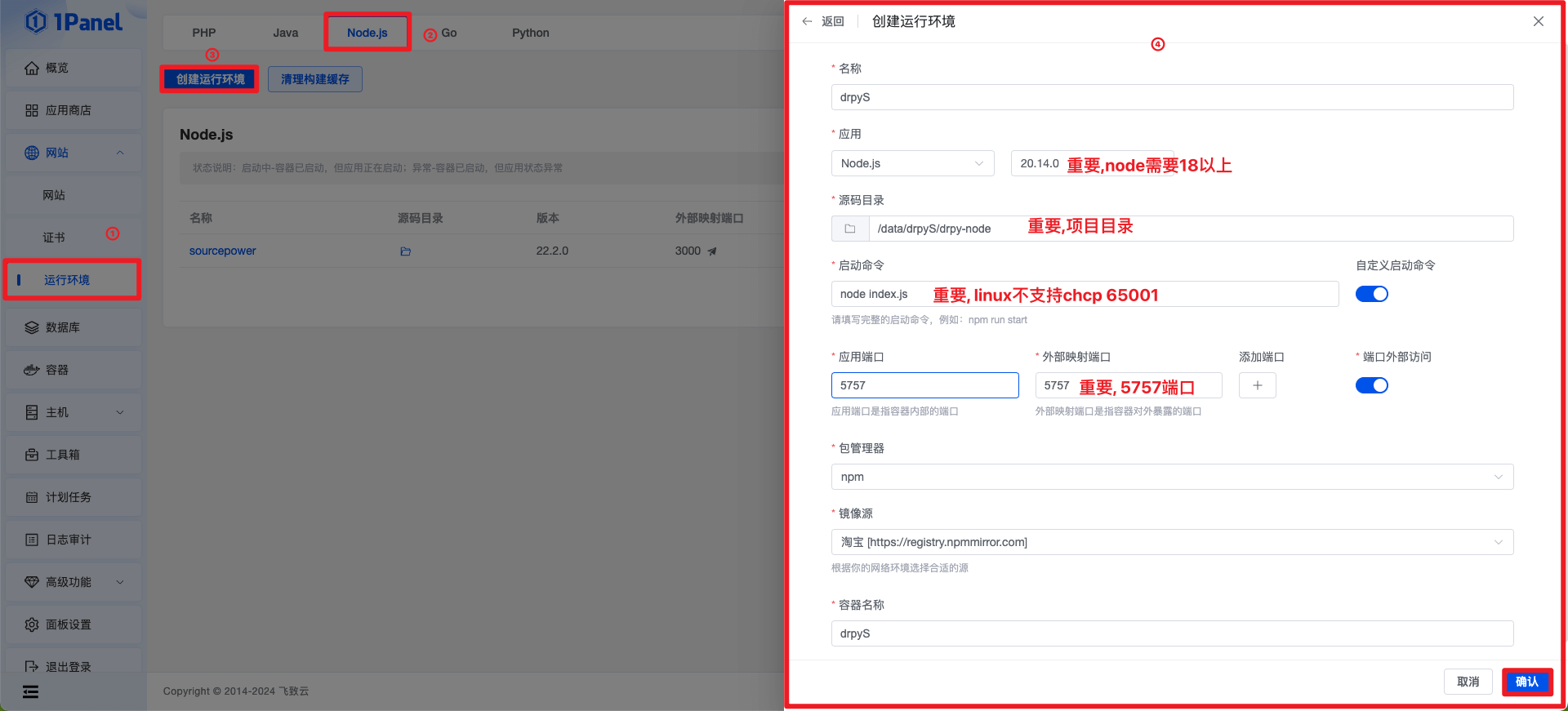
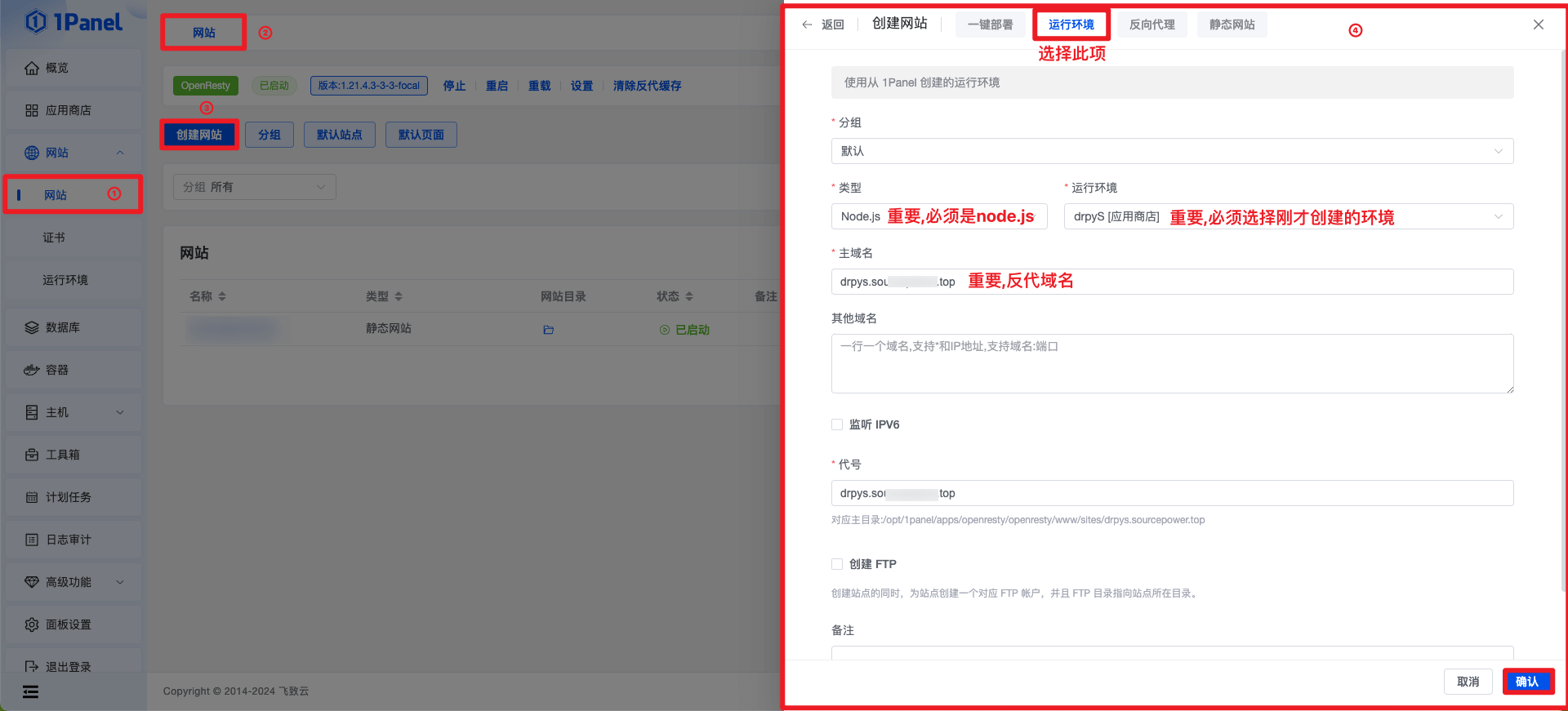
# 1. Go project root directory
cd drpy-node
# 2. Update code
git pull # normal pull
git fetch --all && git reset --hard origin/main # force pull
# 3. Update dependencies
docker exec -it drpyS npm install > /dev/null 2>&1
# 4. Restart(could be docker-compose/docker compose)
docker-compose -f /opt/1panel/runtime/node/drpyS/docker-compose.yml restartThe timed task commands are referenced as follows
# 1. Go project root directory
cd drpy-node
# 2. Update code
# git pull # normal pull
git fetch --all && git reset --hard origin/main # force pull
# 3. Update dependencies
docker exec -it drpyS npm install > /dev/null 2>&1
# 4. Restart(could be docker-compose/docker compose)
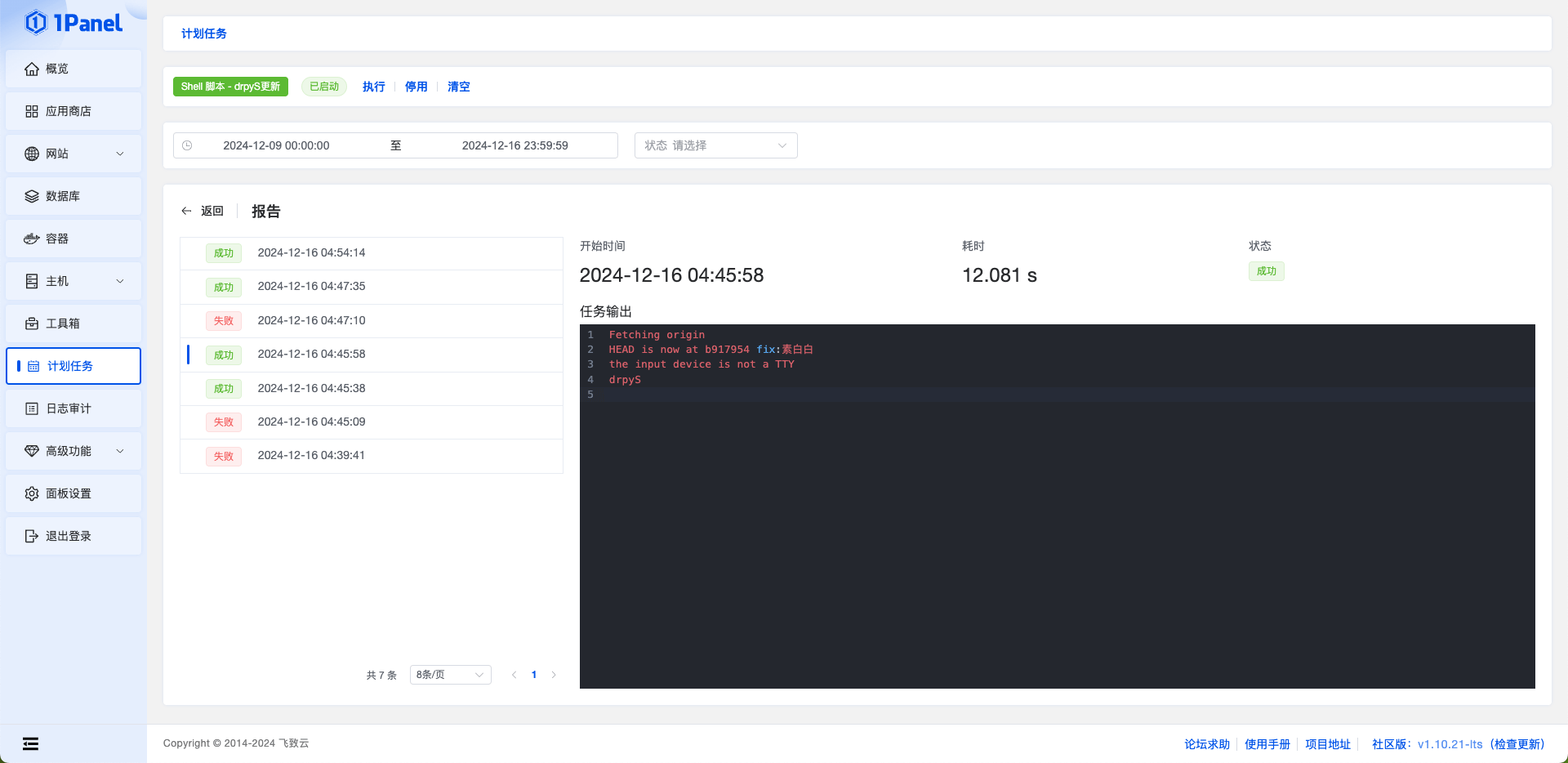
docker-compose -f /opt/1panel/runtime/node/drpyS/docker-compose.yml restart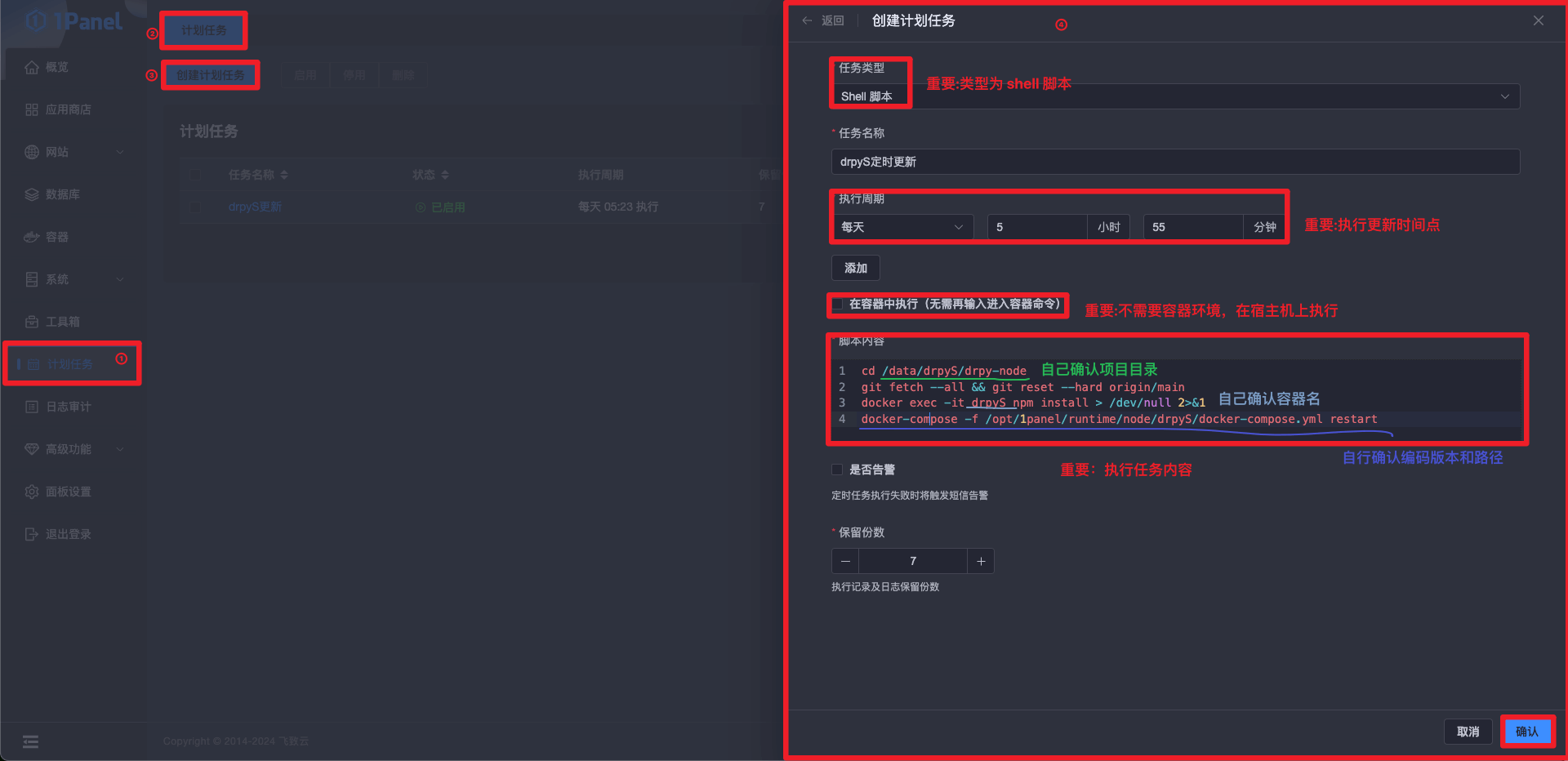
bash <(curl -sSL https://linuxmirrors.cn/docker.sh)docker pull ghcr.io/hjdhnx/drpy-node:latestDo not map the path to
/app, otherwise the environment will be lost, it is recommended to map a specific directory.
# not mapping path
docker run -d --name drpyS -p 5757:5757

# mapping path
docker run -d --name drpyS -p 5757:5757 -v /drpy-node/spider:/app/spider ghcr.io/hjdhnx/drpy-nodedocker stop drpyS
docker rm drpySRepeat steps 2 and 3
Patiently wait for the installation process to complete, measured 1MB bandwidth 2h2g machine the whole process takes 5 minutes.
Note that scripts are not infallible, read the following restrictions before using them
yum apt apt-get dnf pkg package managers.# Install/Update are all this command
bash -c "$(curl -fsSLk https://zy.catni.cn/release/latest/drpys.sh)"#!/bin/bash
#Copyroght @ 2024 by zy(Hiram)
#Install Latest Stable drpyS Release
log() {
local RED="\033[0;31m"
local GREEN="\033[0;32m"
local YELLOW="\033[0;33m"
local BLUE="\033[0;34m"
local PURPLE="\033[0;35m"
local NC="\033[0m"
local message="$2"
case "$1" in
primary )
echo -e "${BLUE}${message}${NC}"
;;
secondly )
echo -e "${PURPLE}${message}${NC}"
;;
danger )
echo -e "${RED}${message}${NC}"
;;
success )
echo -e "${GREEN}${message}${NC}"
;;
warn )
echo -e "${YELLOW}${message}${NC}"
;;
* )
echo -e "${NC}${message}${NC}"
;;
esac
}
input_info() {
echo -e -n "\033[0;35m[输入] $*\033[0m"
}
abort() {
log danger "[终止] $*"
log danger "[终止] 查阅安装文档: https://zy.catni.cn/other/drpyS-build.html"
log danger "[终止] 有偿咨询脚本安装问题解答, 联系QQ:29794882"
fallback_github_hosts
exit 1
}
copy_info() {
log success "[赞助] 🔥由雨云提供服务器赞助, 买服务器上雨云, 优惠码(不含逗号): hiram, 注册地址(含最后下划线): https://www.rainyun.com/hiram_"
echo
log primary "[版权] Copyroght @ 2024 zy(源动力) desgin by Hiram, Updated 2025.5.13 15:34:00"
log danger "[版权] 众所周知, Hiram出品必属垃圾, 所以不建议小白(没脑子)食用"
log danger "[版权] 倒卖脚本死全家"
echo
log default "[声明] 项目提供内容和数据均与脚本作者无关, 该脚本只提供安装服务"
log default "[声明] 脚本仅可运行在主流操作系统, 常见有Ubuntu Debine CentOS; 国产或非主流操作系统可能存在异常"
log default "[声明] 使用前自行确认系统源是否可用, 如不可用自行停止运行该脚本, 该脚本不具备修改系统源能力"
log default "[声明] 安装预计需两分钟, 更新预计需半分钟 (取决于网络)"
}
project_info() {
echo
log default " _ ____
__| |_ __ _ __ _ _/ ___|
/ _\` | '__| '_ \\| | | \___ \\
| (_| | | | |_) | |_| |___) |
\__,_|_| | .__/ \__, |____/
|_| |___/"
echo
log default "[项目] 开源地址: https://github.com/hjdhnx/drpy-node"
}
server_recommend() {
echo
log primary "[广告] 服务器滞销, 帮帮孩子吧"
log primary "[广告] 润雨云(推荐): 首月5折,半年7折,消费有返利 https://www.rainyun.com/hiram_"
log primary "[广告] 阿里云: 0元试用,首购低至0.9元/月起 https://www.aliyun.com/daily-act/ecs/activity_selection?userCode=hlco4dmi"
log primary "[广告] 腾讯云: 2核2G3M云服务器7.92元/月起 https://curl.qcloud.com/jogYnC7h"
log primary "[广告] 京东云: 2核2G3M云服务器仅58元 https://3.cn/20Z-Xyf4"
log primary "[广告] 百度云: 2核2G1M云服务器仅59元 https://cloud.baidu.com/campaign/ambassador-product/index.html?ambassadorId=2e198a5e0dac4c5aa9fe44457e2e9cb4#knowledge-bcc"
log primary "[广告] UCLOUD: 2核2G4M云服务器仅71元 https://www.ucloud.cn/site/active/kuaijiesale.html?invitation_code=C1xDC5B2B581E6C"
}
qrcode_pay() {
echo
echo "███████████████████████████████"
echo "█ ▄▄▄▄▄ █▀ █▀▀ █▀ ▀▄▄ █ ▄▄▄▄▄ █"
echo "█ █ █ █▀ ▄ █▄▄▀▀▀▄ ▄█ █ █ █"
echo "█ █▄▄▄█ █▀█ █▄▀██▀ ▄▀█ █▄▄▄█ █"
echo "█▄▄▄▄▄▄▄█▄█▄█ ▀ ▀▄█▄█ █▄▄▄▄▄▄▄█"
echo "█ ▄ ▄▀▄ ▄█▄▀▄ ▄ █ ▀ ▀ ▀▄█▄▀█"
echo "█▀▄▄▀▄▀▄█ ▀ ▄▄▀▀▄█ ▀ ▀▄▄ ▀█▀██"
echo "███▀▄▄█▄▄▀▄▀▄▀▀▀▄▀█▄ ▀▀▀▀▀▄▄█▀█"
echo "█▀ █ ██▄▄ ▀▄█▀▄▀▄▄█ ▀▄▄▄▀█▄▄▀██"
echo "█▀▀ █▄ ▄ ▀ ▄█▄▄ ▀▄▄ ▀▀█▀█▀▄ █▀█"
echo "█ █▀█ ▄██▀ ▄▄▀▄▄▀ ▀▀ ██▀█▄▀██"
echo "█▄████▄▄█ █▄ ▀ █▀▀▄▄ ▄▄▄ ▀ █"
echo "█ ▄▄▄▄▄ █▄▄██ ▀▀ █ █▄ █▄█ ▄▄███"
echo "█ █ █ █ ▀▀██▀▀▄██ ▀▄▄▄ ▄▀ ▄▄█"
echo "█ █▄▄▄█ █ ▄█ ▄▀▄▄▀ ▀ ▄ ▄ ██"
echo "█▄▄▄▄▄▄▄█▄▄▄████▄█▄█▄████▄▄▄███"
echo
log primary "[赞助] 支付宝扫描如上二维码请脚本作者喝杯咖啡吧"
}
command_exists() {
command -v "$1" 2>&1
}
get_country() {
local country
log default "[网络] 正在获取服务器位置信息, 请稍后"
if ! country=$(curl -s -m 30 "https://ipapi.co/country" 2>/dev/null); then
log warn "[网络] 无法获取服务器位置信息"
result=-1
elif [ "$country" = "CN" ]; then
log warn "[网络] 服务器位置可能位于国内"
result=1
else
log warn "[网络] 服务器位置可能位于国外"
result=0
fi
return $result
}
get_local_ips() {
local ips=""
local ipv4
ipv4=$(ip route get 8.8.8.8 2>/dev/null | awk 'NR==1 {print $7}')
if [ ! -z "$ipv4" ]; then
ips="${ips}${ipv4}\n"
fi
local ipv6
ipv6=$(ip route get 2001:4860:4860::8888 2>/dev/null | awk 'NR==1 {print $7}')
if [ ! -z "$ipv6" ]; then
ips="${ips}[$ipv6]\n"
fi
echo -e "$ips"
}
get_public_ips() {
local ips=""
local ipv4
ipv4=$(curl -s4 https://ifconfig.co || curl -s4 https://api64.ipify.org)
if [[ -n "$ipv4" ]]; then
ips="${ips}${ipv4}\n"
fi
local ipv6
ipv6=$(curl -s6 https://ifconfig.co || curl -s6 https://api64.ipify.org)
if [[ -n "$ipv6" ]]; then
ips="${ips}[$ipv6]\n"
fi
echo -e "$ips"
}
build_url() {
local protocol="${1:-http}"
local ip="${2}"
local port="${3:-}"
local path="${4:-}"
# 确保 protocol 以 :// 结尾
if [[ ! "$protocol" =~ ://$ ]]; then
protocol="$protocol://"
fi
# 构建 URL
local url="$protocol$ip"
if [[ -n "$port" ]]; then
url="$url:$port"
fi
if [[ -n "$path" ]]; then
# 确保 path 以 / 开头
if [[ ! "$path" =~ ^/ ]]; then
path="/$path"
fi
url="$url$path"
fi
echo "$url"
}
get_access_info() {
local local_ips=$(get_local_ips)
local public_ips=$(get_public_ips)
local protocol="${1:-http}"
local port="${2:-}"
local path="${3:-}"
log warn "[信息] 请使用您的浏览器访问面板:"
if [[ -n "$local_ips" ]]; then
for ip in $local_ips; do
local url=$(build_url "$protocol" "$ip" "$port" "$path")
log warn "[信息] 内部地址: $url"
done
fi
if [[ -n "$public_ips" ]]; then
for ip in $public_ips; do
local url=$(build_url "$protocol" "$ip" "$port" "$path")
log warn "[信息] 外部地址: $url"
done
fi
log warn "[信息] 如果您需使用域名访问, 请自行反向代理"
log warn "[信息] 如果您的服务器开启了防火墙(iptables ufw selinux firewalld), 请自行放行或关闭防火墙"
log warn "[信息] 如果您使用的是云服务器, 请在安全组中打开端口 $port"
}
preferred_github_hosts() {
declare -a urls=(
"https://hosts.gitcdn.top/hosts.txt"
"https://raw.hellogithub.com/hosts"
)
if [ ! -z `command_exists sed` ]; then
sed -i "/# preferred-github-hosts begin/Q" /etc/hosts
log default "[GitHub] 预处理hosts"
fi
for url in "${urls[@]}"; do
log default "[GitHub] 尝试从 $url 获取优选hosts信息"
if curl -s -o /dev/null -m 30 "$url"; then
echo "# preferred-github-hosts begin" >> /etc/hosts
curl "$url" >> /etc/hosts
echo "# preferred-github-hosts end" >> /etc/hosts
log success "[GitHub] 获取优选hosts成功"
return
else
log warn "[GitHub] 优选超时, 尝试下一个"
fi
done
log warn "[GitHub] 所有节点优选均超时, 将使用原生请求"
}
fallback_github_hosts() {
if [ -z `command_exists sed` ]; then
log warn "[GitHub] 回退hosts失败, 操作系统不支持sed, 请手动回退"
else
sed -i "/# preferred-github-hosts begin/Q" /etc/hosts
log success "[GitHub] 回退hosts成功"
fi
}
check_stdin() {
if [ ! -t 0 ]; then
abort "STDIN 不是标准的输入设备"
fi
}
check_root() {
if [[ $EUID -ne 0 ]]; then
abort "请以 root 权限运行"
fi
}
check_bash() {
if [ -z "$BASH" ]; then
abort "请用 bash 执行本脚本"
fi
}
check_arch() {
local architecture
local arch=`uname -a`
if [[ $arch =~ "x86_64" ]];then
architecture="amd64"
elif [[ $arch =~ "arm64" ]] || [[ $arch =~ "aarch64" ]];then
architecture="arm64"
elif [[ $arch =~ "armv7l" ]];then
architecture="armv7"
elif [[ $arch =~ "ppc64le" ]];then
architecture="ppc64le"
elif [[ $arch =~ "s390x" ]];then
architecture="s390x"
else
abort "暂不支持$arch系统架构"
fi
}
check_pkg_manage_tool() {
local pkg_manage_tool
if [ ! -z `command_exists yum` ]; then
# Fedora CentOS
pkg_manage_tool=yum
elif [ ! -z `command_exists apt-get` ]; then
# Debian Ubuntu
pkg_manage_tool=apt-get
elif [ ! -z `command_exists apt` ]; then
pkg_manage_tool=apt
elif [ ! -z `command_exists dnf` ]; then
# RedHat AnolisOS
pkg_manage_tool=dnf
elif [ ! -z `command_exists zypper` ]; then
# openSUSE
pkg_manage_tool=zypper
elif [ ! -z `command_exists pkg` ]; then
# Solaris Termux
pkg_manage_tool=pkg
else
abort "仅支持yum apt apt-get dnf pkg zypper包管理工具"
fi
echo $pkg_manage_tool
}
check_depends() {
check_bash
# check_stdin
check_root
check_arch
}
check_install_git() {
if [ -z `command_exists git` ]; then
log default "[pkg] 即将开始安装git"
pkg_git_name="git"
if [ "$pkg_manage_tool" == dnf ]; then
pkg_git_name="git-all"
fi
if ! $pkg_manage_tool install -y $pkg_git_name; then
abort "安装 $pkg_git_name 失败"
fi
fi
local httpVersion=$(git config --global --get http.version)
if [ "$httpVersion" != "HTTP/1.1" ]; then
log default "[git] 设置全局参数http.version: 1.1"
git config --global http.version HTTP/1.1
fi
local httpSslVerify=$(git config --global --get http.sslVerify)
if [ "$httpSslVerify" != "false" ]; then
log default "[git] 设置全局参数http.sslVerify: false"
git config --global http.sslVerify false
fi
local safeDirectory=$(git config --global --get safe.directory)
if [ "$safeDirectory" != "*" ]; then
log default "[git] 设置全局参数safe.directory: *"
git config --global --add safe.directory "*"
fi
}
check_install_python3() {
if [ -z `command_exists python3` ]; then
log default "[pkg] 即将开始安装python"
pkg_python3_name="python3"
if ! $pkg_manage_tool install -y $pkg_python3_name; then
abort "安装 $pkg_git_name 失败"
fi
pkg_pip3_name="python3-pip"
if ! $pkg_manage_tool install -y $pkg_pip3_name; then
abort "安装 $pkg_git_name 失败"
fi
fi
}
check_install_nvm() {
# 默认参数
local nvm_install_dir
if [ -n "$NVM_DIR" ]; then
nvm_install_dir=$(printf %s "${NVM_DIR}")
else
if [ -z "${XDG_CONFIG_HOME-}" ]; then
nvm_install_dir=$(printf %s "${HOME}/.nvm")
else
nvm_install_dir=$(printf %s "${XDG_CONFIG_HOME}/nvm")
fi
fi
# 检查nvm
if [ ! -d "$nvm_install_dir/.git" ]; then
log default "[pkg] 即将开始安装nvm"
if ! curl -o- https://raw.githubusercontent.com/nvm-sh/nvm/v0.40.0/install.sh | bash; then
abort "安装 nvm 失败"
fi
fi
# 设置nvm环境变量
export NVM_DIR="$nvm_install_dir"
if [ -s "$NVM_DIR/nvm.sh" ]; then
. "$NVM_DIR/nvm.sh"
fi
}
check_install_npm_env() {
declare -a modules=(
"yarn"
"pm2"
"node-gyp"
"@mapbox/node-pre-gyp"
)
for module in "${modules[@]}"; do
if [ -z `command_exists $module` ]; then
log default "[node] 即将开始安装 $module"
if ! npm install "$module" -g; then
abort "[node] 安装 $module 失败"
fi
fi
done
}
check_install_node_env() {
check_install_nvm
# 获取所有已安装的Node.js版本
installed_versions=$(nvm list)
# 初始化变量
version_to_use=""
# 检查是否存在版本20或更高
while IFS= read -r line; do
if [[ "$line" =~ v20 ]]; then
version_to_use=$(echo "$line" | grep -o 'v[0-9]*\.[0-9]*\.[0-9]*')
break
fi
done <<< "$installed_versions"
# 使用或安装Node.js版本
if [ -n "$version_to_use" ]; then
log default "[node] 存在$version_to_use, 即将切换到该版本"
nvm use $version_to_use
else
log default "[node] 不存在20及以上版本, 即将安装20版本"
if ! nvm install 20; then
abort "安装 node 20 失败"
fi
nvm use 20
fi
# 设置npm代理
local curr_npm_registry=$(npm config get registry --global)
if [ $country_code -ne 0 ]; then
if [ "$curr_npm_registry" != "https://registry.npmmirror.com" ]; then
log default "[node] 设置npm源为淘宝镜像"
npm config set registry https://registry.npmmirror.com --global
fi
else
if [ "$curr_npm_registry" != "https://registry.npmjs.org/" ] && [ ! -z "$curr_npm_registry" ]; then
log default "[node] 设置npm源回退原生"
npm config delete registry --global
fi
fi
local curr_yarn_registry=$(yarn config get registry --global)
if [ $country_code -ne 0 ]; then
if [ "$curr_yarn_registry" != "https://registry.npmmirror.com" ]; then
log default "[node] 设置yarn源为淘宝镜像"
yarn config set registry "https://registry.npmmirror.com" --global
fi
else
if [ "$curr_yarn_registry" != "https://registry.yarnpkg.com" ] && [ ! -z "$curr_yarn_registry" ]; then
log default "[node] 设置yarn源回退原生"
yarn config delete registry --global
fi
fi
# 安装全局模块
check_install_npm_env
}
project_git_origin() {
local base_path="$1"
local git_repo="$2"
local git_project="$3"
# 检查目录是否非空且存在.git目录
if [[ -d "$base_path/$git_project/.git" ]]; then
local git_config_path="$base_path/$git_project/.git/config"
# 检查.git/config文件是否存在
if [[ -f "$git_config_path" ]]; then
# 提取origin的url
local origin_url=$(awk -F ' = ' '/\[remote "origin"\]/ {getline; print $2}' "$git_config_path")
# 比较url是否匹配
if [[ "$origin_url" == "$git_repo" ]]; then
echo 0
return
fi
fi
fi
echo 1
}
project_install_update() {
local base_path="$1"
local git_repo="$2"
local repo_name="$3"
local result=$(project_git_origin "$base_path" "$git_repo" "$repo_name")
if [ $result -eq 0 ]; then
log default "[项目] 仓库检查结果: 对应"
log default "[项目] 即将开始备份数据"
local back_path="$base_path/bak-drpys"
local timestamp1=`date +%s`
local timestamp2=`date +%Y%m%d`
local backup_dir="$back_path/$timestamp2-$timestamp1"
if [ ! -d "$back_path" ]; then
mkdir -p "$back_path"
fi
mkdir -p "$backup_dir"
if cp -r "$base_path/$repo_name/"* "$backup_dir"; then
log default "[项目] 数据备份成功"
else
log default "[项目] 数据备份失败"
fi
cd $repo_name
log default "[项目] 即将开始更新项目代码"
git pull
# 检查 git pull 的退出状态
if [ $? -ne 0 ]; then
log default "[项目] 正常更新失败, 即将开始强制覆盖代码"
# 强制重置本地分支到远程分支的状态
if ! git fetch --all; then
abort "[项目] 重置状态失败"
fi
# 请根据你的实际分支名称调整 origin/main
if ! git reset --hard origin/main; then
abort "[项目] 强制重置失败"
fi
fi
else
log default "[项目] 仓库检查结果: 不对应或无效"
rm -rf "$base_path/$repo_name"
log default "[项目] 即将开始克隆项目代码"
if ! git clone $git_repo; then
abort "[项目] 克隆失败"
fi
cd $repo_name
fi
}
project_env() {
log default "[环境变量] 即将开始处理环境变量"
if [ ! -f ".env" ]; then
cp .env.development .env
fi
if [ -z `command_exists sed` ]; then
log warn "[环境变量] 操作系统不支持sed, 将赋值默认参数, 如需修改请脚本执行完成后手动修改项目目录下.env文件参数"
if [ ! -f ".env_init_success" ]; then
touch ".env_init_success"
fi
return
fi
declare -A main_desc=(
["COOKIE_AUTH_CODE"]="cookies入库授权密码"
["API_AUTH_NAME"]="主页授权用户名"
["API_AUTH_CODE"]="主页授权密码"
["API_PWD"]="接口授权密码"
)
declare -A main_default=(
["COOKIE_AUTH_CODE"]="drpys"
["API_AUTH_NAME"]="admin"
["API_AUTH_CODE"]="drpys"
["API_PWD"]="drpys"
)
for key in "${!main_desc[@]}"; do
if [ ! -f ".env_init_success" ]; then
input_info "设置${main_desc[$key]}(30秒无输入或留空则为${main_default[$key]}):"
read -t 30 input_env
if [ -z "$input_env" ]; then
echo
fi
input=${input_env:-${main_default[$key]}}
else
if ! grep -q "^$key" .env; then
input_info "设置${main_desc[$key]}(30秒无输入或留空则为${main_default[$key]}):"
read -t 30 input_env
if [ -z "$input_env" ]; then
echo
fi
input=${input_env:-${main_default[$key]}}
fi
fi
if [ ! -z "$input" ]; then
if grep -q "^$key" .env; then
sed -i "s/^$key = .*/$key = $input/g" .env
else
echo "$key = $input" >> .env
fi
fi
done
if [ ! -f ".env_init_success" ]; then
touch ".env_init_success"
fi
}
project_env_show() {
declare -A main_desc=(
["COOKIE_AUTH_CODE"]="cookies入库授权密码"
["API_AUTH_NAME"]="主页授权用户名"
["API_AUTH_CODE"]="主页授权密码"
["API_PWD"]="接口授权密码"
)
log warn "[信息] 授权密码, 请自行牢记或保存(关闭ssh或清屏后不再显示):"
for key in "${!main_desc[@]}"; do
result=$(grep "^$key" .env)
if [ -n "$result" ]; then
# value=$(echo "$result" | cut -d'=' -f2 | tr -d "'[:space:]")
value=$(echo "$result" | cut -d'=' -f2 | tr -d "'")
log warn "[信息] ${main_desc[$key]}: $value"
fi
done
}
project_work() {
local git_repo="https://github.com/hjdhnx/drpy-node.git"
local repo_name=$(echo "$git_repo" | awk -F'/' '{print $NF}' | awk '{gsub(/.git$/, ""); print}')
local default_path=$(pwd)
local run_path=$(pm2 show drpyS | awk '/│ exec cwd / {print $5}')
if [ -n "$run_path" ]; then
log default "[项目] 检测到已存在的项目"
default_path="$(dirname "$run_path")"
else
input_info "设置安装目录(30秒无输入或留空则为$default_path):"
read -t 30 input_path
if [ -z "$input_path" ]; then
echo
fi
# 如果用户没有输入路径,则使用默认路径
[ -z "$input_path" ] && input_path="$default_path"
# 检查目录是否存在,如果不存在则创建
if [ ! -d "$input_path" ]; then
log default "[项目] 目录不存在, 即将创建"
mkdir -p "$input_path"
fi
default_path="$input_path"
fi
log default "[项目] 基础路径$default_path"
cd "${default_path}"
# 更新或安装 code
project_install_update $default_path $git_repo $repo_name
# 安装依赖
log default "[项目] 即将开始安装(编译)项目依赖"
if [ -f "yarn.lock" ]; then
log default "[项目] 存在yarn.lock文件, 即将删除"
rm -rf yarn.lock
fi
if [ -f "package-lock.json" ]; then
log default "[项目] 存在package-lock文件, 即将删除"
rm -rf package-lock.json
fi
yarn
#环境变量
project_env
log default "[项目] 正在启动服务"
if [ -z `command_exists $(pm2 pid drpyS)` ]; then
pm2 delete drpyS
fi
pm2 start index.js --name drpyS
log success "[项目] 服务已成功启动"
}
main() {
shopt -s dotglob
copy_info
project_info
check_depends
pkg_manage_tool=$(check_pkg_manage_tool)
log default "[系统] 即将更新系统依赖, 请耐心等待, 可能较久哦"
$pkg_manage_tool update -y
check_install_git
# check_install_python3
get_country
country_code=$?
if [ $country_code -ne 0 ]; then
preferred_github_hosts
fi
check_install_nvm
check_install_node_env
project_work
if [ $country_code -ne 0 ]; then
fallback_github_hosts
fi
log warn "[信息] =================感谢您的耐心等待, 安装已完成=================="
echo
get_access_info "http" "5757"
echo
project_env_show
echo
log warn "[信息] ==============================================================="
server_recommend
qrcode_pay
shopt -u dotglob
}
trap "onexit" INT
onexit() {
echo
abort "用户手动结束安装"
}
main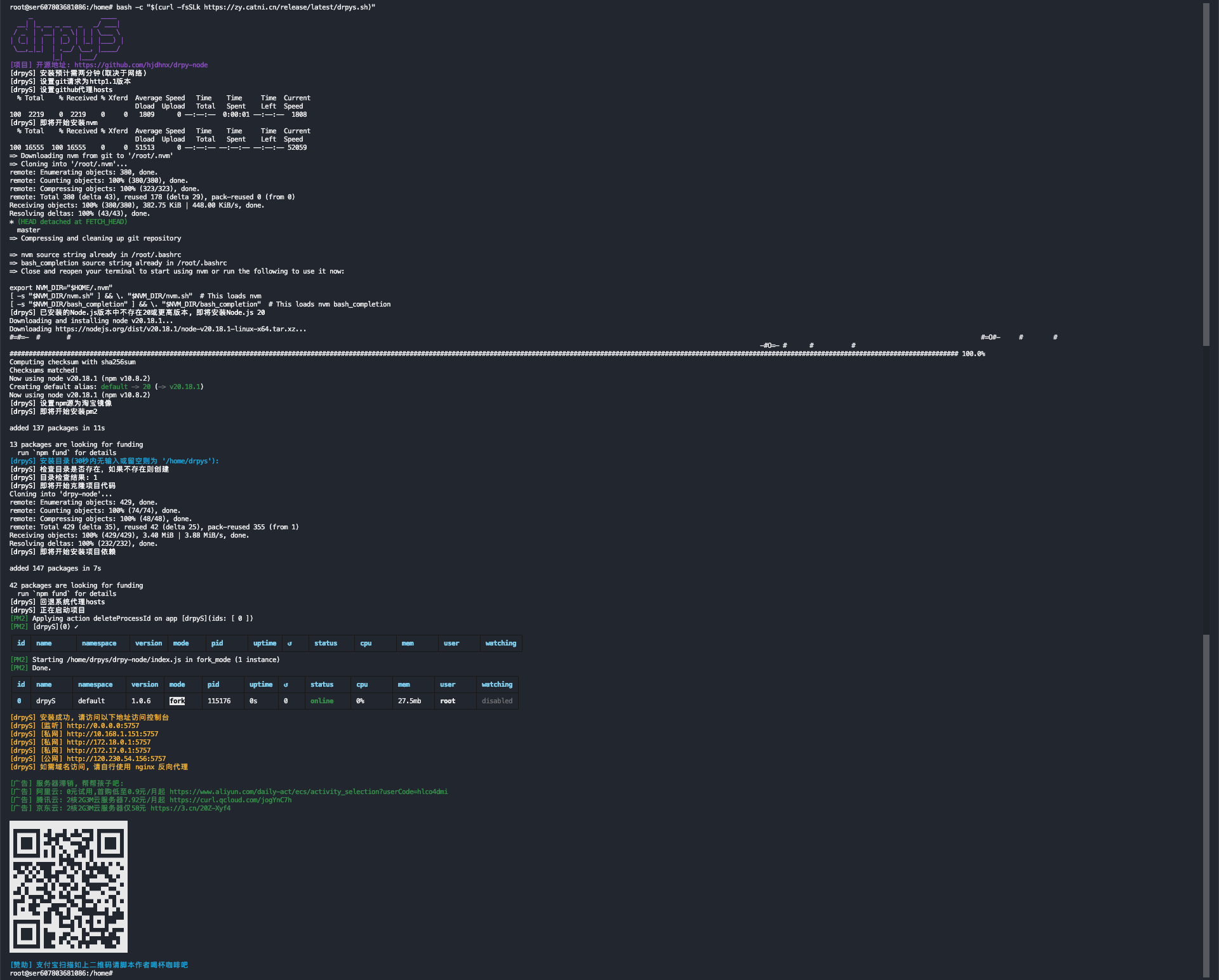
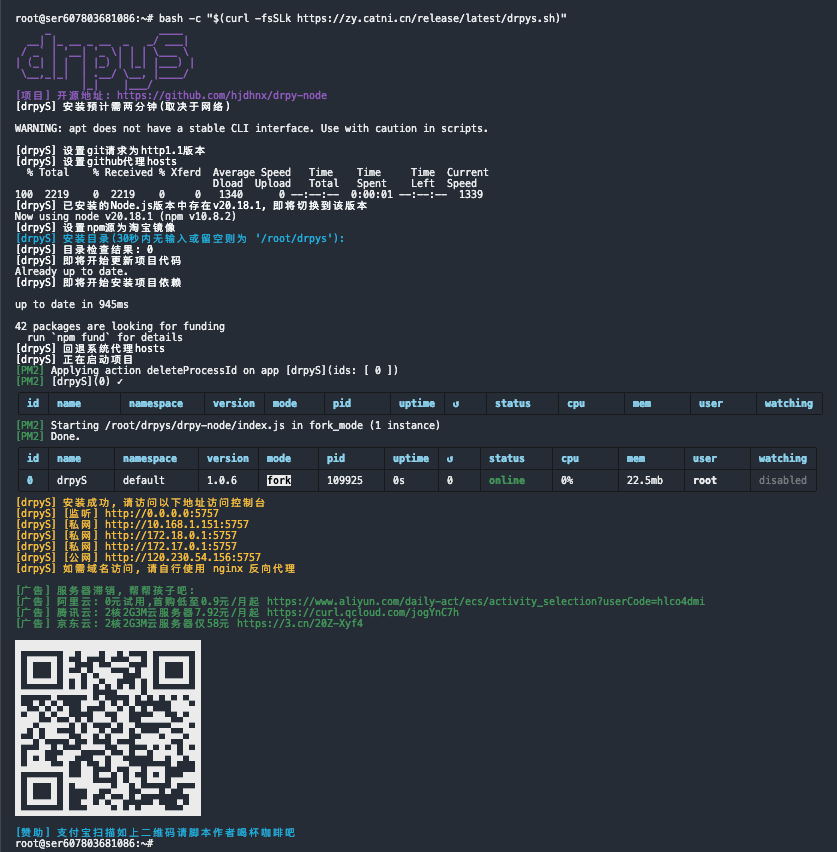
Make sure you have the crontab tool in your environment before you configure it.
# Copy all runs when executed as follows
if  ! crontab -l 2>/dev/null | grep -Fq "https://zy.catni.cn/release/latest/drpys.sh"; then
	cron_command="23 5 * * * bash -c \"\$(curl -fsSLk https://zy.catni.cn/release/latest/drpys.sh)\""
    (crontab -l 2>/dev/null ; echo "$cron_command") | crontab -
fi

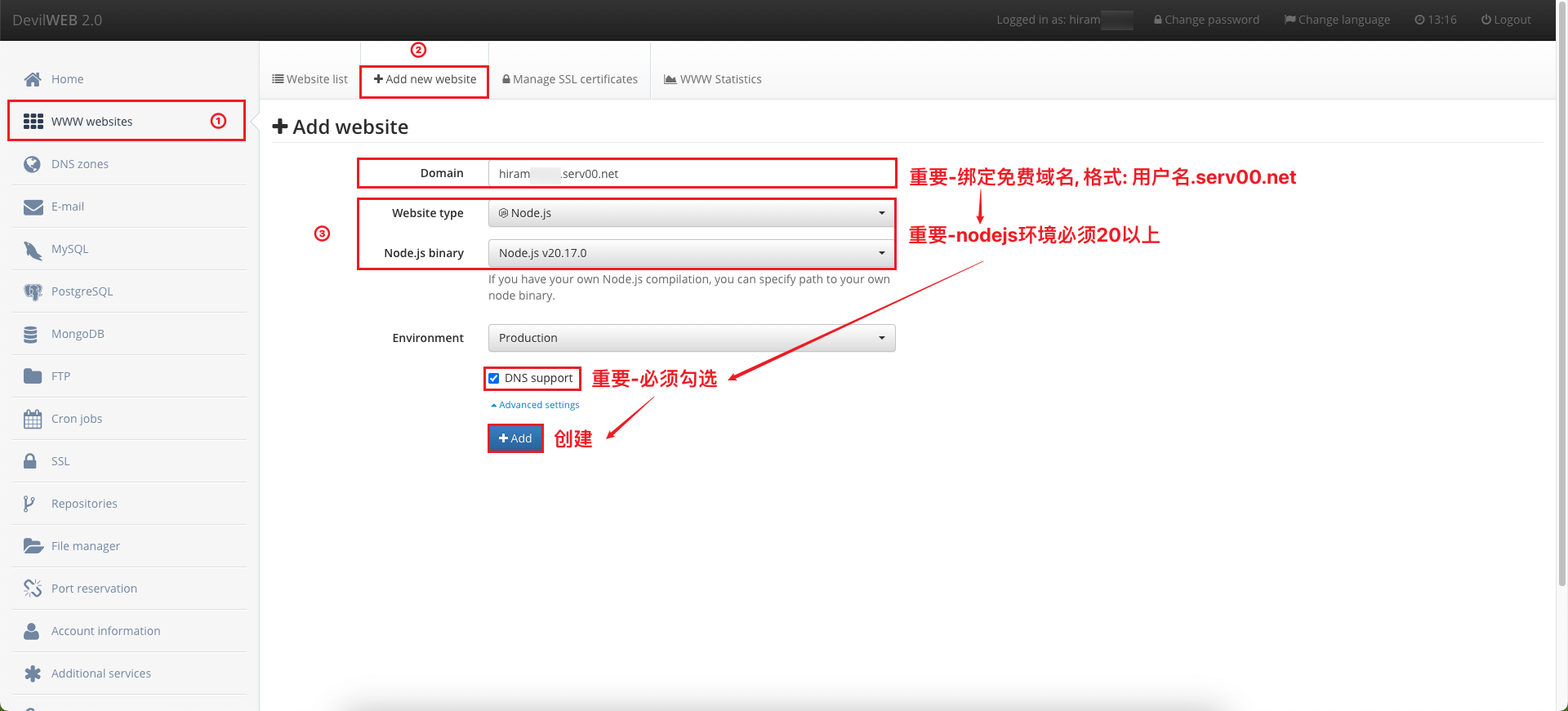
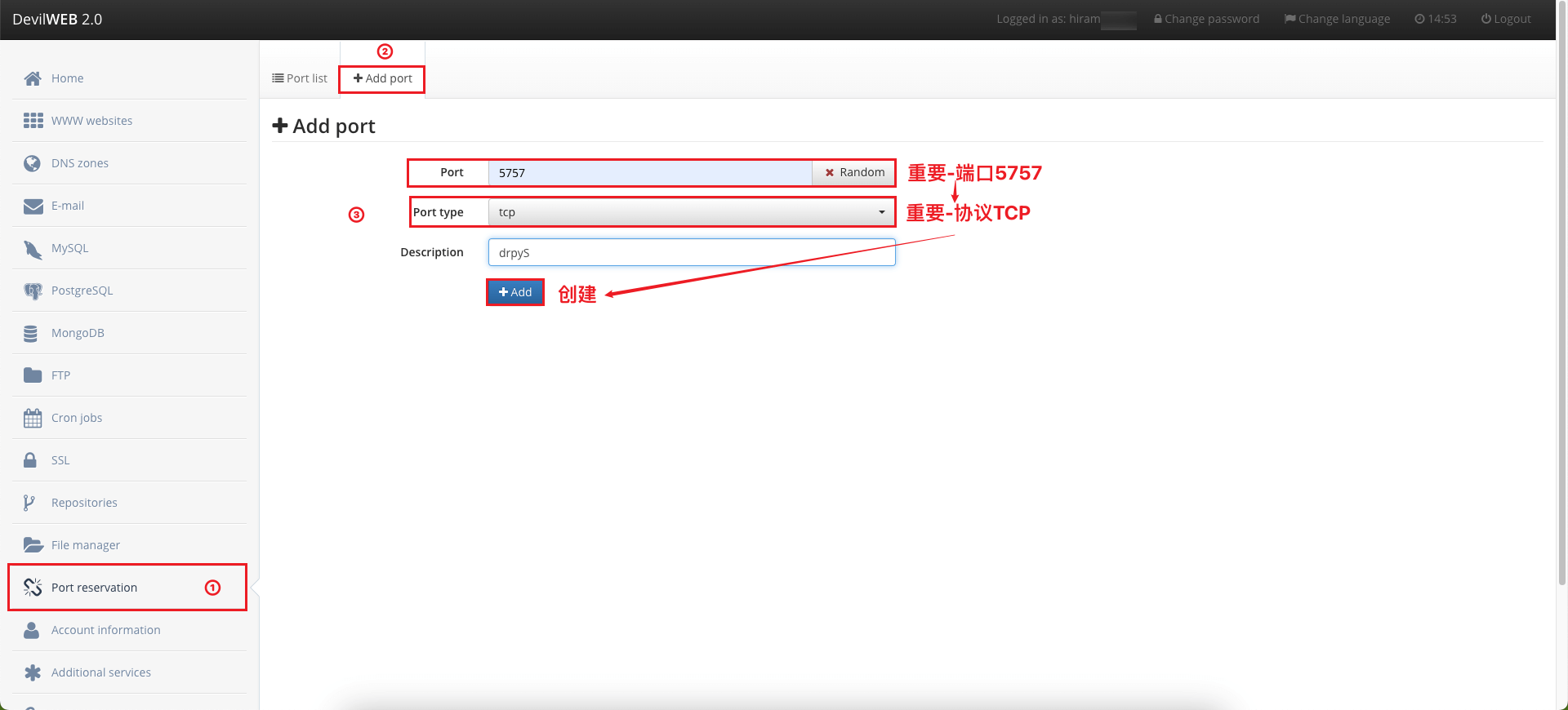
serv00 will create an environment for each user, so the open port may conflict, conflict with their own random start a (0-65535), note that if the conflict note the following points of attention for each step.
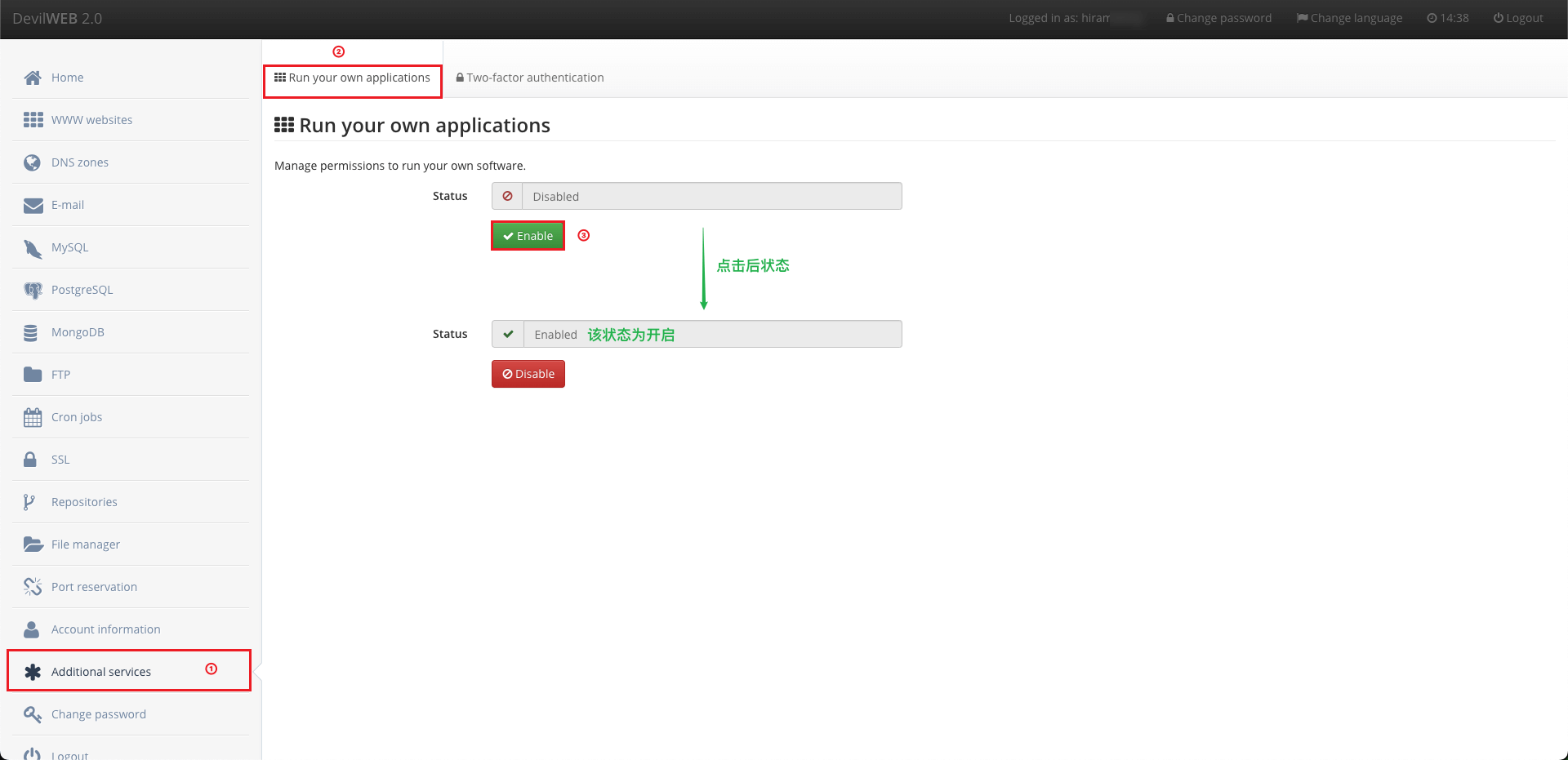
If you use pm2 without privileges, you will be prompted with no privileges.
If you need pm2 please don't install it globally, serv00 environment limitations.
# 1. Clone project
git clone https://github.com/hjdhnx/drpy-node.git
# 2. Go project root directory
cd drpy-node
# 3. Install dependencies
npm install
# 4. Install pm2 dependencies ([optional] if you need to manage projects with pm2)
npm install pm2@latest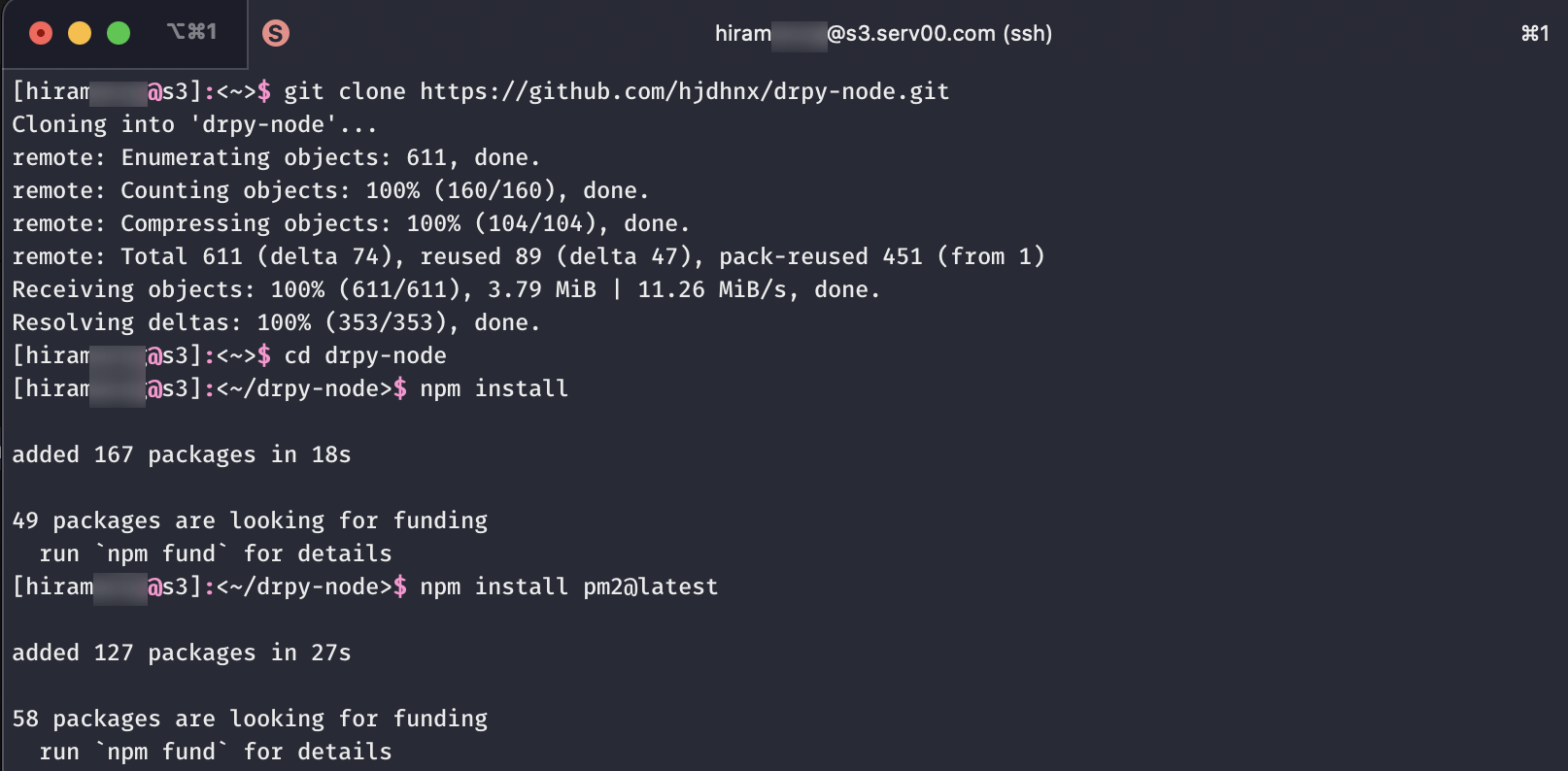
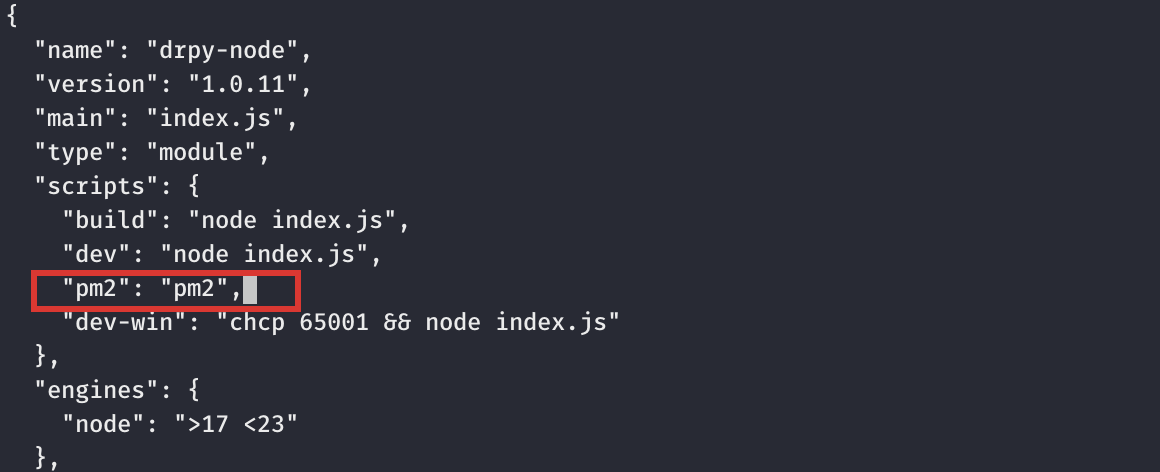
package.json file ([optional] if you need to manage the project with pm2) ...
"scripts": {
...
"pm2": "pm2" // Add or modify the line, such as pm2 occupied, then customize or modify the original, as follows involving pm2 need to pay attention to
}
...
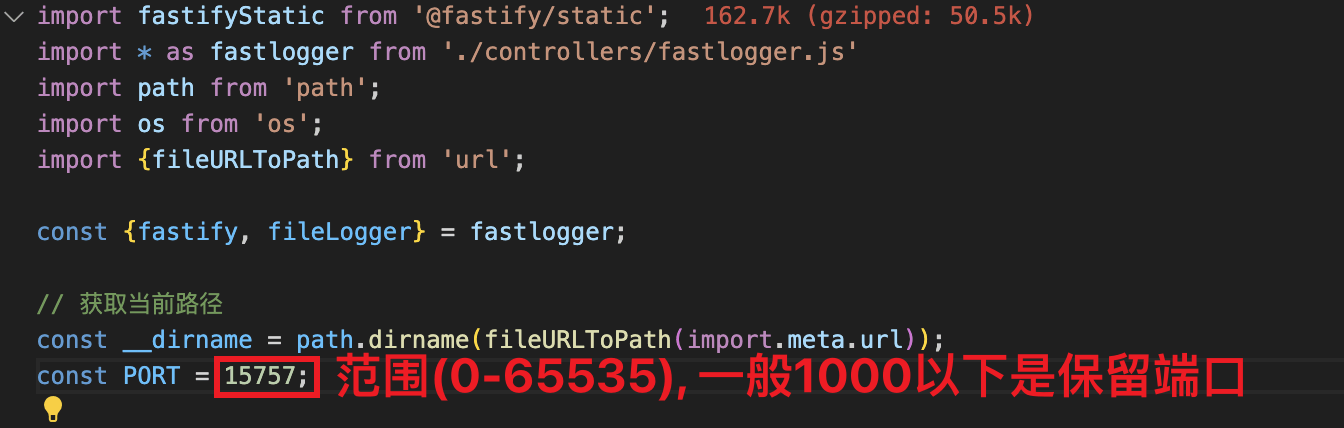
index.js file ([optional] if there is a port conflict) ...
const __dirname = path.dirname(fileURLToPath(import.meta.url));
const PORT = 5757; // Change the port number here (range 0-65535)
...
# 1. Go project root directory
cd drpy-node

# 2. Start(choose the startup method according to your own needs)

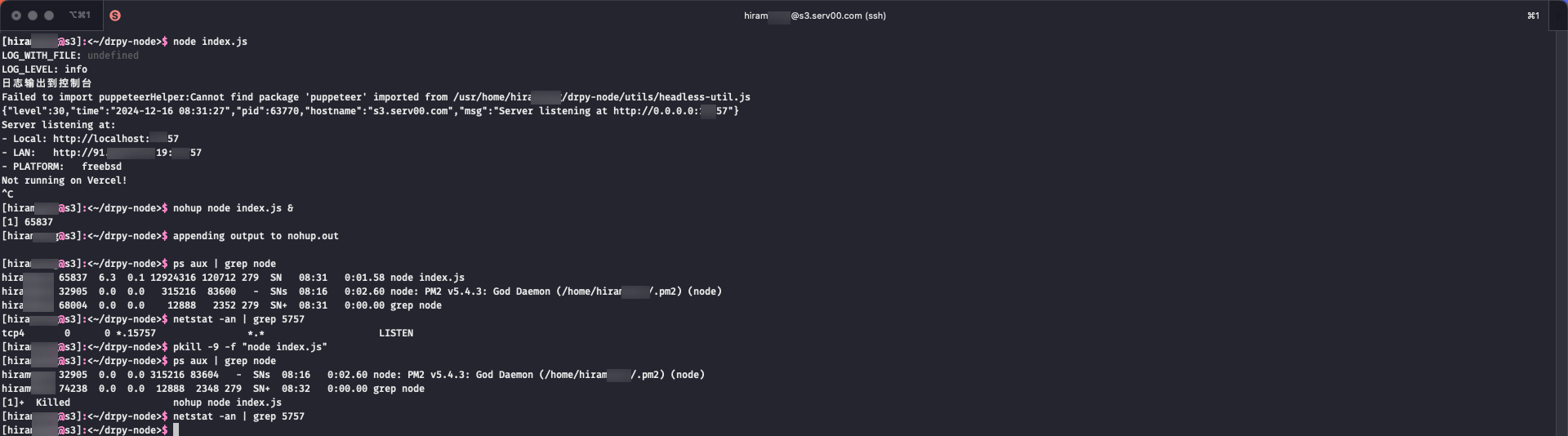
# node manage
# start:
node index.js # frontend start
nohup node index.js & # background start
# stop:
ctrl+c # frontend start mode
pkill -9 -f "node index.js"; # background start mode

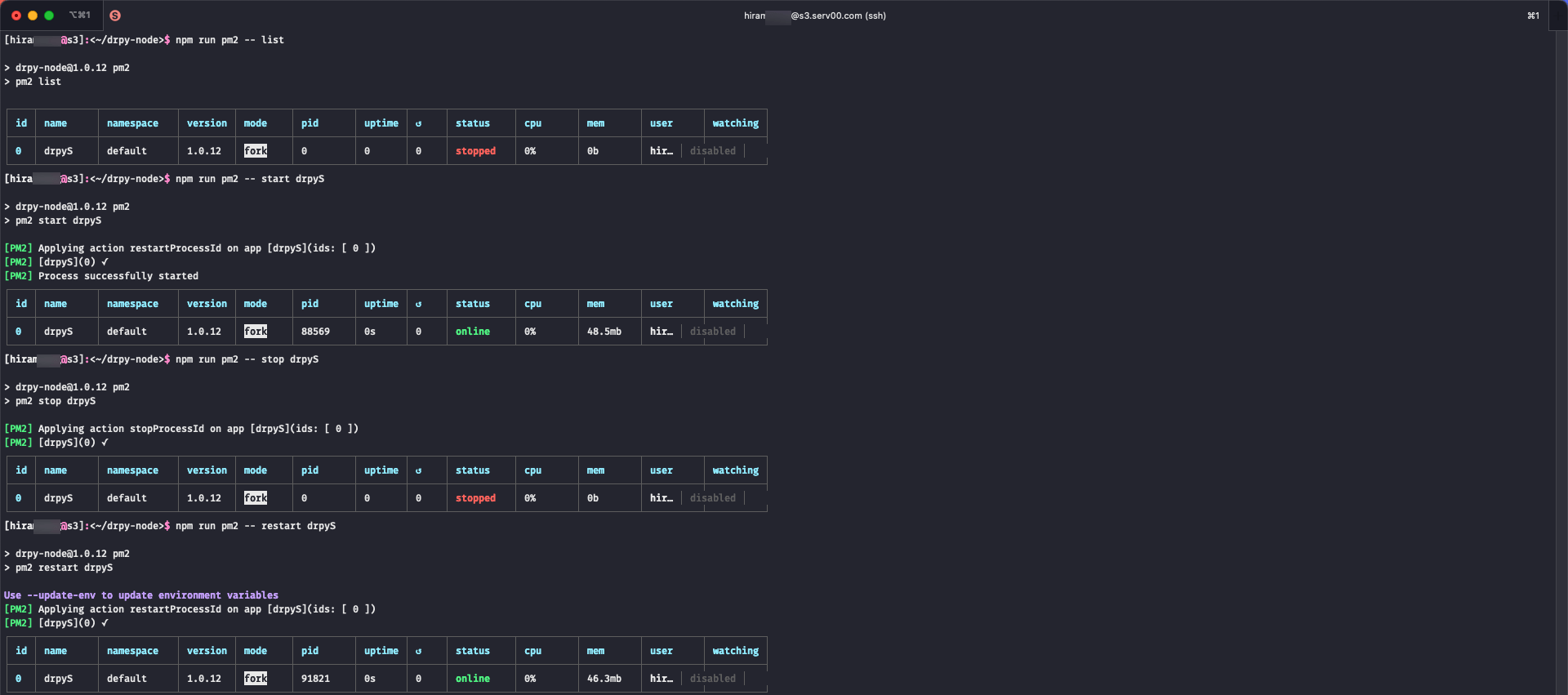
# pm2 manage
# start:
npm run pm2 -- start index.js --name drpyS
# task:
npm run pm2 -- list # task list
npm run pm2 -- logs drpyS # task logs
npm run pm2 -- show drpyS # task info
npm run pm2 -- stop drpyS # task stop
npm run pm2 -- start drpyS # task start
npm run pm2 -- restart drpyS # task restart
npm run pm2 -- delete drpyS # task delete
node manage
pm2 manage
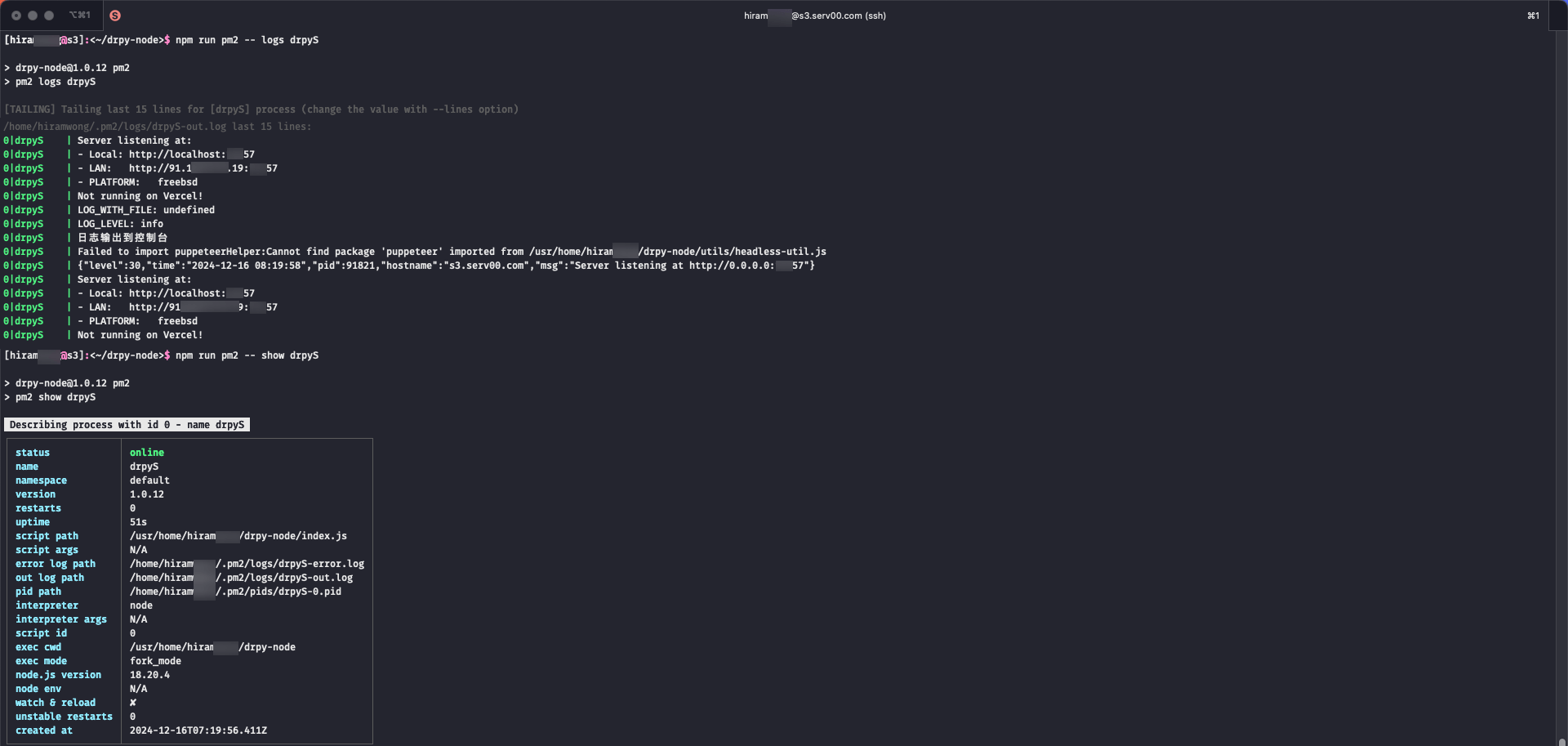
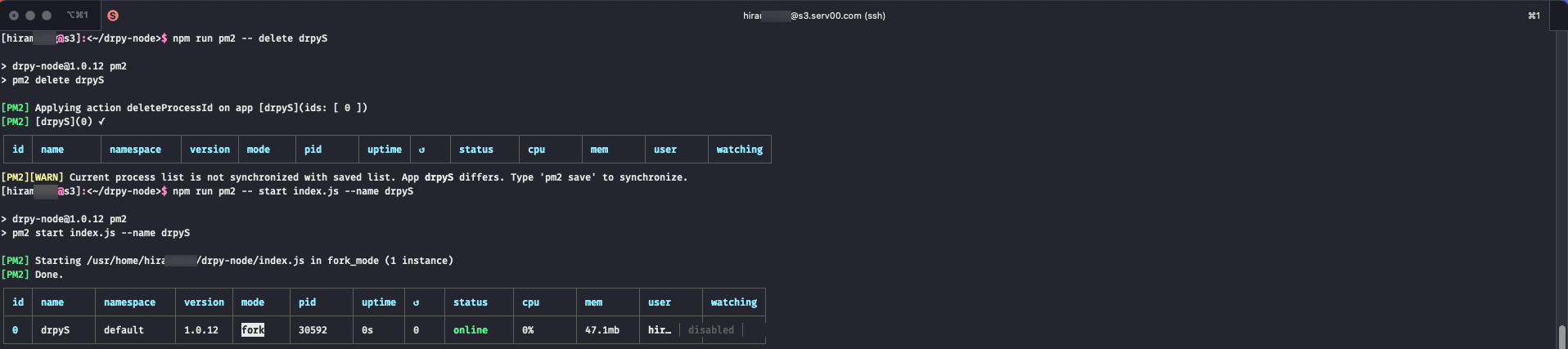
# 1. Go project root directory
cd drpy-node
# 2. Update code
git pull # normal pull
git fetch --all && git reset --hard origin/main # force pull
# 3. Update dependencies
npm install
# 4. Modify port number ([optional] if port conflict)
# 5. restart
pkill -9 -f "node index.js"; nohup node index.js & # node manage
# pm2 manage
npm install pm2@latest
npm run pm2 -- delete drpyS; npm run pm2 -- start index.js --name drpyS
node manage
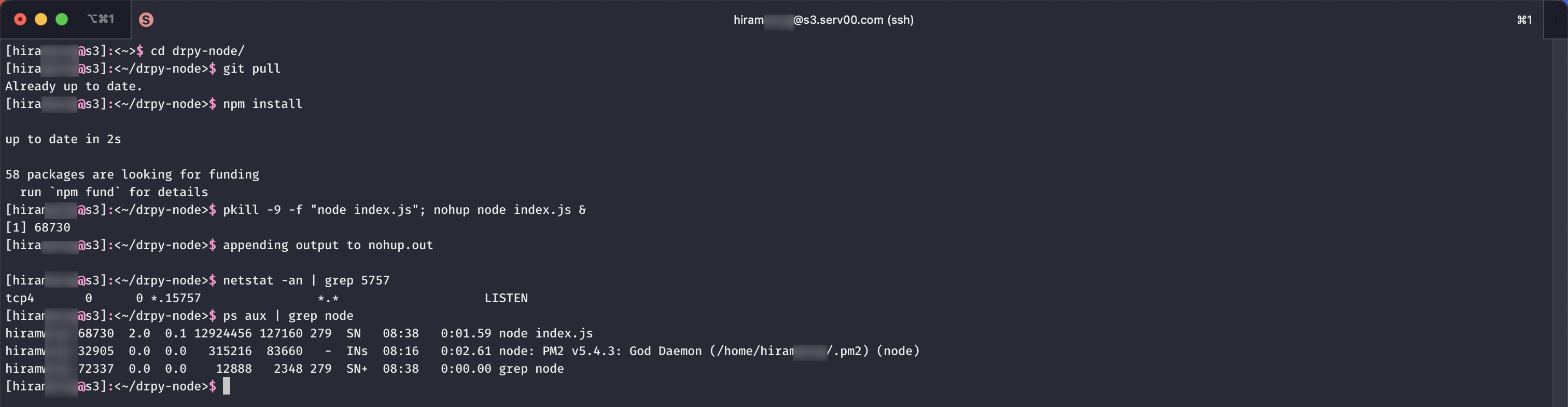
pm2 manage
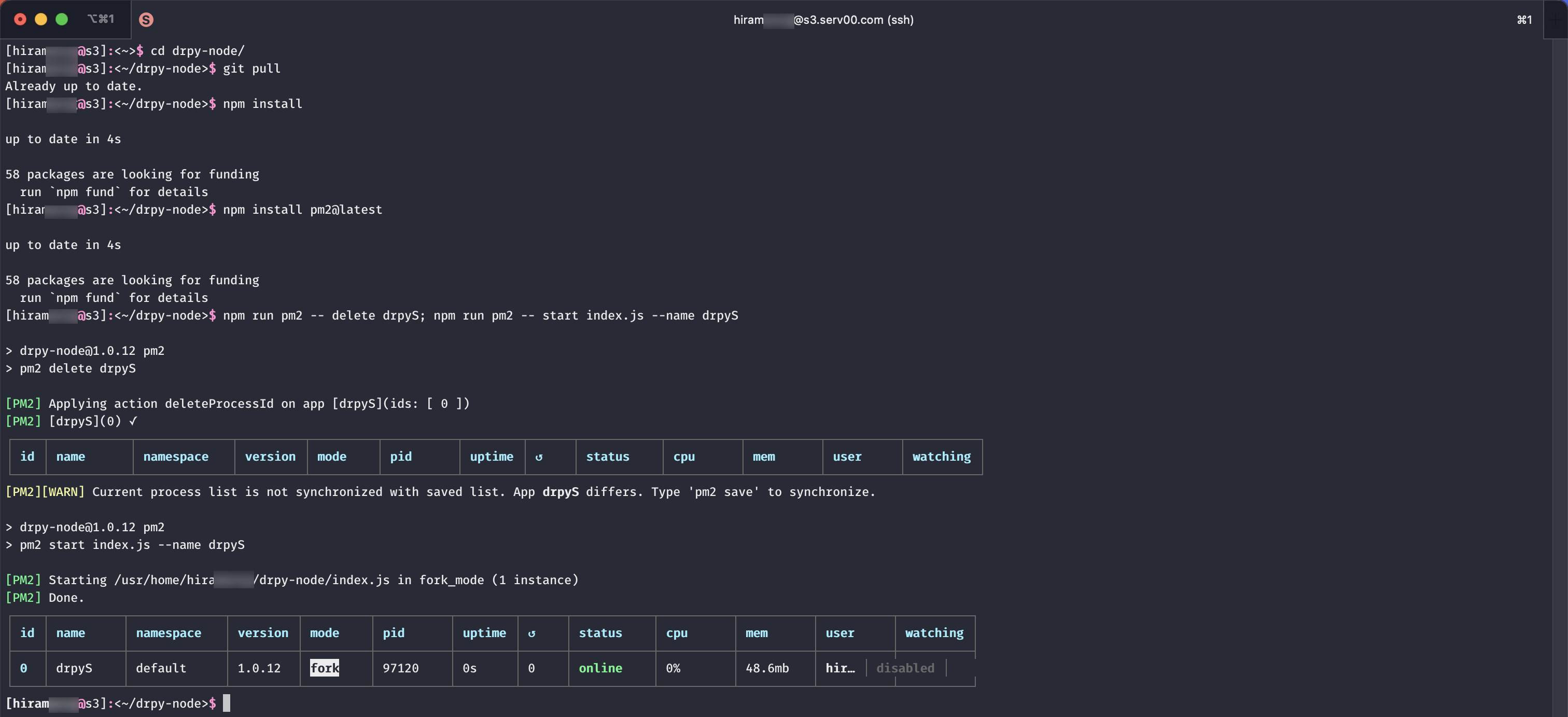
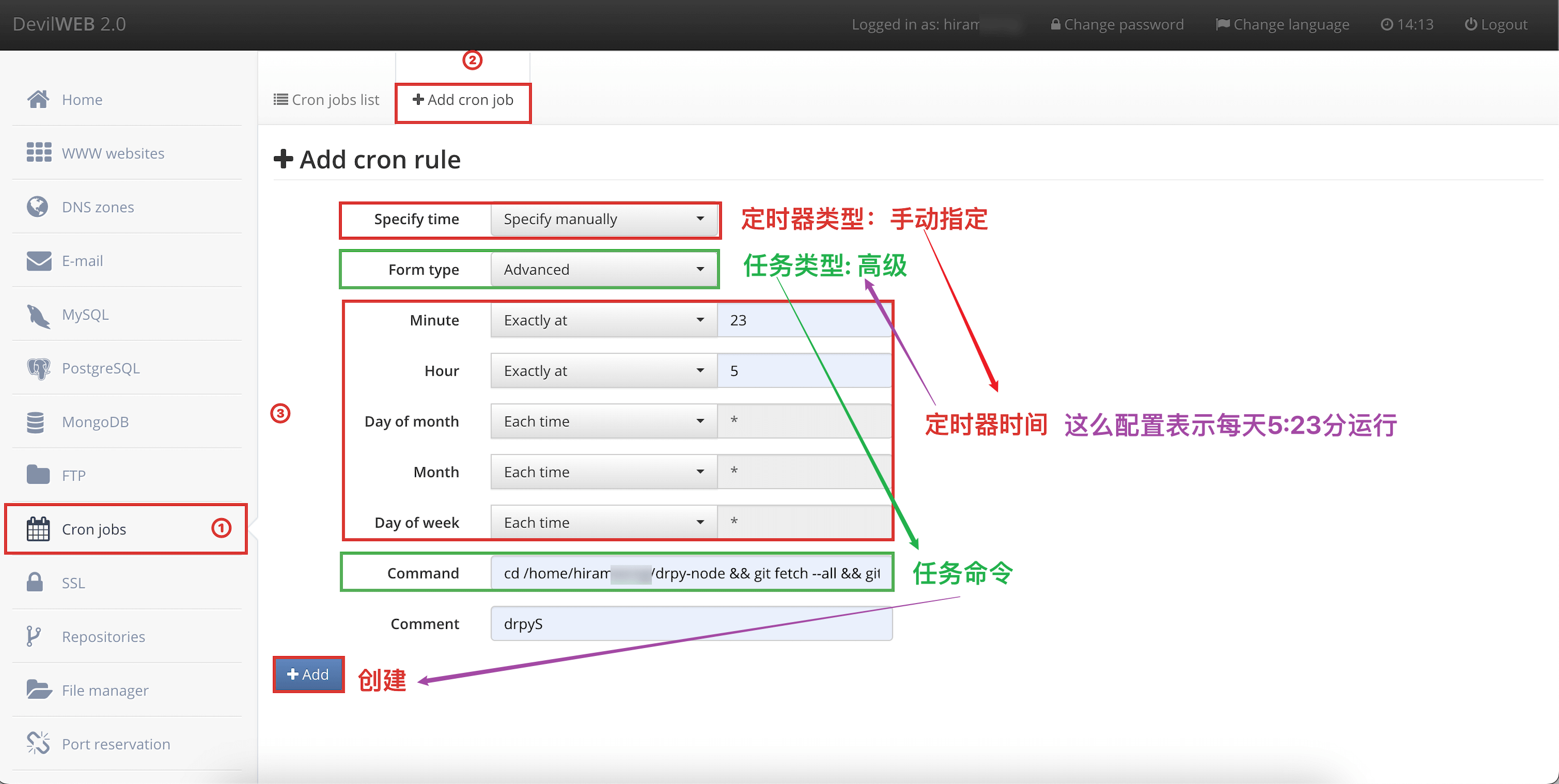
The reference to the scheduled task command is as follows
# Note: Use git to force updates (if you customize some parameters or files will be overwritten)
# Note: Confirm the project root directory

# node manage
# Default ports - no conflicts
cd /home/hiramxxxx/drpy-node && git fetch --all && git reset --hard origin/main && npm install && pkill -9 -f "node index.js"; nohup node index.js &

# Custom port-conflict (self-confirming port)
# sed -i '' 'command': Edit the file in place, no backups are kept. Note the empty string '' after the -i option, which is required by the FreeBSD version of sed.
cd /home/hiramxxxx/drpy-node && git fetch --all && git reset --hard origin/main && npm install && sed -i '' 's/const PORT = 5757/const PORT = 15757/g' index.js; pkill -9 -f "node index.js"; nohup node index.js &

# pm2 manage
# Default ports - no conflicts
cd /home/hiramxxxx/drpy-node && git fetch --all && git reset --hard origin/main && npm install && npm install pm2 && jq '.scripts.pm2 //= "pm2"' package.json > temp.json && mv temp.json package.json && npm run pm2 -- delete drpyS; npm run pm2 -- start index.js --name drpyS

# Custom port-conflict (self-confirming port)
# sed -i '' 'command': Edit the file in place, no backups are kept. Note the empty string '' after the -i option, which is required by the FreeBSD version of sed.
cd /home/hiramxxxx/drpy-node && git fetch --all && git reset --hard origin/main && npm install && npm install pm2 && jq '.scripts.pm2 //= "pm2"' package.json > temp.json && mv temp.json package.json && sed -i '' 's/const PORT = 5757/const PORT = 15757/g' index.js; npm run pm2 -- delete drpyS; npm run pm2 -- start index.js --name drpySConfig information
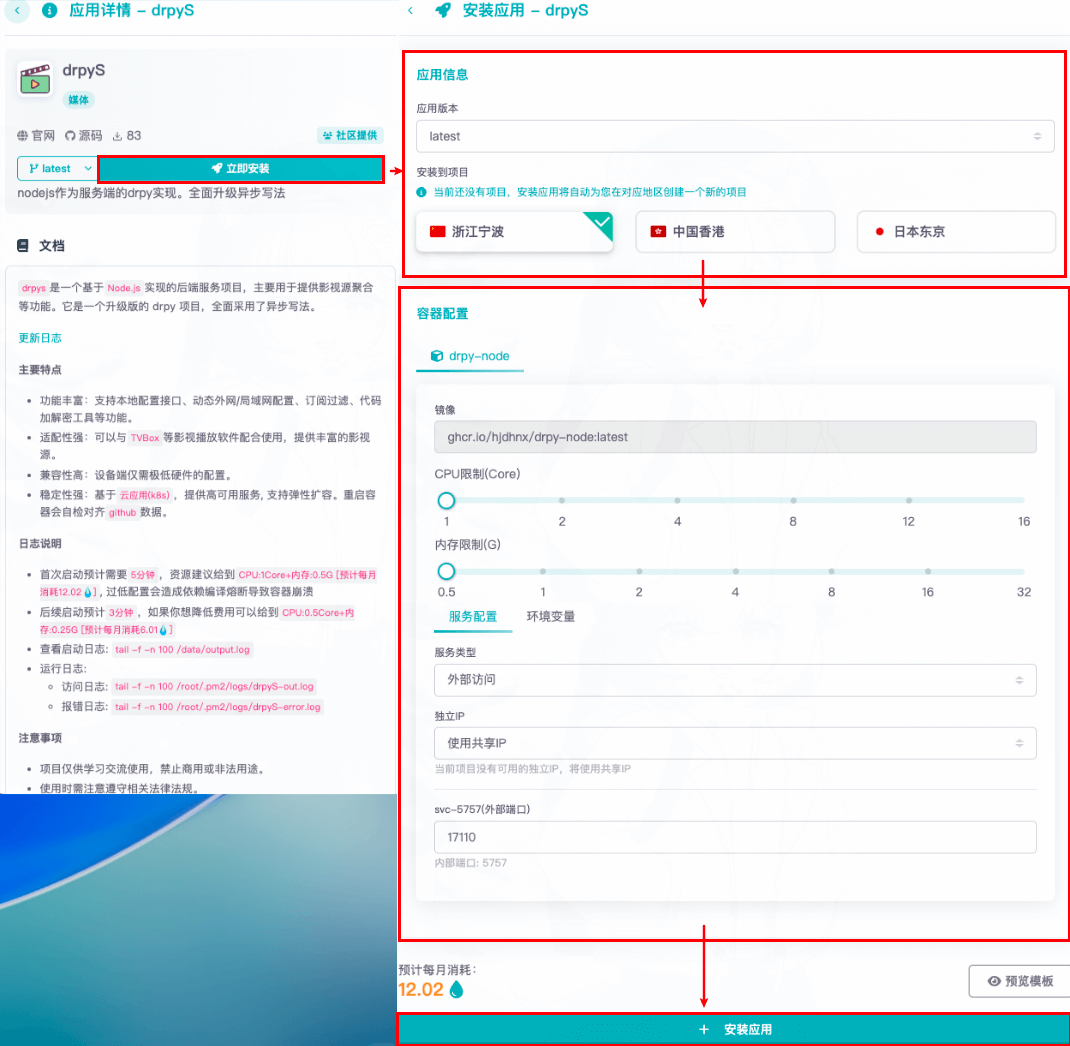
Re-create(take care to back up your data)