买服务器上雨云
 由超大带宽雨云提供赞助
Document
Restart the software after setting to take effect
Access
Tools->Preferences
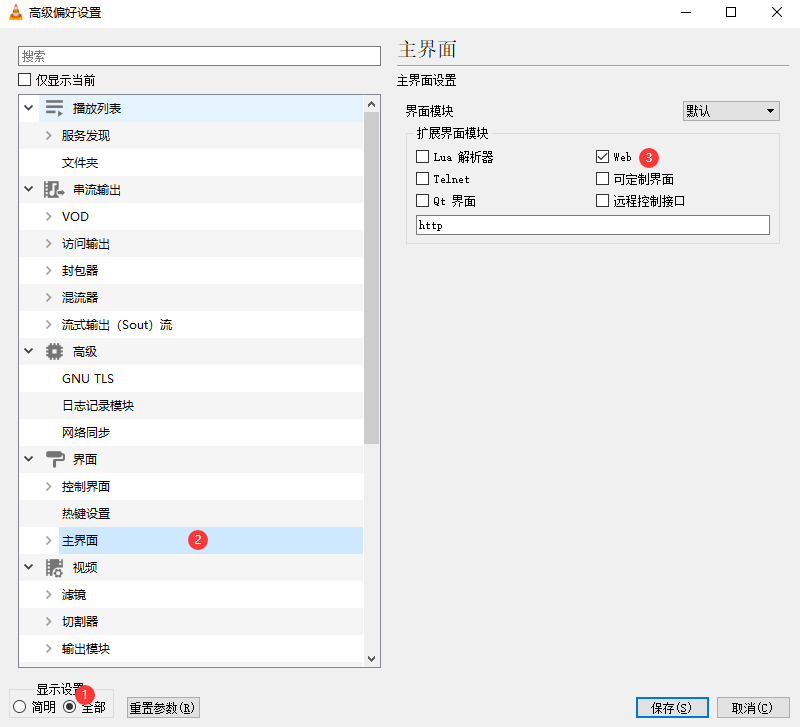
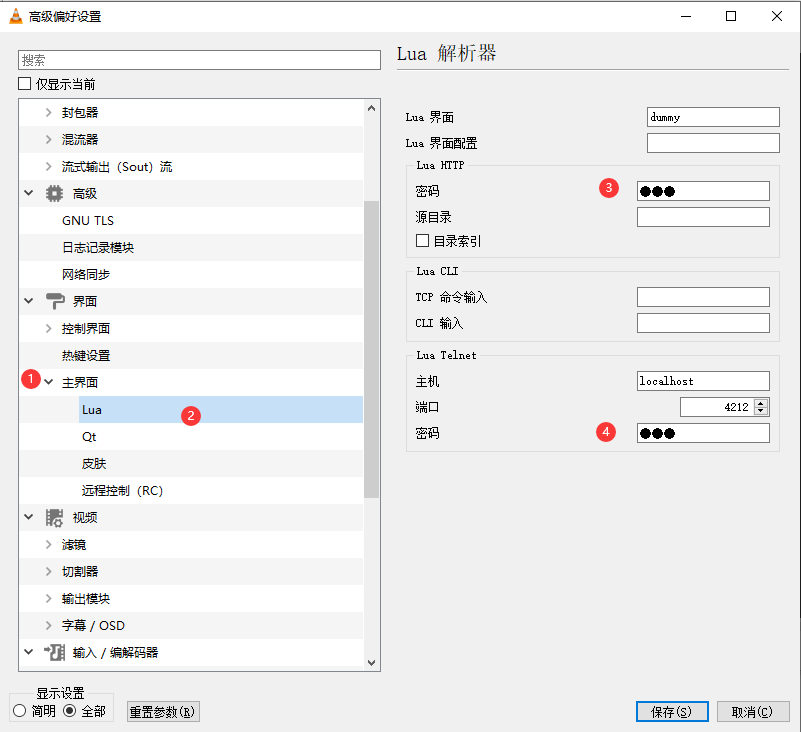
VLC->Setting
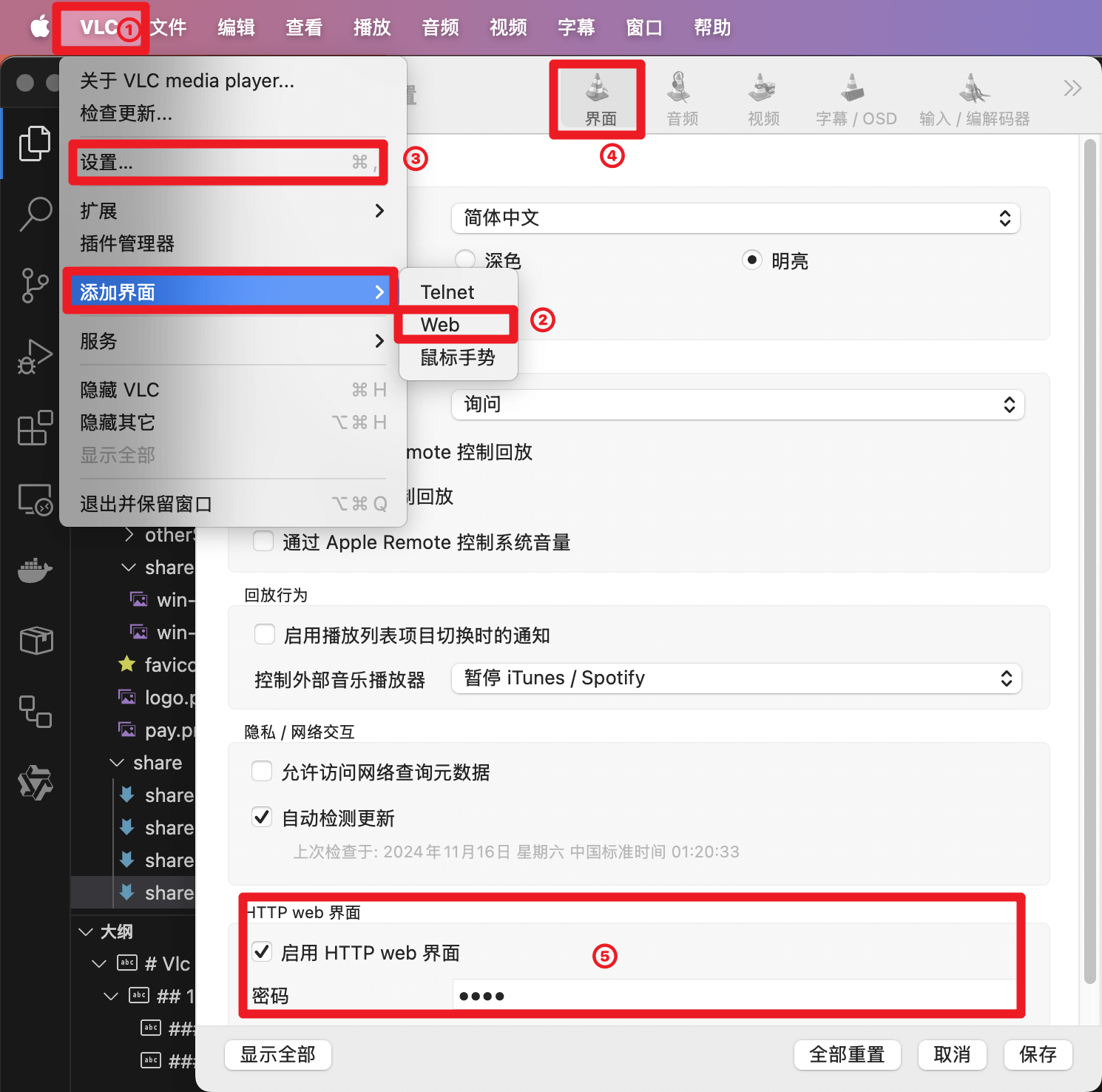
VLC->Setting
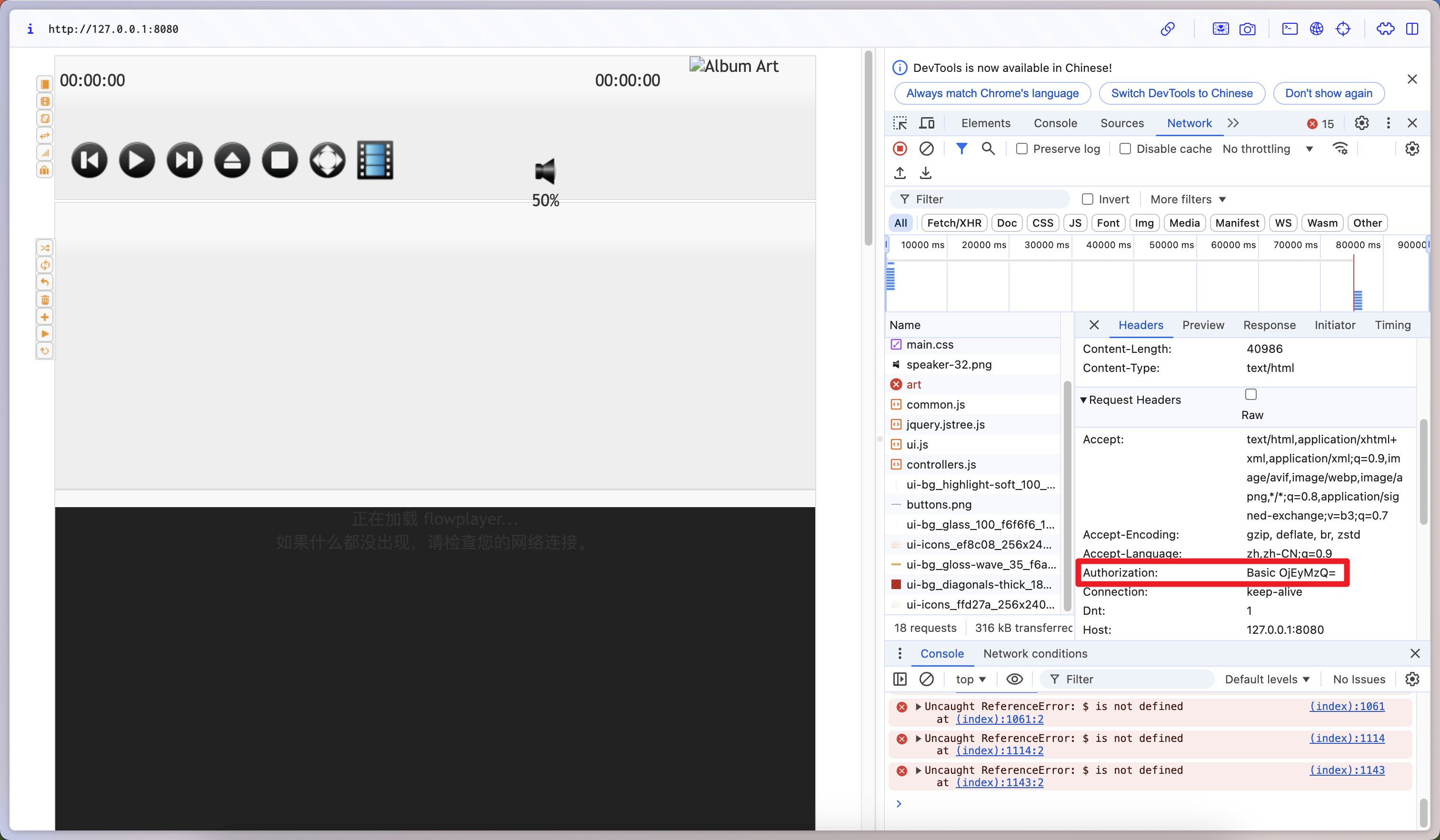
The VLC-web control authorization uses WWW-Authenticate authentication, and this header is typically used in conjunction with a 401 status code.
The server sends the header Www-Authenticate: Basic realm="VLC stream" back to the browser.
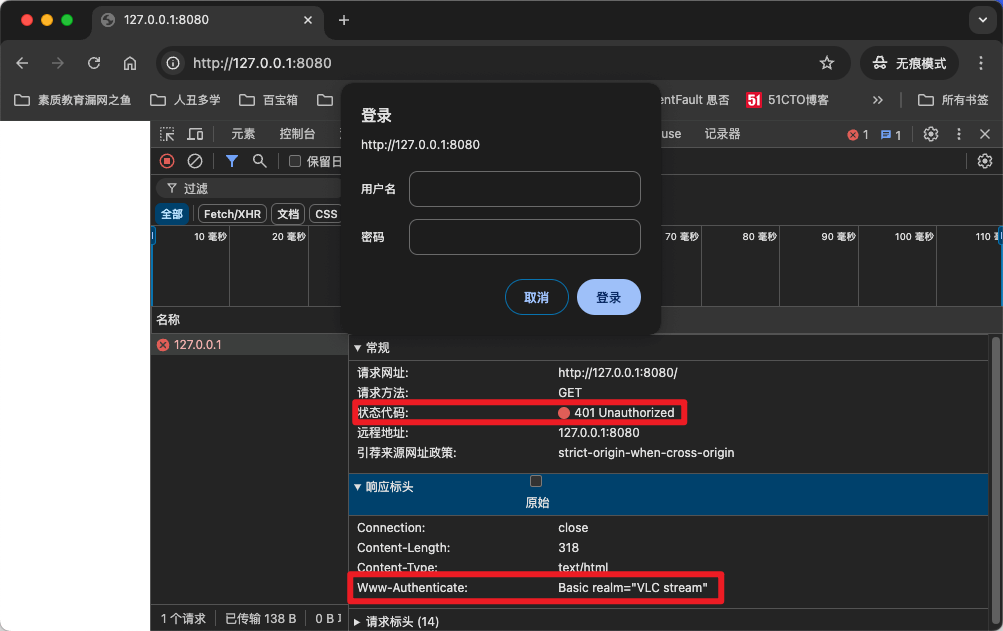
When the browser receives it, it will pop up the login box. After filling out the form, the request header will contain: Authorization: Basic "username:password" base64 encoding.
Api:
http://127.0.0.1:8080/requests/status.xml
<root>
  <fullscreen>false</fullscreen>
  <aspectratio>default</aspectratio>
  <seek_sec>10</seek_sec>
  <apiversion>3</apiversion>
  <currentplid>11</currentplid>
  <time>21</time>
  <volume>36</volume>
  <length>90</length>
  <random>false</random>
  <audiofilters>
    <filter_0/>
  </audiofilters>
  <rate>1</rate>
  <videoeffects>
    <hue>0</hue>
    <saturation>1</saturation>
    <contrast>1</contrast>
    <brightness>1</brightness>
    <gamma>1</gamma>
  </videoeffects>
  <state>paused</state>
  <loop>false</loop>
  <version>3.0.21 Vetinari</version>
  <position>0.237632766366</position>
  <audiodelay>0</audiodelay>
  <repeat>false</repeat>
  <subtitledelay>0</subtitledelay>
  <equalizer/>
  <information>
    <category name="meta">
      <info name="encoded_by">Lavf58.12.100</info>
      <info name="filename">xgplayer-demo-360p.mp4</info>
    </category>
    <category name="流 0">
      <info name="语言">英语</info>
      <info name="缓冲分辨率">640x368</info>
      <info name="编解码器">H264 - MPEG-4 AVC (part 10) (avc1)</info>
      <info name="帧率">25</info>
      <info name="类型">视频</info>
      <info name="已解码格式"/>
      <info name="方向">上左</info>
      <info name="色度位置">左</info>
      <info name="视频分辨率">640x360</info>
    </category>
    <category name="流 1">
      <info name="采样率">48000 Hz</info>
      <info name="语言">英语</info>
      <info name="类型">音频</info>
      <info name="声道">立体声</info>
      <info name="编解码器">MPEG AAC Audio (mp4a)</info>
      <info name="位每采样">32</info>
    </category>
  </information>
  <stats>
    <lostabuffers>0</lostabuffers>
    <readpackets>2335</readpackets>
    <lostpictures>0</lostpictures>
    <demuxreadbytes>1252258</demuxreadbytes>
    <demuxbitrate>0.13066865503788</demuxbitrate>
    <playedabuffers>1060</playedabuffers>
    <demuxcorrupted>0</demuxcorrupted>
    <sendbitrate>0</sendbitrate>
    <sentbytes>0</sentbytes>
    <displayedpictures>535</displayedpictures>
    <demuxreadpackets>0</demuxreadpackets>
    <sentpackets>0</sentpackets>
    <inputbitrate>3.5416431427002</inputbitrate>
    <demuxdiscontinuity>2</demuxdiscontinuity>
    <averagedemuxbitrate>0</averagedemuxbitrate>
    <decodedvideo>1082</decodedvideo>
    <averageinputbitrate>0</averageinputbitrate>
    <readbytes>4775536</readbytes>
    <decodedaudio>2121</decodedaudio>
  </stats>
</root>Base url:
http://127.0.0.1:8080/requests/status.xml
| effect | params | remark |
|---|---|---|
| play&parse | command=pl_pause | |
| stop | command=pl_stop | |
| open playlist | command=pl_play&id=3 | |
| play video | command=in_play&input=url | Special Character Encoding URIComponent Encoding input=encodeURIComponent(url) |
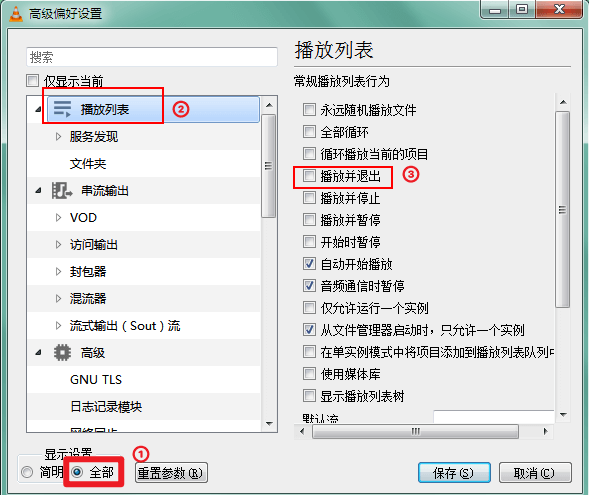
If VLC exits automatically after stopping playback, please configure the following parameters
import axios from 'axios';
import { XMLParser } from 'fast-xml-parser';

// @see https://github.com/NaturalIntelligence/fast-xml-parser/blob/master/docs/v4/1.GettingStarted.md
const xmlOptions = {
  trimValues: true,
  textNodeName: '$text',
  ignoreAttributes: false,
  attributeNamePrefix: '',
  parseAttributeValue: true,
};
const parser = new XMLParser(xmlOptions);

class VlcControl {
  host: string = '127.0.0.1';
  port: number = 8080;
  username: string = '';
  password: string = 'zyfun';

  constructor(options) {
    this.host = options.host;
    this.port = options.port;
    this.password = options.password;
    this.username = options.username;
  }

  async play() {
    await this.vlcWebApiControl('/requests/status.xml', { command: 'pl_play' });
  }

  async pause() {
    const status = await this.vlcWebApiControl('/requests/status.xml');
    if (status.root.state === 'playing') {
      await this.vlcWebApiControl('/requests/status.xml', { command: 'pl_pause' });
    }
  }

  async toggle() {
    await this.vlcWebApiControl('/requests/status.xml', { command: 'pl_pause' });
  }

  async volume(volume: number) {
    this.vlcWebApiControl('/requests/status.xml', { command: 'volume', val: volume * 100 * 3.2 });
  }

  async speed(speed: number) {
    this.vlcWebApiControl('/requests/status.xml', { command: 'rate', val: speed });
  }

  async seek(seek: number | string) {
    this.vlcWebApiControl('/requests/status.xml', { command: 'seek', val: seek });
  }

  async currentTime() {
    const status = await this.vlcWebApiControl('/requests/status.xml');
    return status.root.time || 0;
  }

  async duration() {
    const status = await this.vlcWebApiControl('/requests/status.xml');
    return status.root.length || 0;
  }

  async time() {
    const status = await this.vlcWebApiControl('/requests/status.xml');
    return {
      currentTime: status.root.time || 0,
      duration: status.root.length || 0,
    };
  }

  getControlUrl() {
    return `http://${this.host}:${this.port}`;
  }

  async vlcWebApiControl(path: string = '/requests/status.xml', params: any = {}) {
    try {
      const response = await axios({
        url: `${this.getControlUrl()}${path}`,
        method: 'GET',
        auth: {
          username: this.username,
          password: this.password,
        },
        params: params,
      });
      return parser.parse(response.data);
    } catch (err: any) {
      console.error(`Error sending VLC http command: ${err.message}`);
      throw err;
    }
  }
}

export default VlcControl;