买服务器上雨云
 由超大带宽雨云提供赞助
项目信息
须知
服务器推荐
如果你还没有服务器,欢迎通过以下优惠链接选购。
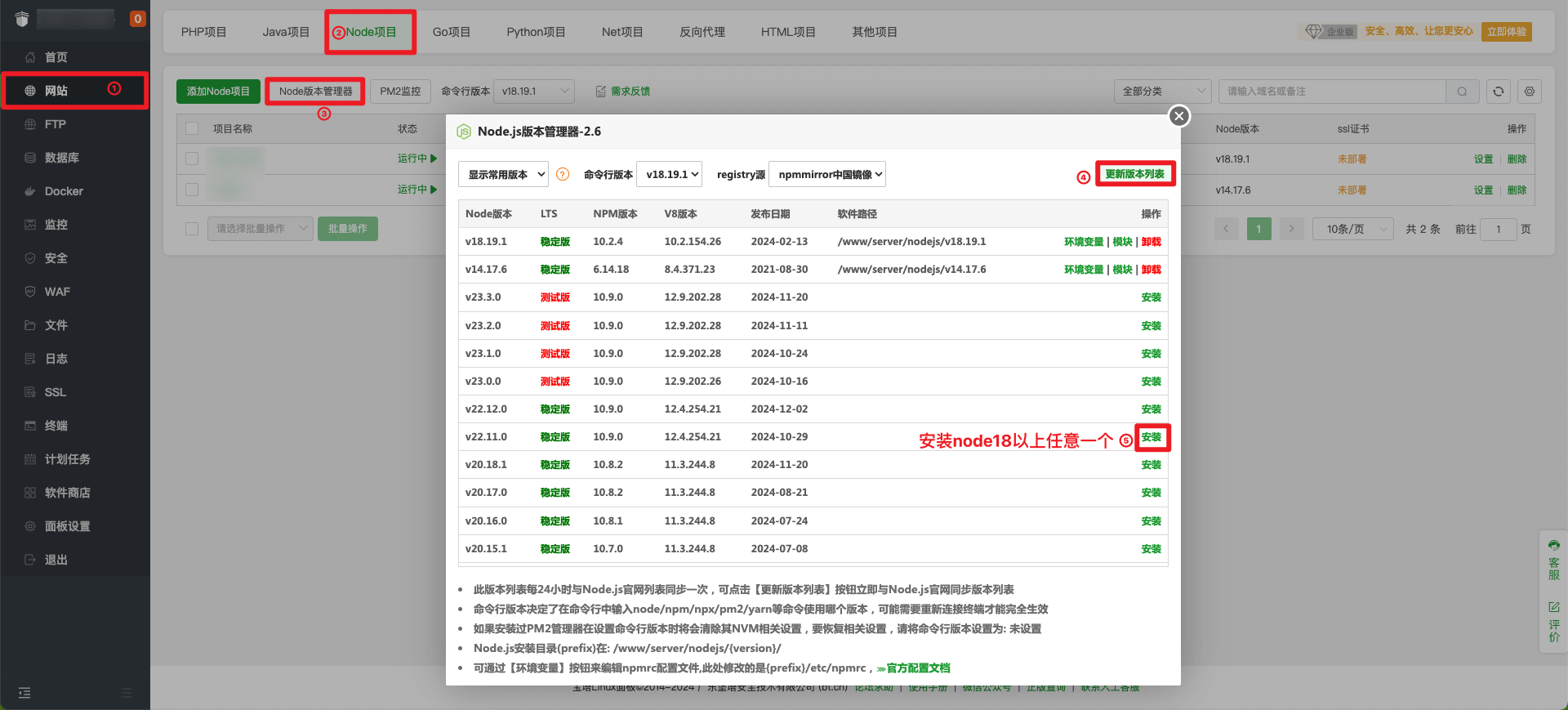
最新版本的宝塔面板安装节点环境,无需安装额外的pm2。
# 1. 安装git
apt-get install git # ubuntu
yum install git # centos
# 2. 克隆
git clone https://github.com/hjdhnx/drpy-node.git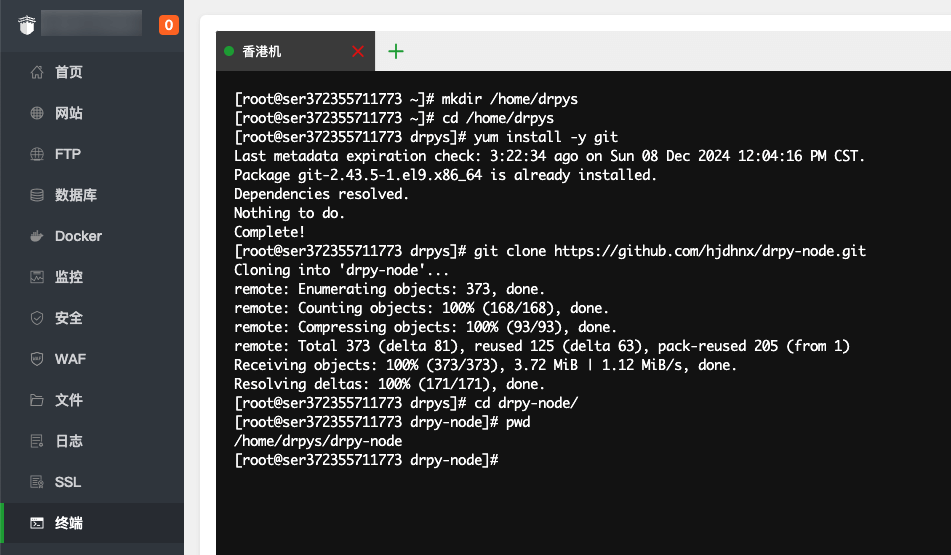
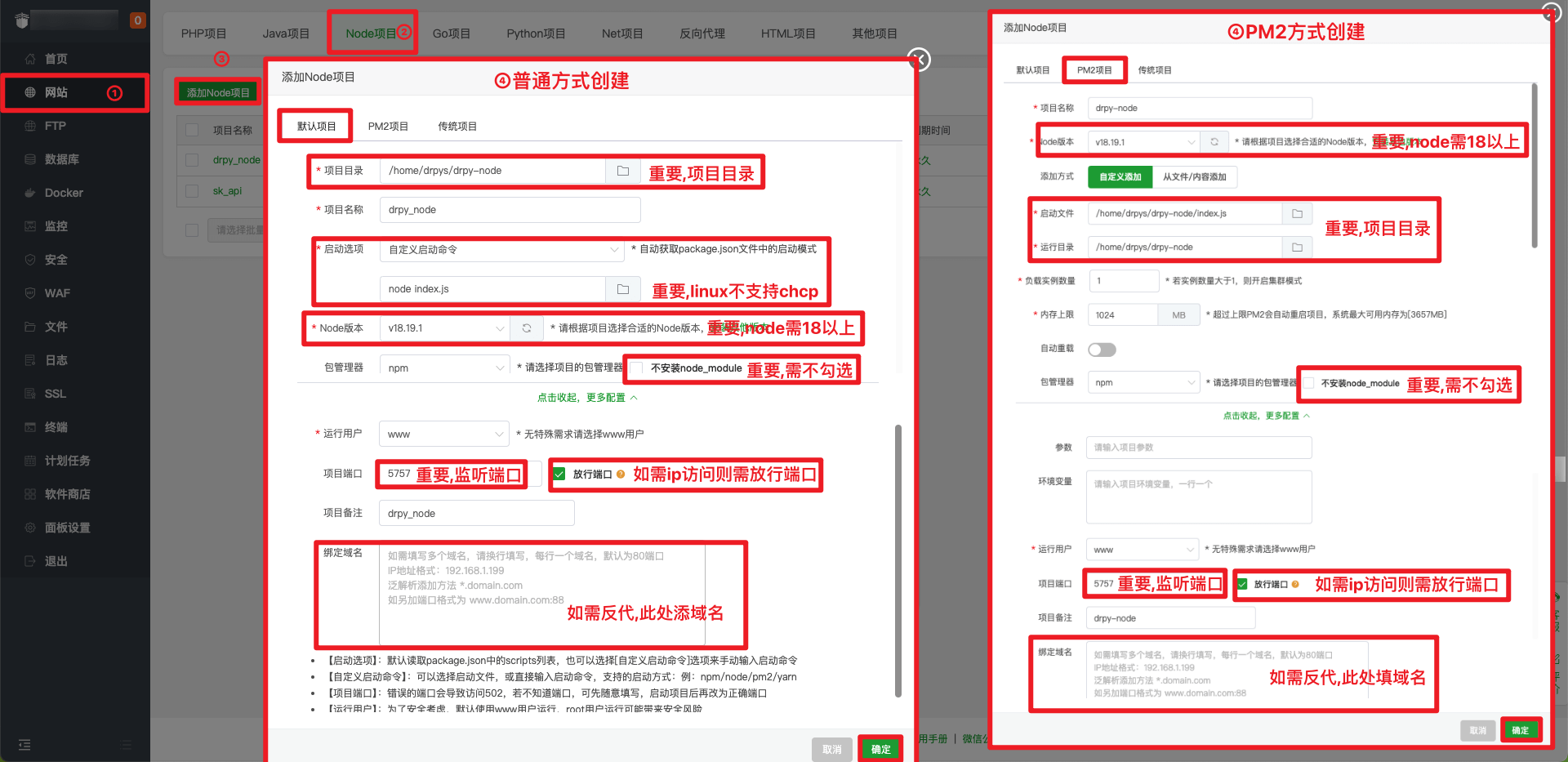
在node和pm2中选择一种管理方法。
# 1. Go project root directory
cd drpy-node
# 2. Update code
git pull # normal pull
git fetch --all && git reset --hard origin/main # force pull
# 3. restart
Website->Node Project->Status->Reboot# node
# 注:项目目录、node路径和运行用户
PATH=/www/server/nodejs/v18.20.5/bin:/sbin:/usr/bin:/usr/sbin:/usr/local/bin:/usr/local/sbin:~/bin # 注意node版本路径
export PATH
export HOME=/www # 注意运行用户
export NODE_PATH="/www/server/nodejs/v18.20.5/etc/node_modules" # 注意node版本路径
cd /home/www/drpy-node # 注意项目路径
git fetch --all && git reset --hard origin/main
npm install
pgrep -f "node index.js" | grep -v $$ | xargs -r kill -9
nohup node index.js > /www/wwwlogs/nodejs/drpy_node.log 2>&1 &
# pm2
# 注:项目目录、node路径和运行用户
PATH=/www/server/nodejs/v18.20.5/bin:/sbin:/usr/bin:/usr/sbin:/usr/local/bin:/usr/local/sbin:~/bin # 注意node版本路径
export PATH
export PM2_HOME=/root/.pm2/
export HOME=/root # 注意运行用户
export NODE_PATH="/www/server/nodejs/v18.20.5/etc/node_modules" # 注意node版本路径
cd /home/www/drpy-node/ # 注意项目路径
git fetch --all && git reset --hard origin/main
npm install
npm install -g pm2
pm2 delete drpyS
pm2 start /www/server/nodejs/vhost/pm2_configs/drpyS/ecosystem.config.cjs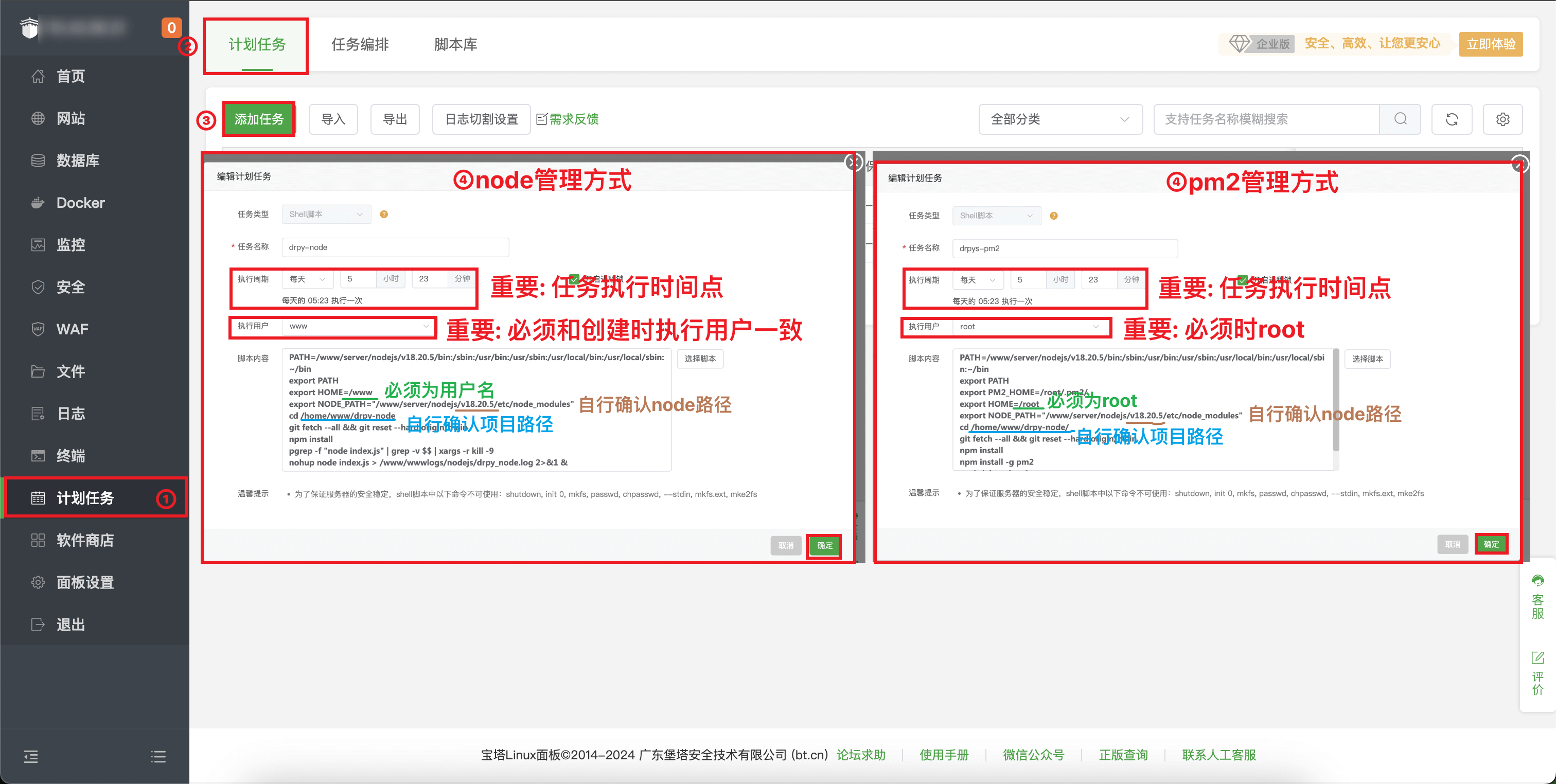
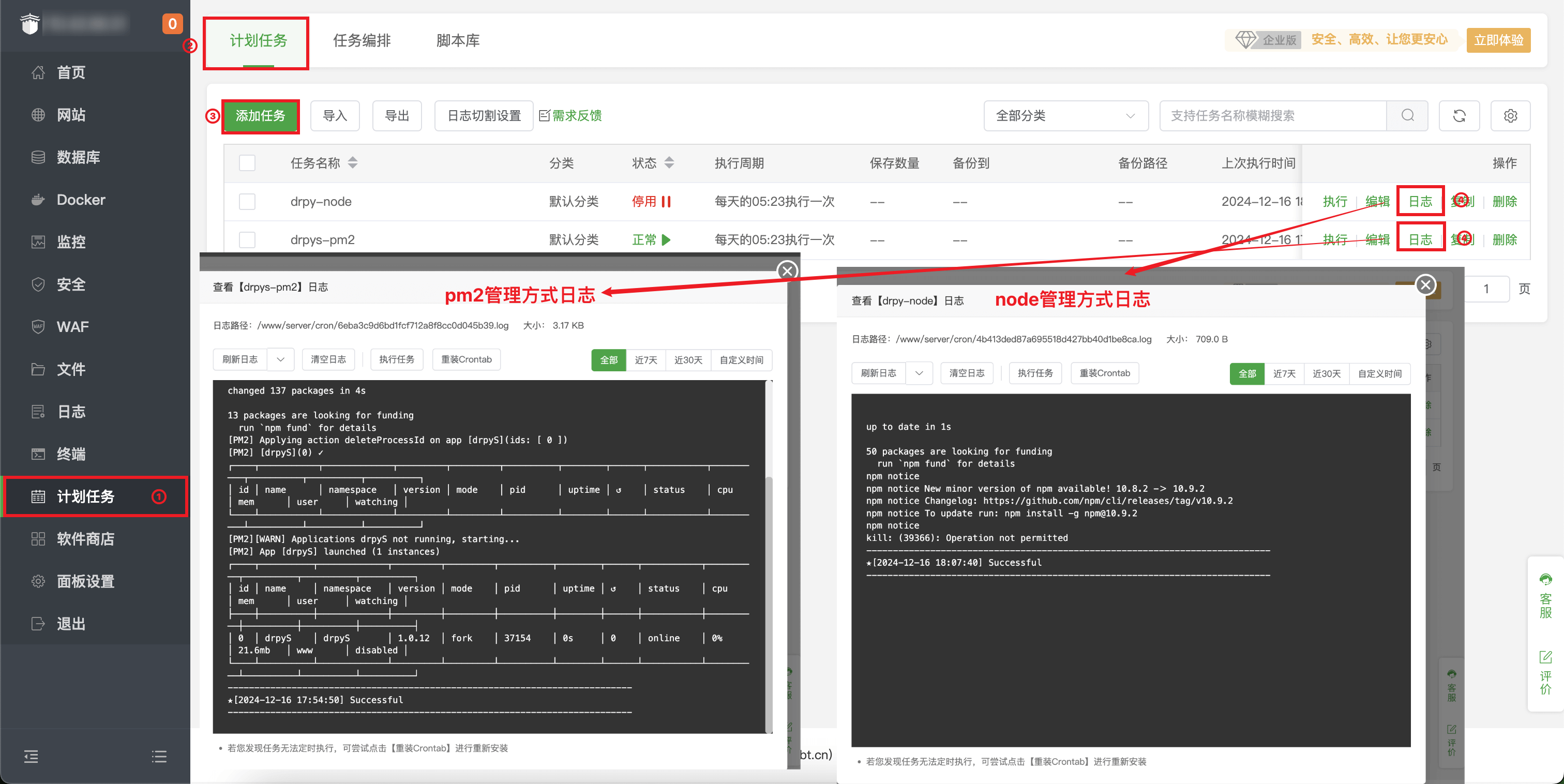
# 1. 安装git
apt-get install git # ubuntu
yum install git # centos
# 2. 克隆
git clone https://github.com/hjdhnx/drpy-node.git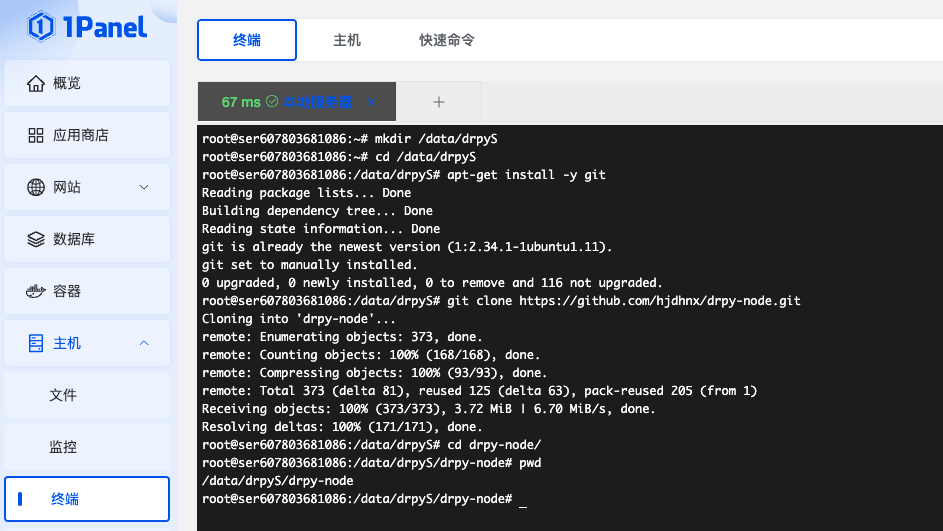
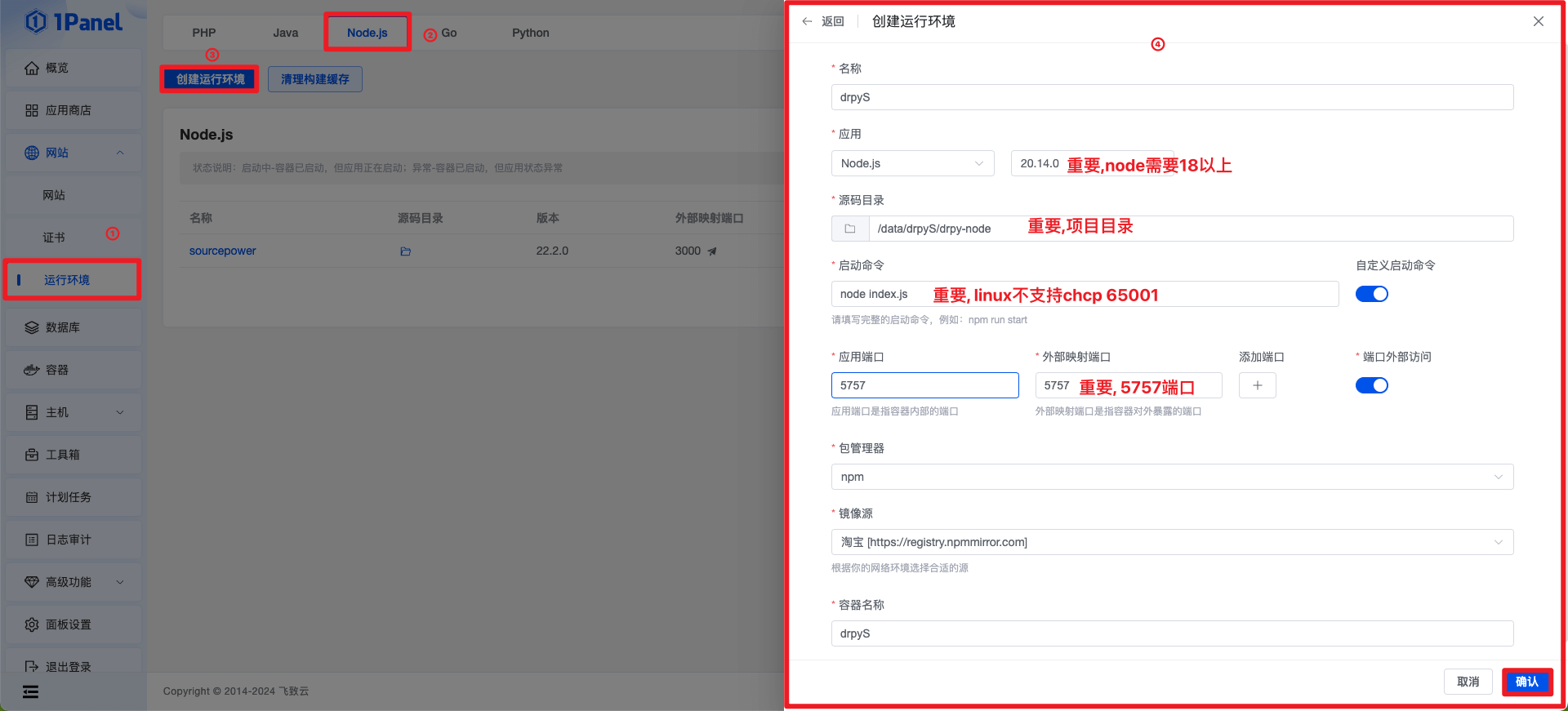
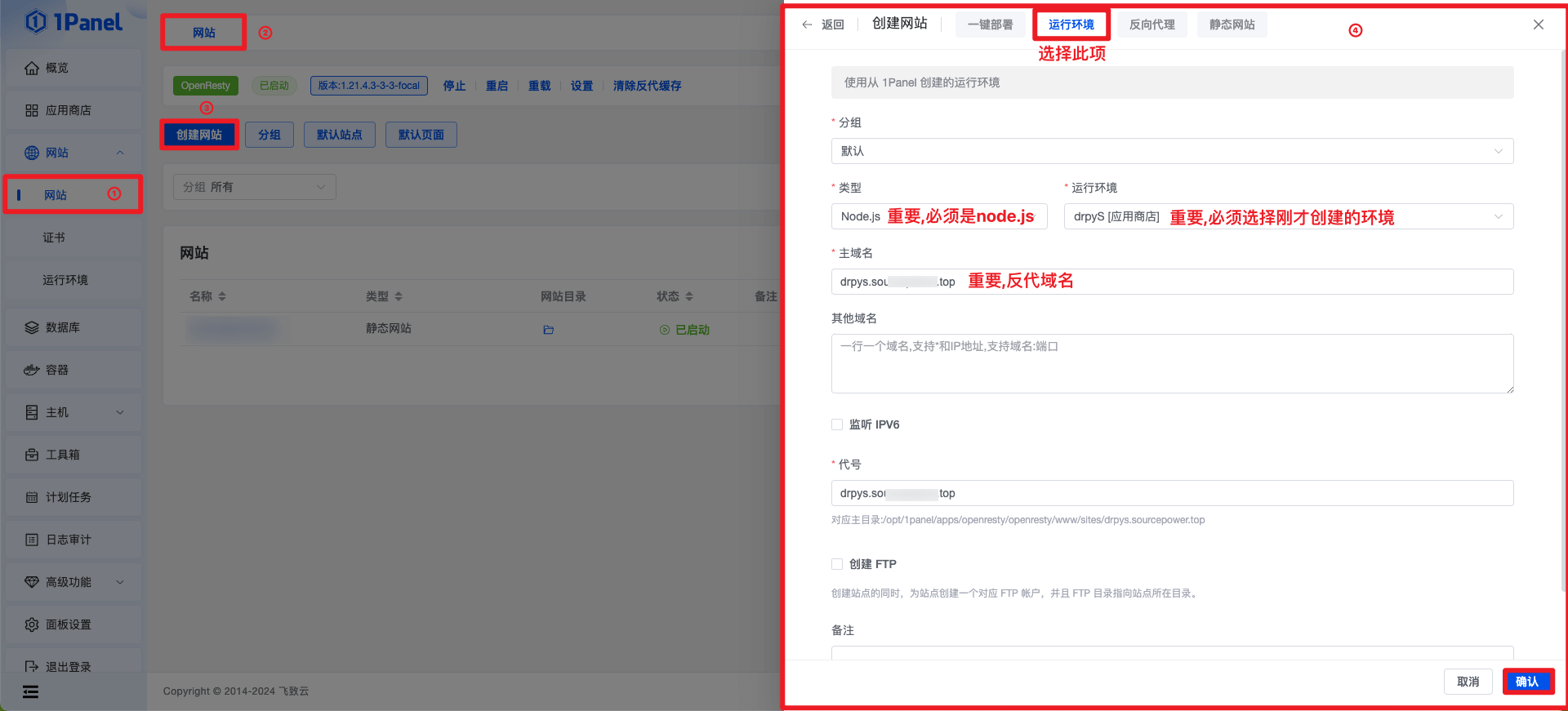
# 1. Go project root directory
cd drpy-node
# 2. Update code
git pull # normal pull
git fetch --all && git reset --hard origin/main # force pull
# 3. Update dependencies
docker exec -it drpyS npm install > /dev/null 2>&1
# 4. restart(could be docker-compose/docker compose)
docker-compose -f /opt/1panel/runtime/node/drpyS/docker-compose.yml restart定时任务命令参考如下
# 1. 进入项目根目录
cd drpy-node
# 2. 更新代码
# git pull # normal pull
git fetch --all && git reset --hard origin/main # force pull
# 3. 更新依赖
docker exec -it drpyS npm install > /dev/null 2>&1
# 4. 重启可以是 docker-compose/docker compose)
docker-compose -f /opt/1panel/runtime/node/drpyS/docker-compose.yml restart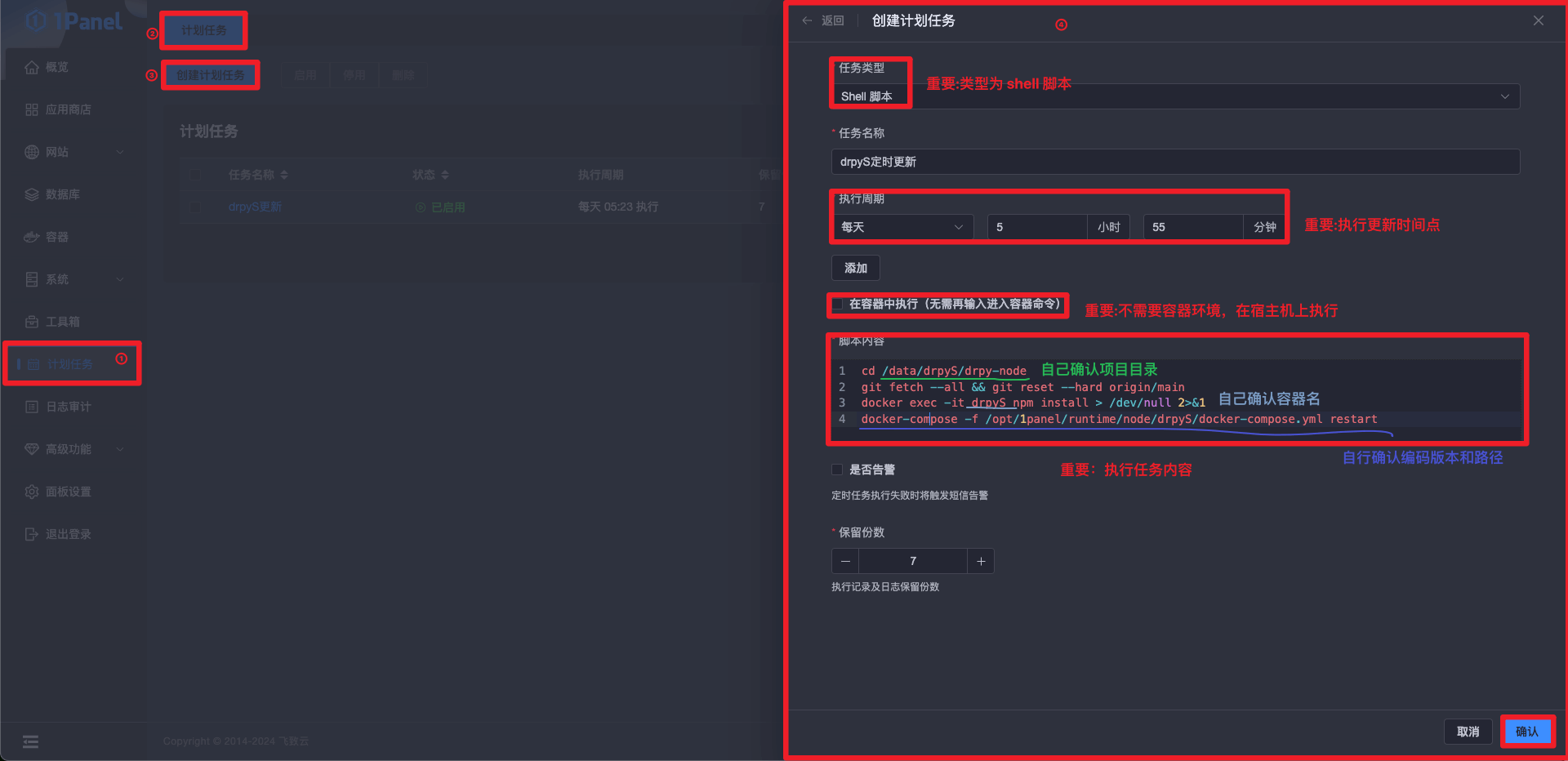
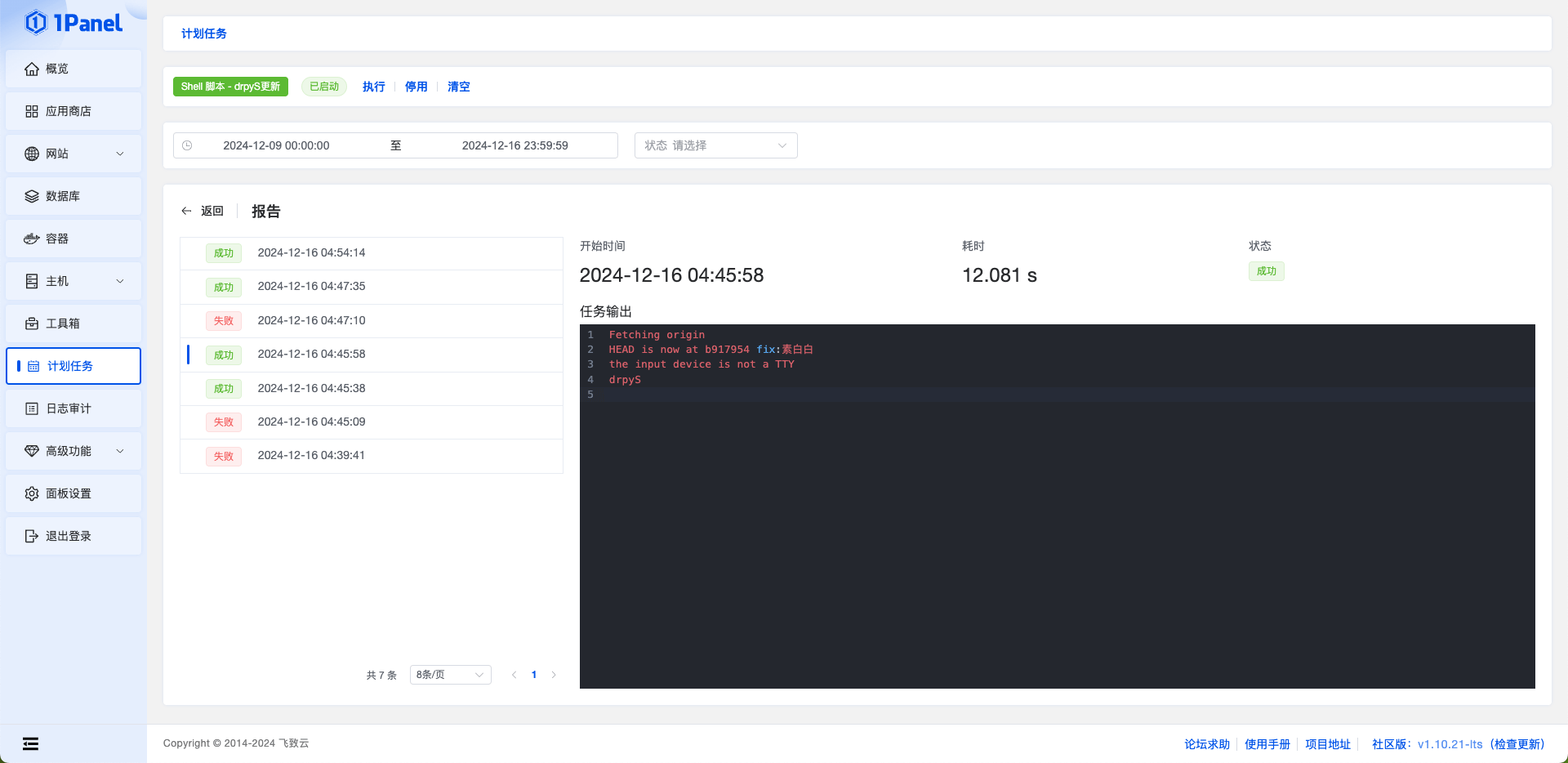
bash <(curl -sSL https://linuxmirrors.cn/docker.sh)docker pull ghcr.io/hjdhnx/drpy-node:latest映射路径不要映射到
/app, 否则会导致环境丢失, 建议映射具体目录
# 不映射路径
docker run -d --name drpyS -p 5757:5757

# 映射路径
docker run -d --name drpyS -p 5757:5757 -v /drpy-node/spider:/app/spider ghcr.io/hjdhnx/drpy-nodedocker stop drpyS
docker rm drpyS重复步骤 2 和 3
耐心等待安装过程完成, 实测1MB带宽2h2g机器全过程需5分钟
注意脚本不是万能的, 使用前先阅读如下限制
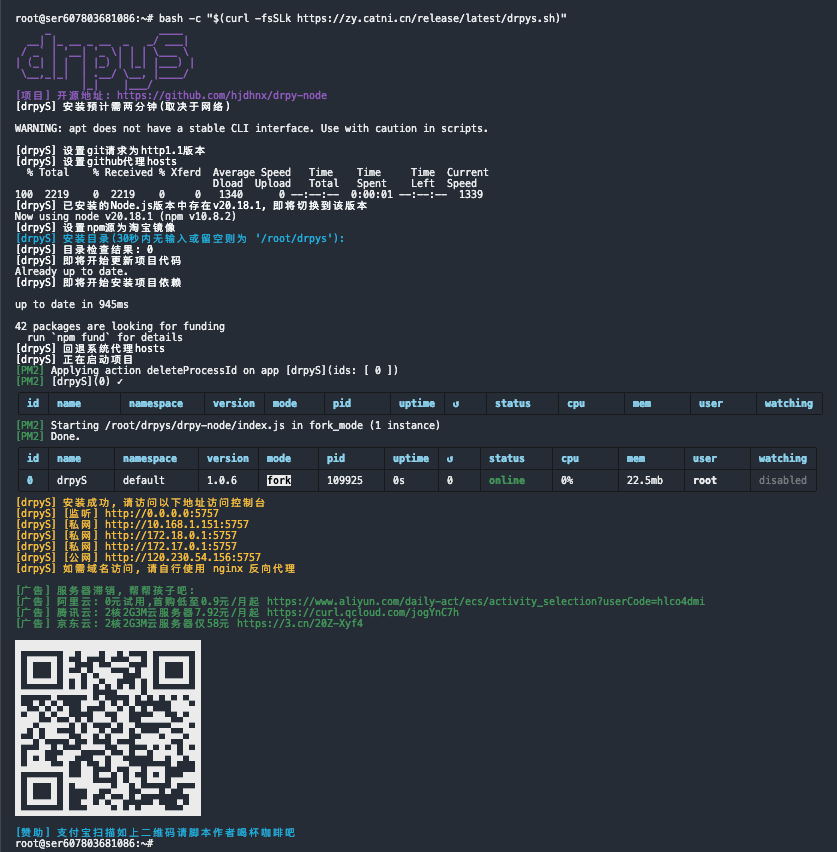
yum apt apt-get dnf pkg包管理器# 安装/更新都是该命令
bash -c "$(curl -fsSLk https://zy.catni.cn/release/latest/drpys.sh)"#!/bin/bash
#Copyroght @ 2024 by zy(Hiram)
#Install Latest Stable drpyS Release
log() {
local RED="\033[0;31m"
local GREEN="\033[0;32m"
local YELLOW="\033[0;33m"
local BLUE="\033[0;34m"
local PURPLE="\033[0;35m"
local NC="\033[0m"
local message="$2"
case "$1" in
primary )
echo -e "${BLUE}${message}${NC}"
;;
secondly )
echo -e "${PURPLE}${message}${NC}"
;;
danger )
echo -e "${RED}${message}${NC}"
;;
success )
echo -e "${GREEN}${message}${NC}"
;;
warn )
echo -e "${YELLOW}${message}${NC}"
;;
* )
echo -e "${NC}${message}${NC}"
;;
esac
}
input_info() {
echo -e -n "\033[0;35m[输入] $*\033[0m"
}
abort() {
log danger "[终止] $*"
log danger "[终止] 查阅安装文档: https://zy.catni.cn/other/drpyS-build.html"
log danger "[终止] 有偿咨询脚本安装问题解答, 联系QQ:29794882"
fallback_github_hosts
exit 1
}
copy_info() {
log success "[赞助] 🔥由雨云提供服务器赞助, 买服务器上雨云, 优惠码(不含逗号): hiram, 注册地址(含最后下划线): https://www.rainyun.com/hiram_"
echo
log primary "[版权] Copyroght @ 2024 zy(源动力) desgin by Hiram, Updated 2025.5.13 15:34:00"
log danger "[版权] 众所周知, Hiram出品必属垃圾, 所以不建议小白(没脑子)食用"
log danger "[版权] 倒卖脚本死全家"
echo
log default "[声明] 项目提供内容和数据均与脚本作者无关, 该脚本只提供安装服务"
log default "[声明] 脚本仅可运行在主流操作系统, 常见有Ubuntu Debine CentOS; 国产或非主流操作系统可能存在异常"
log default "[声明] 使用前自行确认系统源是否可用, 如不可用自行停止运行该脚本, 该脚本不具备修改系统源能力"
log default "[声明] 安装预计需两分钟, 更新预计需半分钟 (取决于网络)"
}
project_info() {
echo
log default " _ ____
__| |_ __ _ __ _ _/ ___|
/ _\` | '__| '_ \\| | | \___ \\
| (_| | | | |_) | |_| |___) |
\__,_|_| | .__/ \__, |____/
|_| |___/"
echo
log default "[项目] 开源地址: https://github.com/hjdhnx/drpy-node"
}
server_recommend() {
echo
log primary "[广告] 服务器滞销, 帮帮孩子吧"
log primary "[广告] 润雨云(推荐): 首月5折,半年7折,消费有返利 https://www.rainyun.com/hiram_"
log primary "[广告] 阿里云: 0元试用,首购低至0.9元/月起 https://www.aliyun.com/daily-act/ecs/activity_selection?userCode=hlco4dmi"
log primary "[广告] 腾讯云: 2核2G3M云服务器7.92元/月起 https://curl.qcloud.com/jogYnC7h"
log primary "[广告] 京东云: 2核2G3M云服务器仅58元 https://3.cn/20Z-Xyf4"
log primary "[广告] 百度云: 2核2G1M云服务器仅59元 https://cloud.baidu.com/campaign/ambassador-product/index.html?ambassadorId=2e198a5e0dac4c5aa9fe44457e2e9cb4#knowledge-bcc"
log primary "[广告] UCLOUD: 2核2G4M云服务器仅71元 https://www.ucloud.cn/site/active/kuaijiesale.html?invitation_code=C1xDC5B2B581E6C"
}
qrcode_pay() {
echo
echo "███████████████████████████████"
echo "█ ▄▄▄▄▄ █▀ █▀▀ █▀ ▀▄▄ █ ▄▄▄▄▄ █"
echo "█ █ █ █▀ ▄ █▄▄▀▀▀▄ ▄█ █ █ █"
echo "█ █▄▄▄█ █▀█ █▄▀██▀ ▄▀█ █▄▄▄█ █"
echo "█▄▄▄▄▄▄▄█▄█▄█ ▀ ▀▄█▄█ █▄▄▄▄▄▄▄█"
echo "█ ▄ ▄▀▄ ▄█▄▀▄ ▄ █ ▀ ▀ ▀▄█▄▀█"
echo "█▀▄▄▀▄▀▄█ ▀ ▄▄▀▀▄█ ▀ ▀▄▄ ▀█▀██"
echo "███▀▄▄█▄▄▀▄▀▄▀▀▀▄▀█▄ ▀▀▀▀▀▄▄█▀█"
echo "█▀ █ ██▄▄ ▀▄█▀▄▀▄▄█ ▀▄▄▄▀█▄▄▀██"
echo "█▀▀ █▄ ▄ ▀ ▄█▄▄ ▀▄▄ ▀▀█▀█▀▄ █▀█"
echo "█ █▀█ ▄██▀ ▄▄▀▄▄▀ ▀▀ ██▀█▄▀██"
echo "█▄████▄▄█ █▄ ▀ █▀▀▄▄ ▄▄▄ ▀ █"
echo "█ ▄▄▄▄▄ █▄▄██ ▀▀ █ █▄ █▄█ ▄▄███"
echo "█ █ █ █ ▀▀██▀▀▄██ ▀▄▄▄ ▄▀ ▄▄█"
echo "█ █▄▄▄█ █ ▄█ ▄▀▄▄▀ ▀ ▄ ▄ ██"
echo "█▄▄▄▄▄▄▄█▄▄▄████▄█▄█▄████▄▄▄███"
echo
log primary "[赞助] 支付宝扫描如上二维码请脚本作者喝杯咖啡吧"
}
command_exists() {
command -v "$1" 2>&1
}
get_country() {
local country
log default "[网络] 正在获取服务器位置信息, 请稍后"
if ! country=$(curl -s -m 30 "https://ipapi.co/country" 2>/dev/null); then
log warn "[网络] 无法获取服务器位置信息"
result=-1
elif [ "$country" = "CN" ]; then
log warn "[网络] 服务器位置可能位于国内"
result=1
else
log warn "[网络] 服务器位置可能位于国外"
result=0
fi
return $result
}
get_local_ips() {
local ips=""
local ipv4
ipv4=$(ip route get 8.8.8.8 2>/dev/null | awk 'NR==1 {print $7}')
if [ ! -z "$ipv4" ]; then
ips="${ips}${ipv4}\n"
fi
local ipv6
ipv6=$(ip route get 2001:4860:4860::8888 2>/dev/null | awk 'NR==1 {print $7}')
if [ ! -z "$ipv6" ]; then
ips="${ips}[$ipv6]\n"
fi
echo -e "$ips"
}
get_public_ips() {
local ips=""
local ipv4
ipv4=$(curl -s4 https://ifconfig.co || curl -s4 https://api64.ipify.org)
if [[ -n "$ipv4" ]]; then
ips="${ips}${ipv4}\n"
fi
local ipv6
ipv6=$(curl -s6 https://ifconfig.co || curl -s6 https://api64.ipify.org)
if [[ -n "$ipv6" ]]; then
ips="${ips}[$ipv6]\n"
fi
echo -e "$ips"
}
build_url() {
local protocol="${1:-http}"
local ip="${2}"
local port="${3:-}"
local path="${4:-}"
# 确保 protocol 以 :// 结尾
if [[ ! "$protocol" =~ ://$ ]]; then
protocol="$protocol://"
fi
# 构建 URL
local url="$protocol$ip"
if [[ -n "$port" ]]; then
url="$url:$port"
fi
if [[ -n "$path" ]]; then
# 确保 path 以 / 开头
if [[ ! "$path" =~ ^/ ]]; then
path="/$path"
fi
url="$url$path"
fi
echo "$url"
}
get_access_info() {
local local_ips=$(get_local_ips)
local public_ips=$(get_public_ips)
local protocol="${1:-http}"
local port="${2:-}"
local path="${3:-}"
log warn "[信息] 请使用您的浏览器访问面板:"
if [[ -n "$local_ips" ]]; then
for ip in $local_ips; do
local url=$(build_url "$protocol" "$ip" "$port" "$path")
log warn "[信息] 内部地址: $url"
done
fi
if [[ -n "$public_ips" ]]; then
for ip in $public_ips; do
local url=$(build_url "$protocol" "$ip" "$port" "$path")
log warn "[信息] 外部地址: $url"
done
fi
log warn "[信息] 如果您需使用域名访问, 请自行反向代理"
log warn "[信息] 如果您的服务器开启了防火墙(iptables ufw selinux firewalld), 请自行放行或关闭防火墙"
log warn "[信息] 如果您使用的是云服务器, 请在安全组中打开端口 $port"
}
preferred_github_hosts() {
declare -a urls=(
"https://hosts.gitcdn.top/hosts.txt"
"https://raw.hellogithub.com/hosts"
)
if [ ! -z `command_exists sed` ]; then
sed -i "/# preferred-github-hosts begin/Q" /etc/hosts
log default "[GitHub] 预处理hosts"
fi
for url in "${urls[@]}"; do
log default "[GitHub] 尝试从 $url 获取优选hosts信息"
if curl -s -o /dev/null -m 30 "$url"; then
echo "# preferred-github-hosts begin" >> /etc/hosts
curl "$url" >> /etc/hosts
echo "# preferred-github-hosts end" >> /etc/hosts
log success "[GitHub] 获取优选hosts成功"
return
else
log warn "[GitHub] 优选超时, 尝试下一个"
fi
done
log warn "[GitHub] 所有节点优选均超时, 将使用原生请求"
}
fallback_github_hosts() {
if [ -z `command_exists sed` ]; then
log warn "[GitHub] 回退hosts失败, 操作系统不支持sed, 请手动回退"
else
sed -i "/# preferred-github-hosts begin/Q" /etc/hosts
log success "[GitHub] 回退hosts成功"
fi
}
check_stdin() {
if [ ! -t 0 ]; then
abort "STDIN 不是标准的输入设备"
fi
}
check_root() {
if [[ $EUID -ne 0 ]]; then
abort "请以 root 权限运行"
fi
}
check_bash() {
if [ -z "$BASH" ]; then
abort "请用 bash 执行本脚本"
fi
}
check_arch() {
local architecture
local arch=`uname -a`
if [[ $arch =~ "x86_64" ]];then
architecture="amd64"
elif [[ $arch =~ "arm64" ]] || [[ $arch =~ "aarch64" ]];then
architecture="arm64"
elif [[ $arch =~ "armv7l" ]];then
architecture="armv7"
elif [[ $arch =~ "ppc64le" ]];then
architecture="ppc64le"
elif [[ $arch =~ "s390x" ]];then
architecture="s390x"
else
abort "暂不支持$arch系统架构"
fi
}
check_pkg_manage_tool() {
local pkg_manage_tool
if [ ! -z `command_exists yum` ]; then
# Fedora CentOS
pkg_manage_tool=yum
elif [ ! -z `command_exists apt-get` ]; then
# Debian Ubuntu
pkg_manage_tool=apt-get
elif [ ! -z `command_exists apt` ]; then
pkg_manage_tool=apt
elif [ ! -z `command_exists dnf` ]; then
# RedHat AnolisOS
pkg_manage_tool=dnf
elif [ ! -z `command_exists zypper` ]; then
# openSUSE
pkg_manage_tool=zypper
elif [ ! -z `command_exists pkg` ]; then
# Solaris Termux
pkg_manage_tool=pkg
else
abort "仅支持yum apt apt-get dnf pkg zypper包管理工具"
fi
echo $pkg_manage_tool
}
check_depends() {
check_bash
# check_stdin
check_root
check_arch
}
check_install_git() {
if [ -z `command_exists git` ]; then
log default "[pkg] 即将开始安装git"
pkg_git_name="git"
if [ "$pkg_manage_tool" == dnf ]; then
pkg_git_name="git-all"
fi
if ! $pkg_manage_tool install -y $pkg_git_name; then
abort "安装 $pkg_git_name 失败"
fi
fi
local httpVersion=$(git config --global --get http.version)
if [ "$httpVersion" != "HTTP/1.1" ]; then
log default "[git] 设置全局参数http.version: 1.1"
git config --global http.version HTTP/1.1
fi
local httpSslVerify=$(git config --global --get http.sslVerify)
if [ "$httpSslVerify" != "false" ]; then
log default "[git] 设置全局参数http.sslVerify: false"
git config --global http.sslVerify false
fi
local safeDirectory=$(git config --global --get safe.directory)
if [ "$safeDirectory" != "*" ]; then
log default "[git] 设置全局参数safe.directory: *"
git config --global --add safe.directory "*"
fi
}
check_install_python3() {
if [ -z `command_exists python3` ]; then
log default "[pkg] 即将开始安装python"
pkg_python3_name="python3"
if ! $pkg_manage_tool install -y $pkg_python3_name; then
abort "安装 $pkg_git_name 失败"
fi
pkg_pip3_name="python3-pip"
if ! $pkg_manage_tool install -y $pkg_pip3_name; then
abort "安装 $pkg_git_name 失败"
fi
fi
}
check_install_nvm() {
# 默认参数
local nvm_install_dir
if [ -n "$NVM_DIR" ]; then
nvm_install_dir=$(printf %s "${NVM_DIR}")
else
if [ -z "${XDG_CONFIG_HOME-}" ]; then
nvm_install_dir=$(printf %s "${HOME}/.nvm")
else
nvm_install_dir=$(printf %s "${XDG_CONFIG_HOME}/nvm")
fi
fi
# 检查nvm
if [ ! -d "$nvm_install_dir/.git" ]; then
log default "[pkg] 即将开始安装nvm"
if ! curl -o- https://raw.githubusercontent.com/nvm-sh/nvm/v0.40.0/install.sh | bash; then
abort "安装 nvm 失败"
fi
fi
# 设置nvm环境变量
export NVM_DIR="$nvm_install_dir"
if [ -s "$NVM_DIR/nvm.sh" ]; then
. "$NVM_DIR/nvm.sh"
fi
}
check_install_npm_env() {
declare -a modules=(
"yarn"
"pm2"
"node-gyp"
"@mapbox/node-pre-gyp"
)
for module in "${modules[@]}"; do
if [ -z `command_exists $module` ]; then
log default "[node] 即将开始安装 $module"
if ! npm install "$module" -g; then
abort "[node] 安装 $module 失败"
fi
fi
done
}
check_install_node_env() {
check_install_nvm
# 获取所有已安装的Node.js版本
installed_versions=$(nvm list)
# 初始化变量
version_to_use=""
# 检查是否存在版本20或更高
while IFS= read -r line; do
if [[ "$line" =~ v20 ]]; then
version_to_use=$(echo "$line" | grep -o 'v[0-9]*\.[0-9]*\.[0-9]*')
break
fi
done <<< "$installed_versions"
# 使用或安装Node.js版本
if [ -n "$version_to_use" ]; then
log default "[node] 存在$version_to_use, 即将切换到该版本"
nvm use $version_to_use
else
log default "[node] 不存在20及以上版本, 即将安装20版本"
if ! nvm install 20; then
abort "安装 node 20 失败"
fi
nvm use 20
fi
# 设置npm代理
local curr_npm_registry=$(npm config get registry --global)
if [ $country_code -ne 0 ]; then
if [ "$curr_npm_registry" != "https://registry.npmmirror.com" ]; then
log default "[node] 设置npm源为淘宝镜像"
npm config set registry https://registry.npmmirror.com --global
fi
else
if [ "$curr_npm_registry" != "https://registry.npmjs.org/" ] && [ ! -z "$curr_npm_registry" ]; then
log default "[node] 设置npm源回退原生"
npm config delete registry --global
fi
fi
local curr_yarn_registry=$(yarn config get registry --global)
if [ $country_code -ne 0 ]; then
if [ "$curr_yarn_registry" != "https://registry.npmmirror.com" ]; then
log default "[node] 设置yarn源为淘宝镜像"
yarn config set registry "https://registry.npmmirror.com" --global
fi
else
if [ "$curr_yarn_registry" != "https://registry.yarnpkg.com" ] && [ ! -z "$curr_yarn_registry" ]; then
log default "[node] 设置yarn源回退原生"
yarn config delete registry --global
fi
fi
# 安装全局模块
check_install_npm_env
}
project_git_origin() {
local base_path="$1"
local git_repo="$2"
local git_project="$3"
# 检查目录是否非空且存在.git目录
if [[ -d "$base_path/$git_project/.git" ]]; then
local git_config_path="$base_path/$git_project/.git/config"
# 检查.git/config文件是否存在
if [[ -f "$git_config_path" ]]; then
# 提取origin的url
local origin_url=$(awk -F ' = ' '/\[remote "origin"\]/ {getline; print $2}' "$git_config_path")
# 比较url是否匹配
if [[ "$origin_url" == "$git_repo" ]]; then
echo 0
return
fi
fi
fi
echo 1
}
project_install_update() {
local base_path="$1"
local git_repo="$2"
local repo_name="$3"
local result=$(project_git_origin "$base_path" "$git_repo" "$repo_name")
if [ $result -eq 0 ]; then
log default "[项目] 仓库检查结果: 对应"
log default "[项目] 即将开始备份数据"
local back_path="$base_path/bak-drpys"
local timestamp1=`date +%s`
local timestamp2=`date +%Y%m%d`
local backup_dir="$back_path/$timestamp2-$timestamp1"
if [ ! -d "$back_path" ]; then
mkdir -p "$back_path"
fi
mkdir -p "$backup_dir"
if cp -r "$base_path/$repo_name/"* "$backup_dir"; then
log default "[项目] 数据备份成功"
else
log default "[项目] 数据备份失败"
fi
cd $repo_name
log default "[项目] 即将开始更新项目代码"
git pull
# 检查 git pull 的退出状态
if [ $? -ne 0 ]; then
log default "[项目] 正常更新失败, 即将开始强制覆盖代码"
# 强制重置本地分支到远程分支的状态
if ! git fetch --all; then
abort "[项目] 重置状态失败"
fi
# 请根据你的实际分支名称调整 origin/main
if ! git reset --hard origin/main; then
abort "[项目] 强制重置失败"
fi
fi
else
log default "[项目] 仓库检查结果: 不对应或无效"
rm -rf "$base_path/$repo_name"
log default "[项目] 即将开始克隆项目代码"
if ! git clone $git_repo; then
abort "[项目] 克隆失败"
fi
cd $repo_name
fi
}
project_env() {
log default "[环境变量] 即将开始处理环境变量"
if [ ! -f ".env" ]; then
cp .env.development .env
fi
if [ -z `command_exists sed` ]; then
log warn "[环境变量] 操作系统不支持sed, 将赋值默认参数, 如需修改请脚本执行完成后手动修改项目目录下.env文件参数"
if [ ! -f ".env_init_success" ]; then
touch ".env_init_success"
fi
return
fi
declare -A main_desc=(
["COOKIE_AUTH_CODE"]="cookies入库授权密码"
["API_AUTH_NAME"]="主页授权用户名"
["API_AUTH_CODE"]="主页授权密码"
["API_PWD"]="接口授权密码"
)
declare -A main_default=(
["COOKIE_AUTH_CODE"]="drpys"
["API_AUTH_NAME"]="admin"
["API_AUTH_CODE"]="drpys"
["API_PWD"]="drpys"
)
for key in "${!main_desc[@]}"; do
if [ ! -f ".env_init_success" ]; then
input_info "设置${main_desc[$key]}(30秒无输入或留空则为${main_default[$key]}):"
read -t 30 input_env
if [ -z "$input_env" ]; then
echo
fi
input=${input_env:-${main_default[$key]}}
else
if ! grep -q "^$key" .env; then
input_info "设置${main_desc[$key]}(30秒无输入或留空则为${main_default[$key]}):"
read -t 30 input_env
if [ -z "$input_env" ]; then
echo
fi
input=${input_env:-${main_default[$key]}}
fi
fi
if [ ! -z "$input" ]; then
if grep -q "^$key" .env; then
sed -i "s/^$key = .*/$key = $input/g" .env
else
echo "$key = $input" >> .env
fi
fi
done
if [ ! -f ".env_init_success" ]; then
touch ".env_init_success"
fi
}
project_env_show() {
declare -A main_desc=(
["COOKIE_AUTH_CODE"]="cookies入库授权密码"
["API_AUTH_NAME"]="主页授权用户名"
["API_AUTH_CODE"]="主页授权密码"
["API_PWD"]="接口授权密码"
)
log warn "[信息] 授权密码, 请自行牢记或保存(关闭ssh或清屏后不再显示):"
for key in "${!main_desc[@]}"; do
result=$(grep "^$key" .env)
if [ -n "$result" ]; then
# value=$(echo "$result" | cut -d'=' -f2 | tr -d "'[:space:]")
value=$(echo "$result" | cut -d'=' -f2 | tr -d "'")
log warn "[信息] ${main_desc[$key]}: $value"
fi
done
}
project_work() {
local git_repo="https://github.com/hjdhnx/drpy-node.git"
local repo_name=$(echo "$git_repo" | awk -F'/' '{print $NF}' | awk '{gsub(/.git$/, ""); print}')
local default_path=$(pwd)
local run_path=$(pm2 show drpyS | awk '/│ exec cwd / {print $5}')
if [ -n "$run_path" ]; then
log default "[项目] 检测到已存在的项目"
default_path="$(dirname "$run_path")"
else
input_info "设置安装目录(30秒无输入或留空则为$default_path):"
read -t 30 input_path
if [ -z "$input_path" ]; then
echo
fi
# 如果用户没有输入路径,则使用默认路径
[ -z "$input_path" ] && input_path="$default_path"
# 检查目录是否存在,如果不存在则创建
if [ ! -d "$input_path" ]; then
log default "[项目] 目录不存在, 即将创建"
mkdir -p "$input_path"
fi
default_path="$input_path"
fi
log default "[项目] 基础路径$default_path"
cd "${default_path}"
# 更新或安装 code
project_install_update $default_path $git_repo $repo_name
# 安装依赖
log default "[项目] 即将开始安装(编译)项目依赖"
if [ -f "yarn.lock" ]; then
log default "[项目] 存在yarn.lock文件, 即将删除"
rm -rf yarn.lock
fi
if [ -f "package-lock.json" ]; then
log default "[项目] 存在package-lock文件, 即将删除"
rm -rf package-lock.json
fi
yarn
#环境变量
project_env
log default "[项目] 正在启动服务"
if [ -z `command_exists $(pm2 pid drpyS)` ]; then
pm2 delete drpyS
fi
pm2 start index.js --name drpyS
log success "[项目] 服务已成功启动"
}
main() {
shopt -s dotglob
copy_info
project_info
check_depends
pkg_manage_tool=$(check_pkg_manage_tool)
log default "[系统] 即将更新系统依赖, 请耐心等待, 可能较久哦"
$pkg_manage_tool update -y
check_install_git
# check_install_python3
get_country
country_code=$?
if [ $country_code -ne 0 ]; then
preferred_github_hosts
fi
check_install_nvm
check_install_node_env
project_work
if [ $country_code -ne 0 ]; then
fallback_github_hosts
fi
log warn "[信息] =================感谢您的耐心等待, 安装已完成=================="
echo
get_access_info "http" "5757"
echo
project_env_show
echo
log warn "[信息] ==============================================================="
server_recommend
qrcode_pay
shopt -u dotglob
}
trap "onexit" INT
onexit() {
echo
abort "用户手动结束安装"
}
main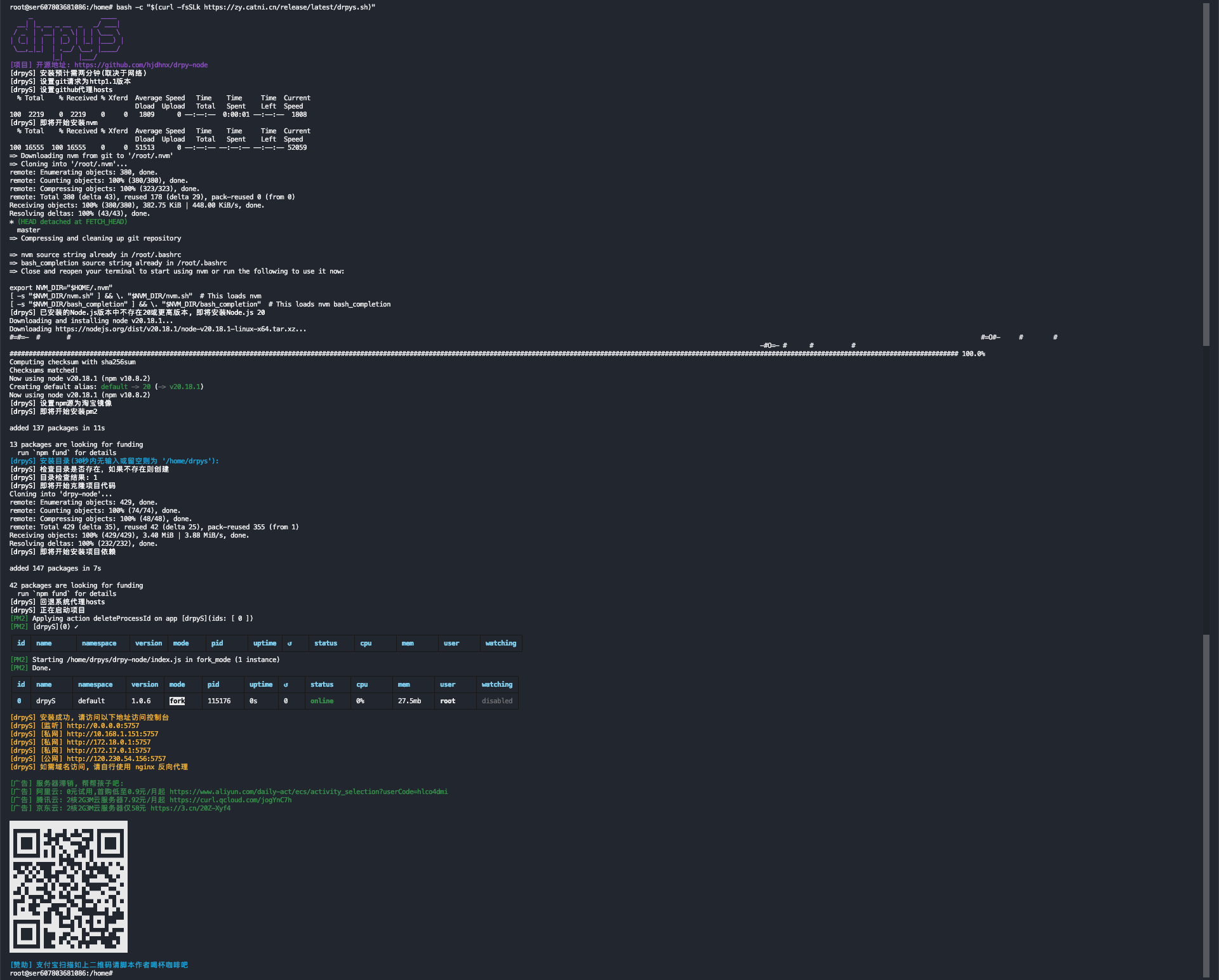
配置前自行确认环境是否有crontab工具
# 如下执行时复制全部运行
if  ! crontab -l 2>/dev/null | grep -Fq "https://zy.catni.cn/release/latest/drpys.sh"; then
	cron_command="23 5 * * * bash -c \"\$(curl -fsSLk https://zy.catni.cn/release/latest/drpys.sh)\""
    (crontab -l 2>/dev/null ; echo "$cron_command") | crontab -
fi

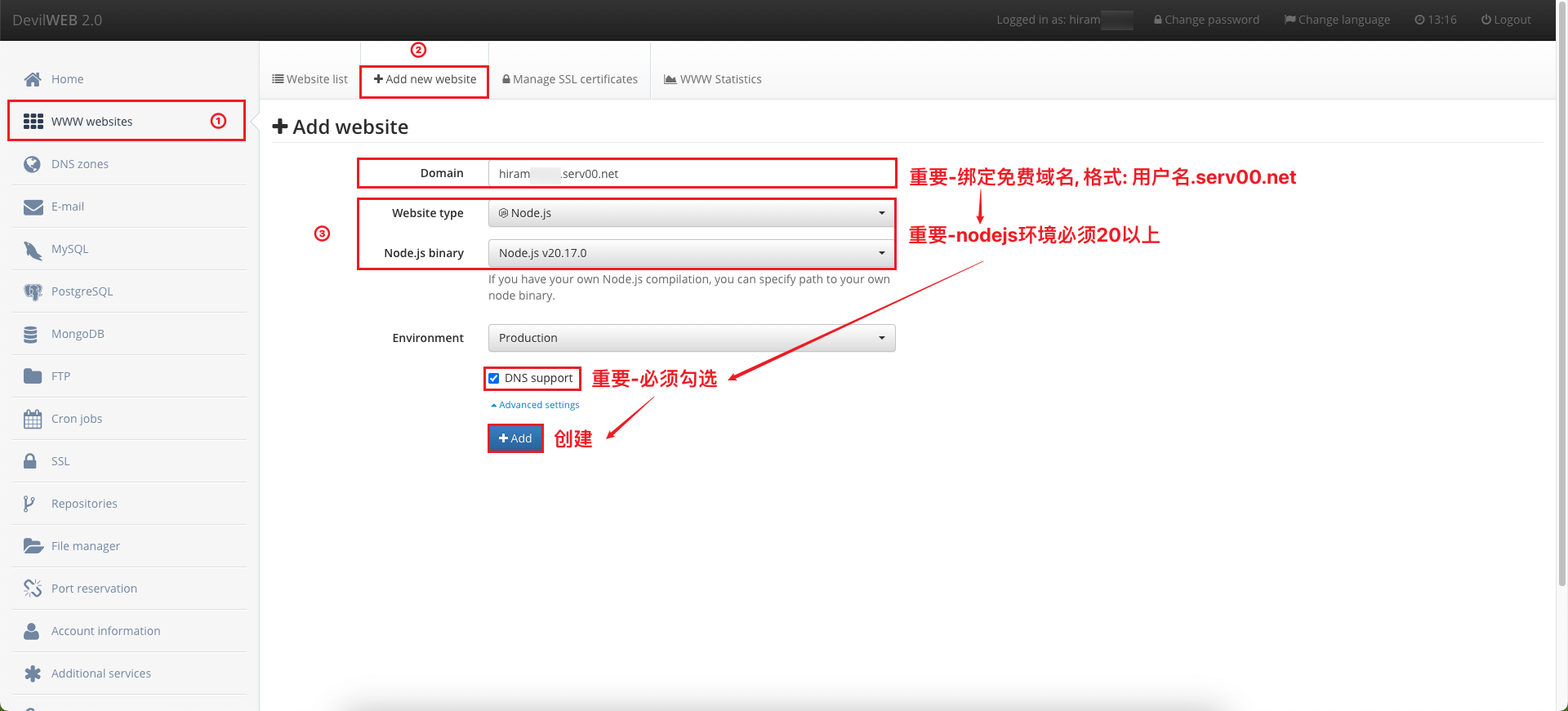
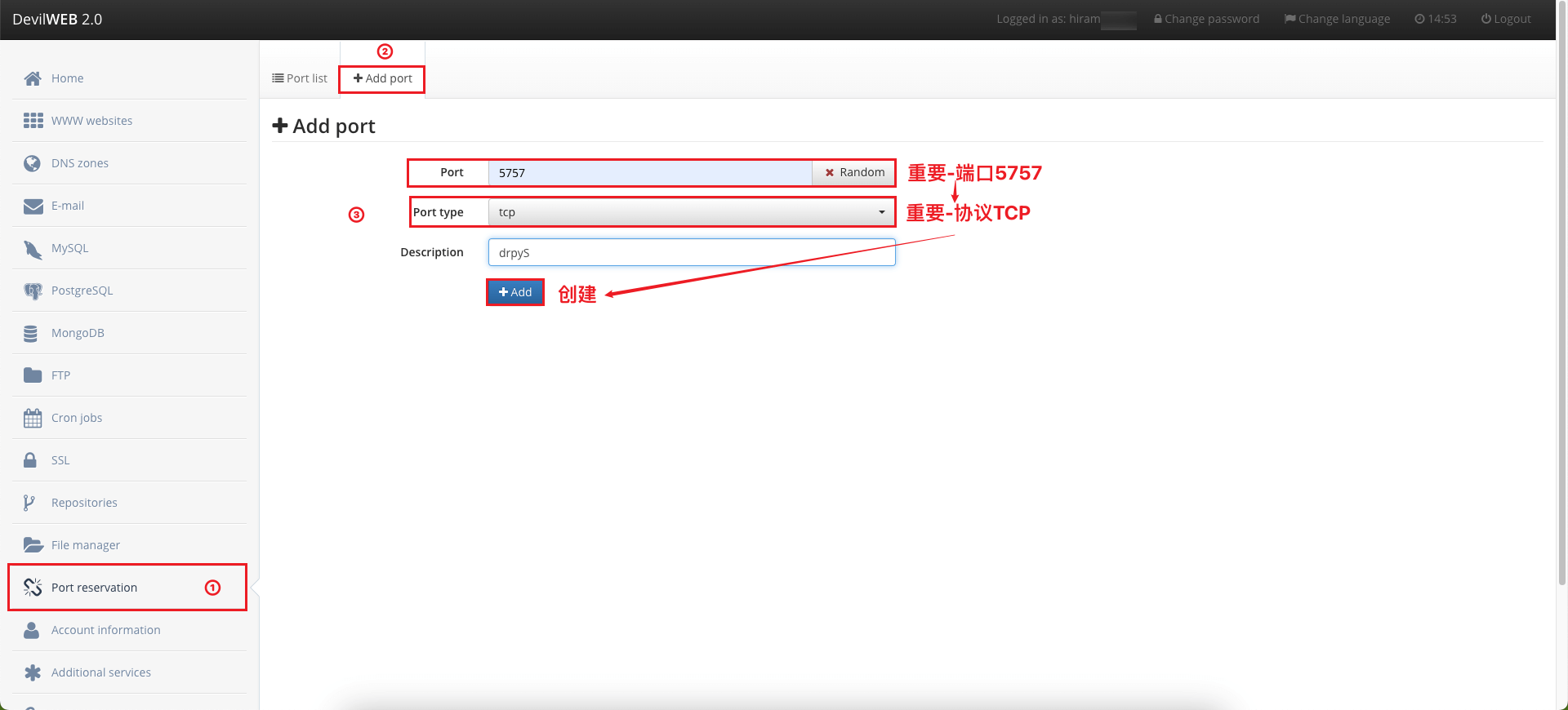
serv00会为每个用户创建一个环境, 所以开放端口可能冲突, 冲突则自己随便起一个(0-65535), 注意如果冲突注意如下每一个步骤的注意点
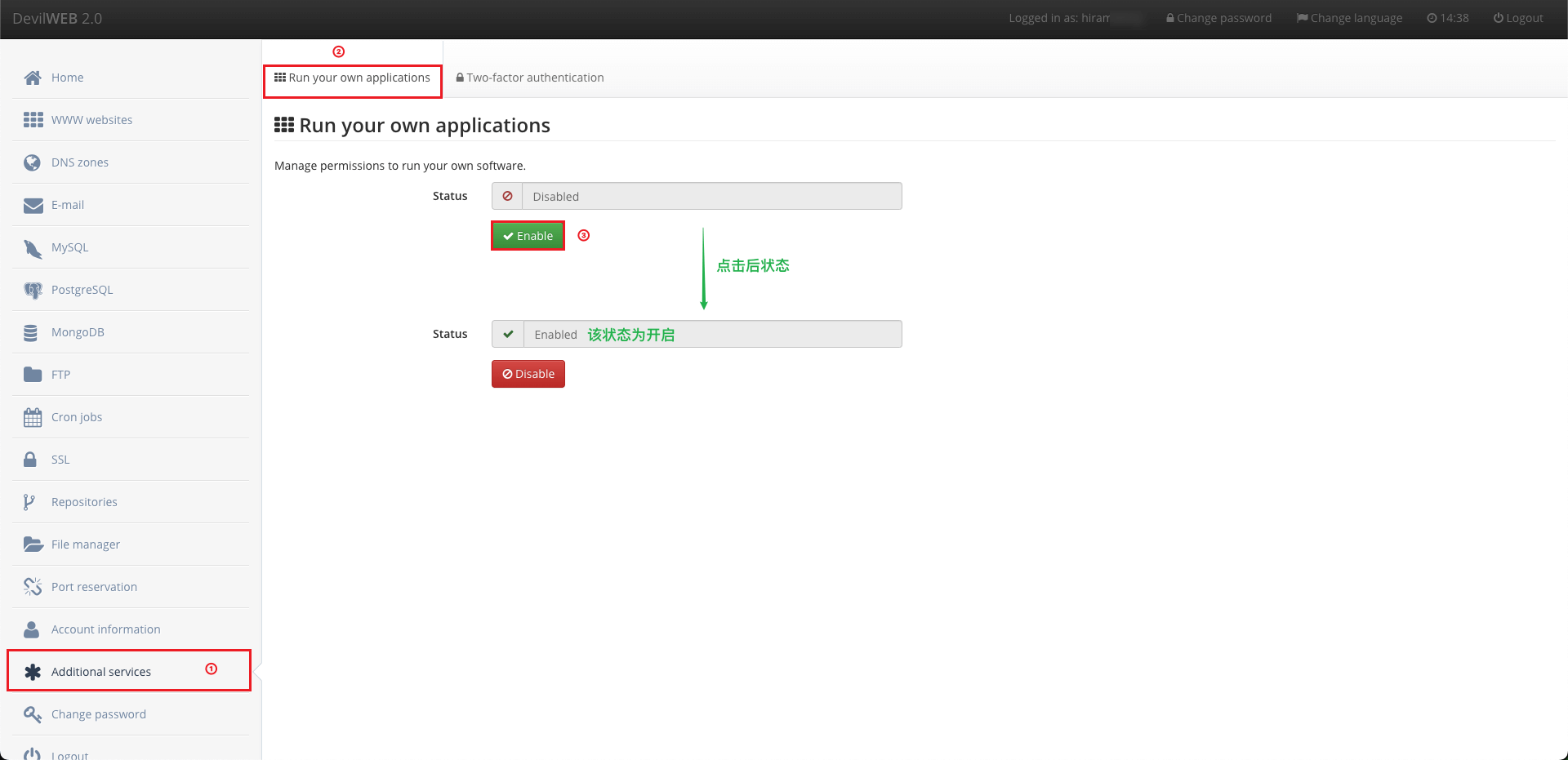
使用pm2时如不开启权限, 则提示无权限
如果需要 pm2 请不要全局安装, serv00环境限制
# 1. 克隆项目
git clone https://github.com/hjdhnx/drpy-node.git
# 2. 进入项目根目录
cd drpy-node
# 3. 安装所需依赖
npm install
# 4. 安装pm2依赖([可选]如果需要用pm2管理项目)
npm install pm2@latest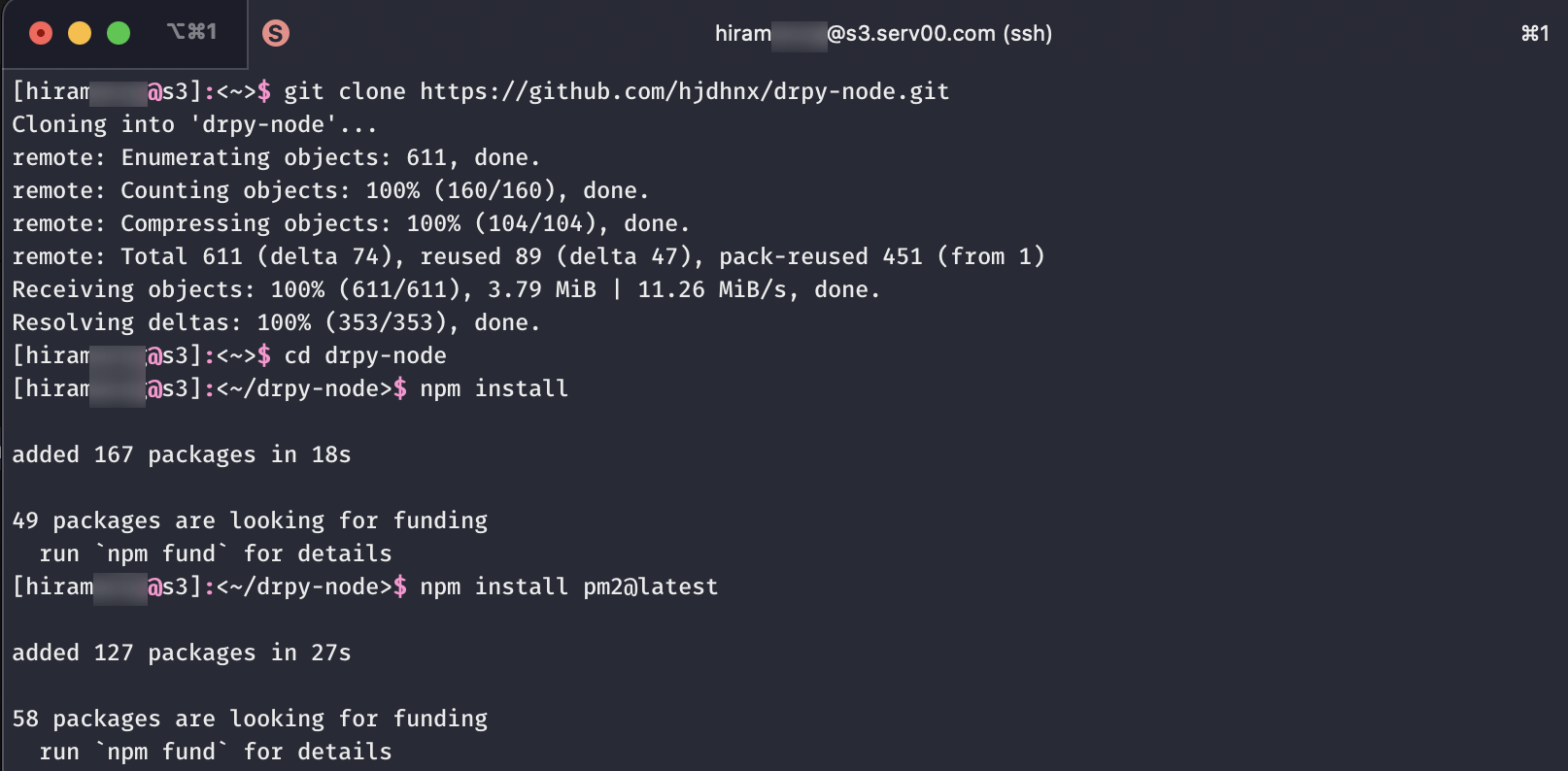
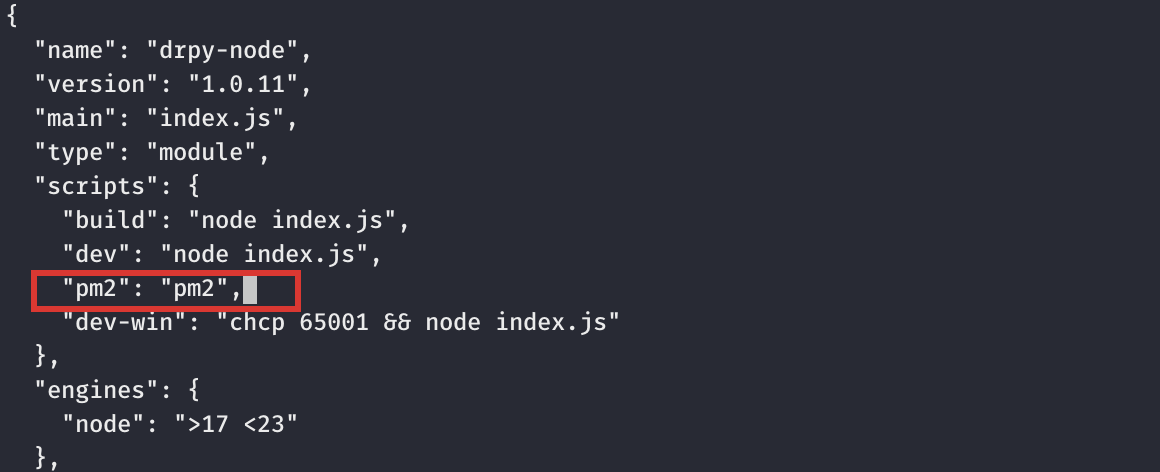
package.json文件([可选]如果需要用pm2管理项目) ...
"scripts": {
...
"pm2": "pm2" // 增加或修改该行,如pm2占用,则自定义或修改原来,如下涉及pm2都需要注意
}
...
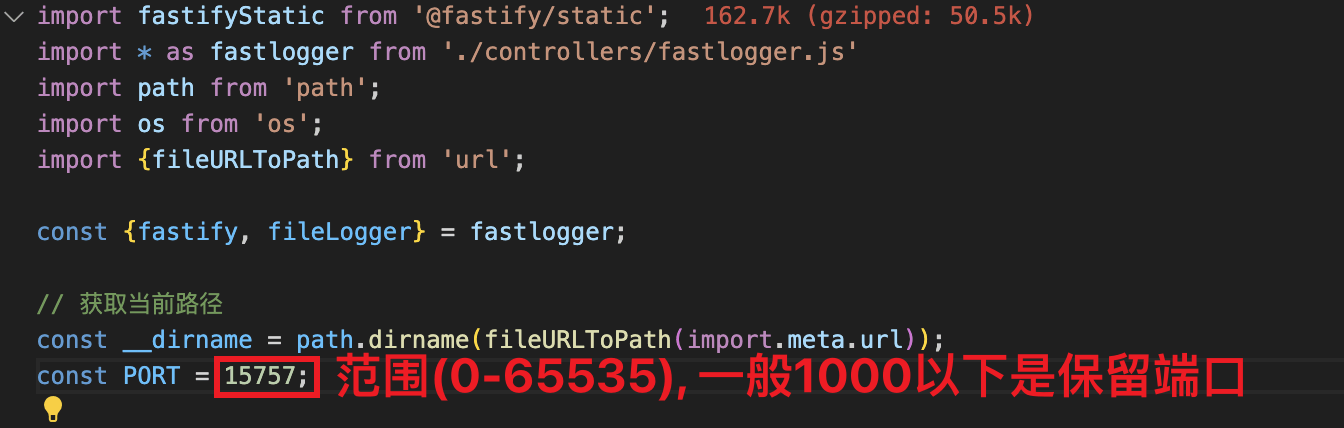
index.js文件([可选]如果端口冲突) ...
const __dirname = path.dirname(fileURLToPath(import.meta.url));
const PORT = 5757; // 修改此处端口数字(范围0-65535)
...
# 1. 进入项目根目录
cd drpy-node

# 2. 启动项目(根据自己需要选择启动方式)

# node管理
# 启动:
node index.js # 前台启动
nohup node index.js & # 后台启动
# 停止:
ctrl+c # 前台启动模式
pkill -9 -f "node index.js"; # 后台启动模式

# pm2管理
# 启动:
npm run pm2 -- start index.js --name drpyS
# 任务操作:
npm run pm2 -- list # 查看任务列表
npm run pm2 -- logs drpyS # 查看日志
npm run pm2 -- show drpyS # 查看任务详情
npm run pm2 -- stop drpyS # 停止任务
npm run pm2 -- start drpyS # 启动任务
npm run pm2 -- restart drpyS # 重启任务
npm run pm2 -- delete drpyS # 删除任务
node普通管理
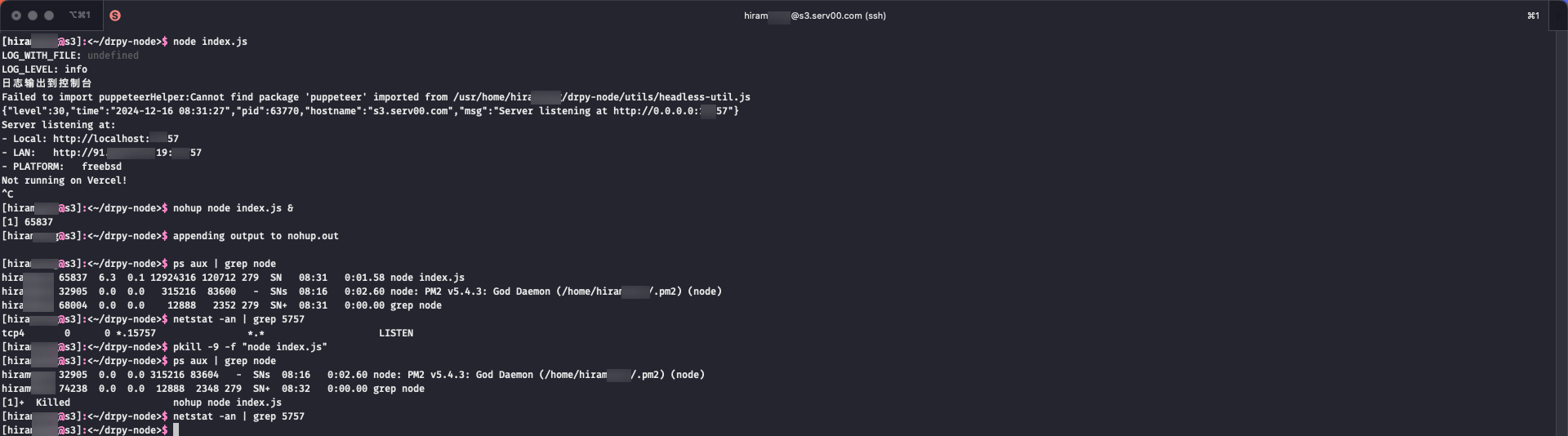
pm2管理
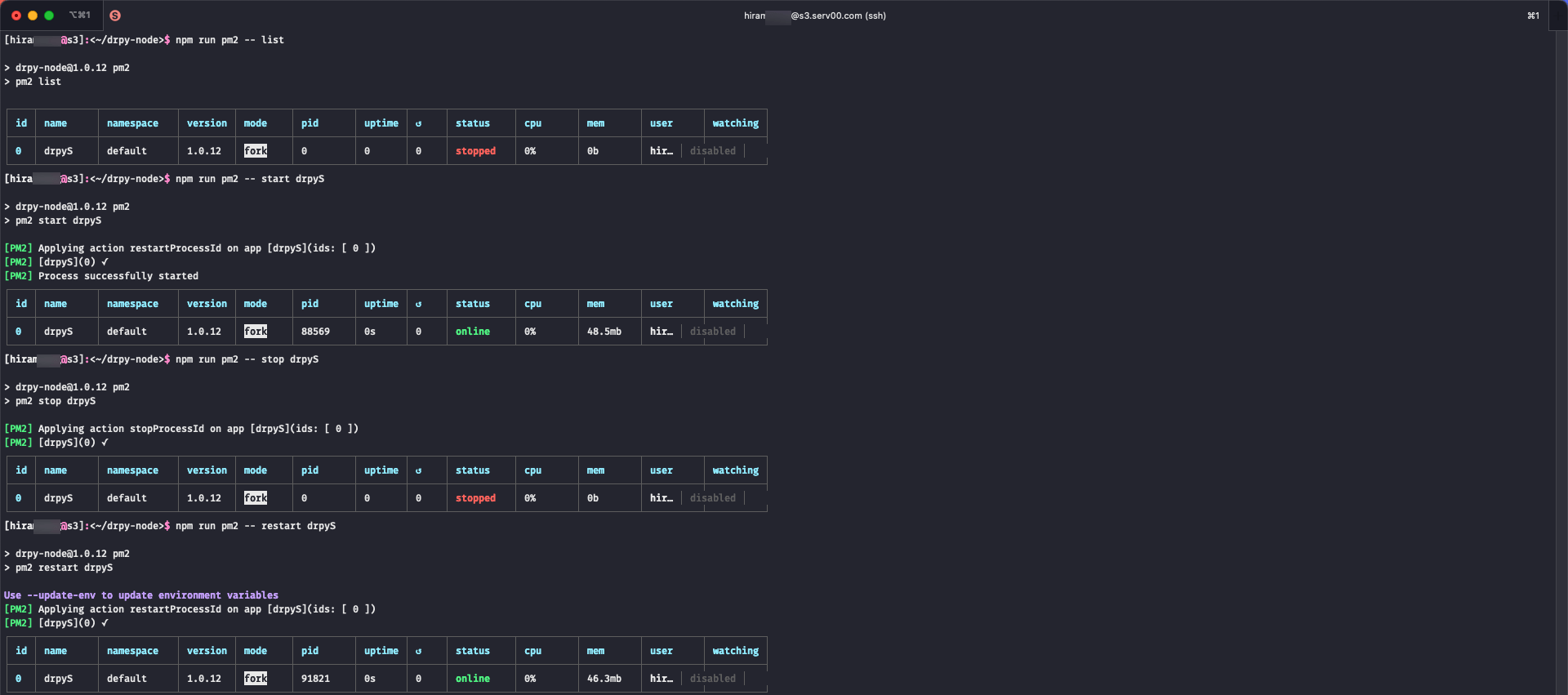
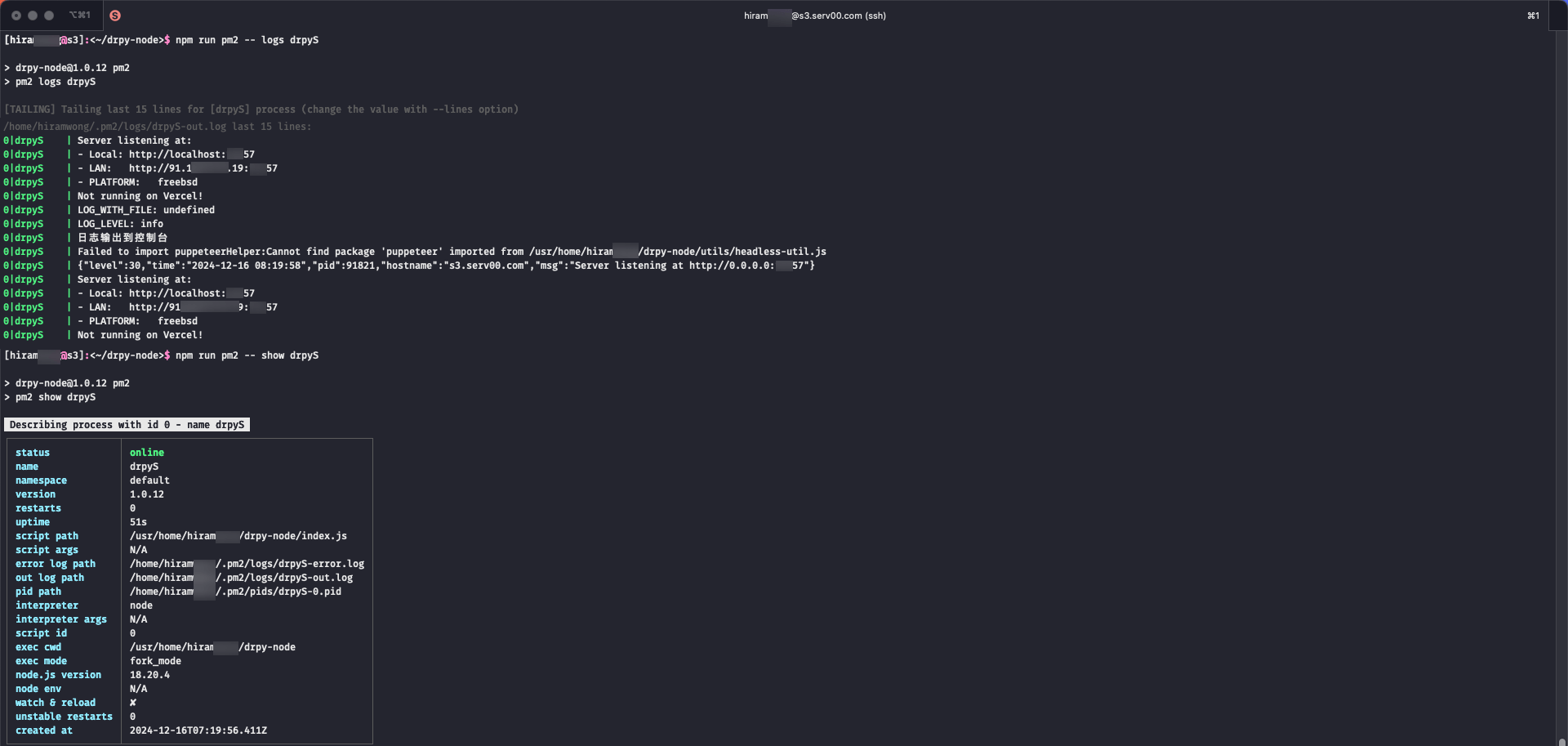
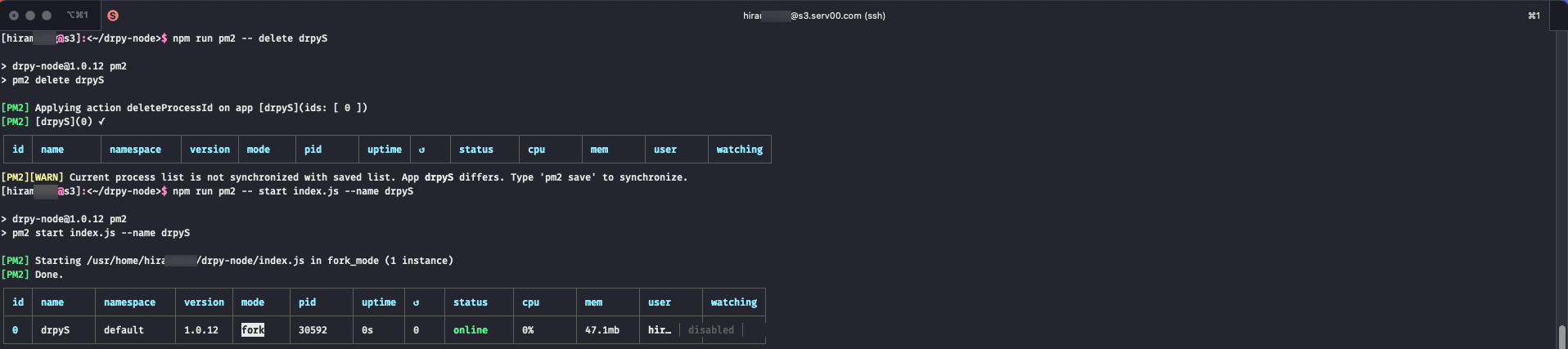
# 1. 进入项目根目录
cd drpy-node
# 2. 更新代码
git pull # 普通拉取
git fetch --all && git reset --hard origin/main # 强制拉取
# 3. 更新依赖
npm install
# 4. 修改端口号([可选]如果端口冲突)
# 5. 重启服务
pkill -9 -f "node index.js"; nohup node index.js & # node管理
# pm2管理
npm install pm2@latest
npm run pm2 -- delete drpyS; npm run pm2 -- start index.js --name drpyS
node普通管理
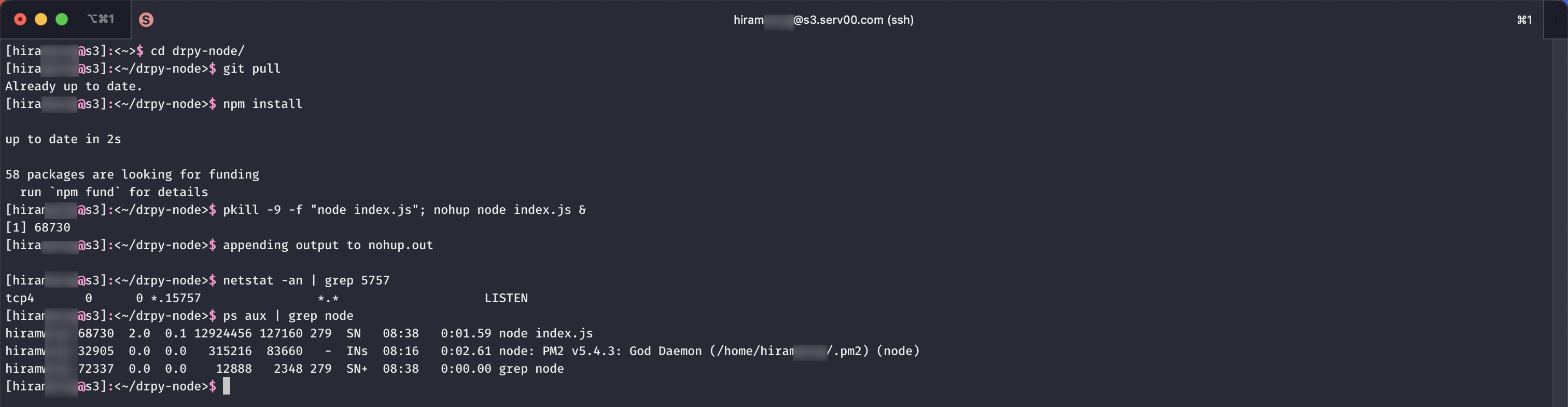
pm2管理
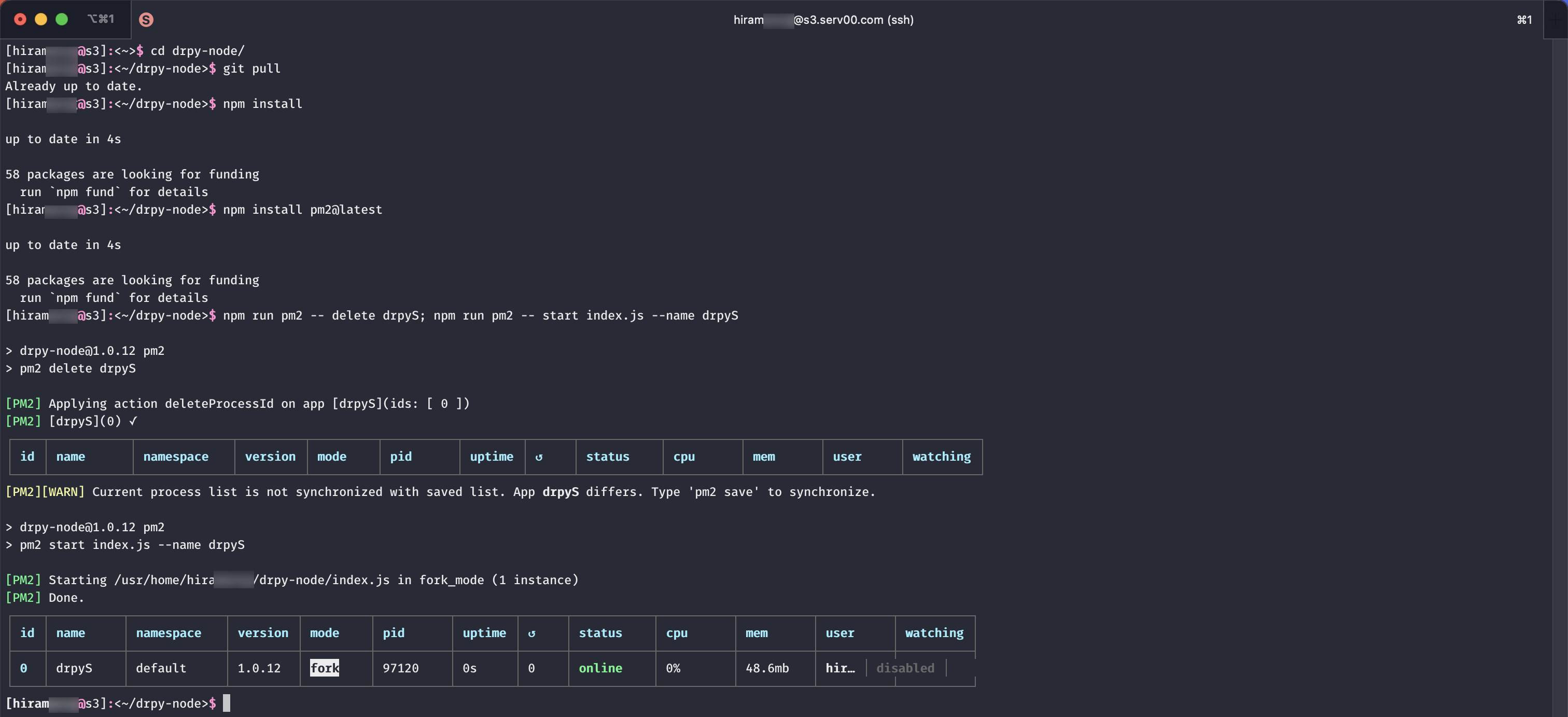
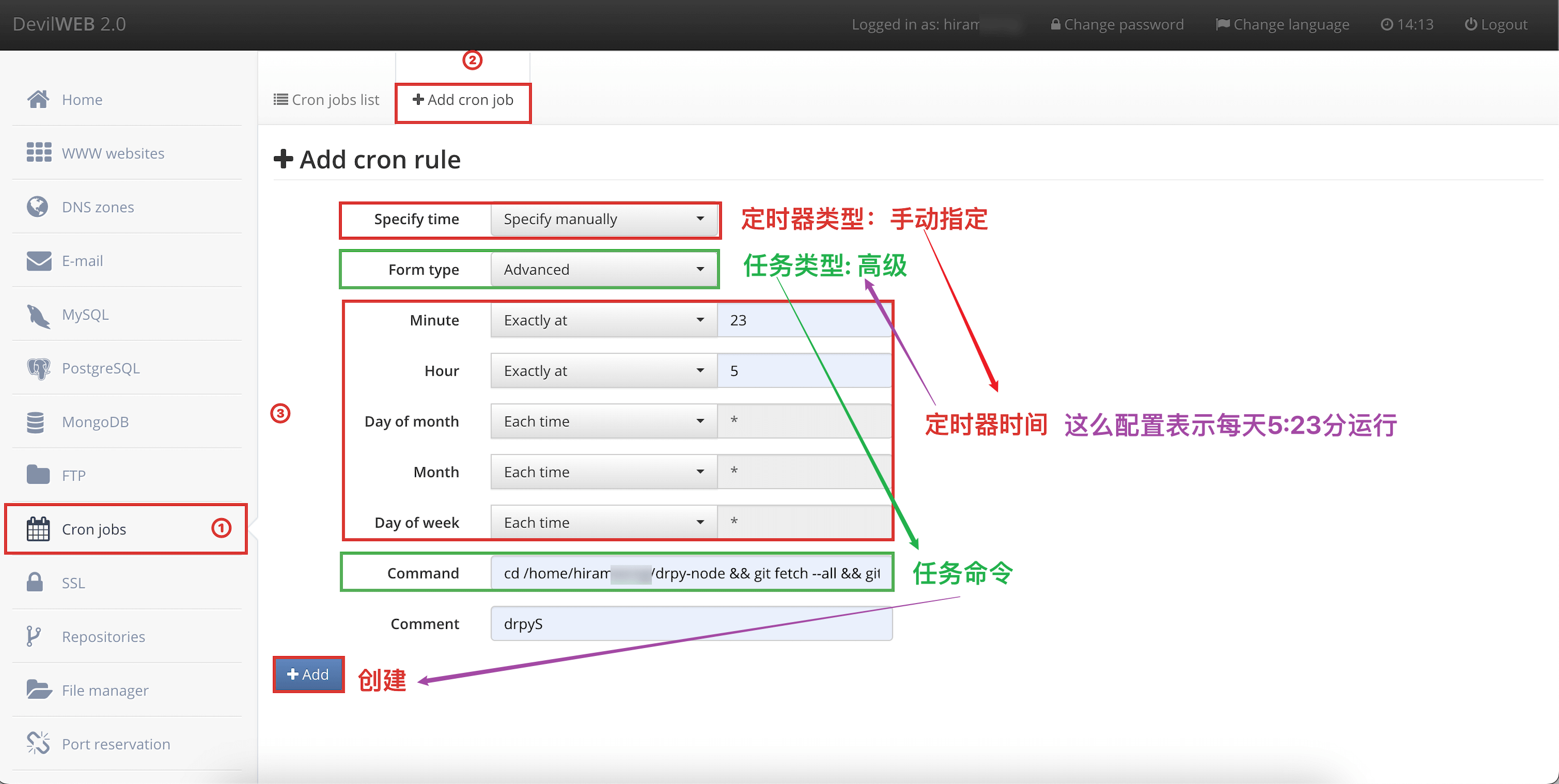
定时任务命令参考如下
# 注意: 使用 git 强制更新(如果自定义过一些参数或文件将被覆盖)
# 注意: 确认项目根目录

# node管理
# 默认端口-不冲突
cd /home/hiramxxxx/drpy-node && git fetch --all && git reset --hard origin/main && npm install && pkill -9 -f "node index.js"; nohup node index.js &

# 自定义端口-冲突(自己确认端口)
# sed -i '' 'command': 就地编辑文件, 不保留备份. 注意 -i 选项后面的空字符串 '', 这是 FreeBSD 版本的 sed 所必需的
cd /home/hiramxxxx/drpy-node && git fetch --all && git reset --hard origin/main && npm install && sed -i '' 's/const PORT = 5757/const PORT = 15757/g' index.js; pkill -9 -f "node index.js"; nohup node index.js &

# pm2管理
# 默认端口-不冲突
cd /home/hiramxxxx/drpy-node && git fetch --all && git reset --hard origin/main && npm install && npm install pm2 && jq '.scripts.pm2 //= "pm2"' package.json > temp.json && mv temp.json package.json && npm run pm2 -- delete drpyS; npm run pm2 -- start index.js --name drpyS

# 自定义端口-冲突(自己确认端口)
# sed -i '' 'command': 就地编辑文件, 不保留备份. 注意 -i 选项后面的空字符串 '', 这是 FreeBSD 版本的 sed 所必需的
cd /home/hiramxxxx/drpy-node && git fetch --all && git reset --hard origin/main && npm install && npm install pm2 && jq '.scripts.pm2 //= "pm2"' package.json > temp.json && mv temp.json package.json && sed -i '' 's/const PORT = 5757/const PORT = 15757/g' index.js; npm run pm2 -- delete drpyS; npm run pm2 -- start index.js --name drpyS配置信息
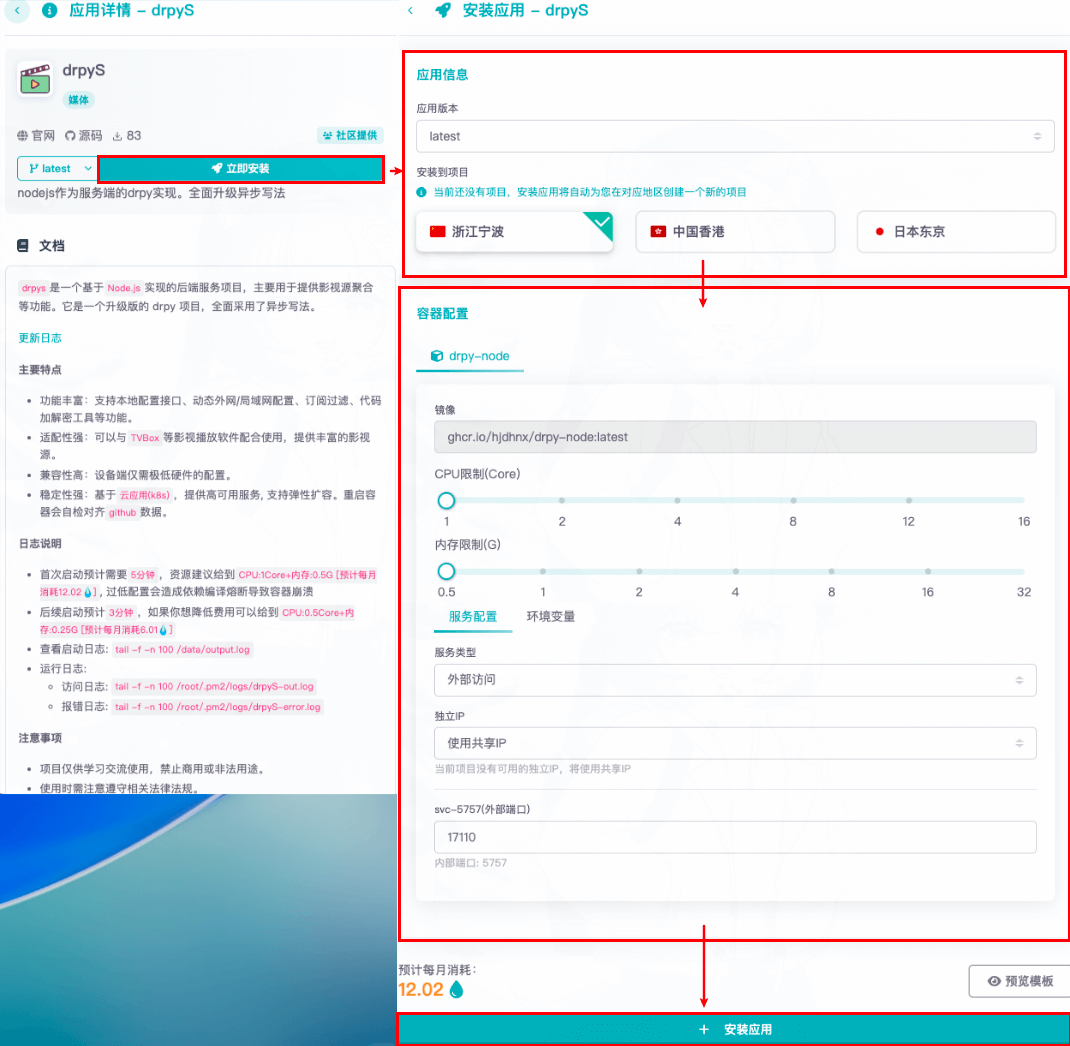
重新创建(注意备份数据)